A backlink profile is the complete pattern of external links pointing to a website.
It includes more than the total number of backlinks. A proper backlink profile analysis looks at:
- which websites link to you
- which individual pages contain those links
- which pages on your site receive them
- the anchor text used
- whether links are followed, nofollowed, sponsored or user-generated
- how quickly links are being gained or lost
- whether the links are relevant, editorial and legitimate
- whether any part of the profile suggests deliberate manipulation
Google uses links to discover pages and as a signal when assessing page relevance. However, not every backlink carries the same value, and no backlink metric guarantees higher rankings.
This guide explains how to check your backlink profile, interpret the data and decide what needs improvement.
What Is a Backlink Profile?
Your backlink profile is the collection and distribution of links from external websites to your domain.
Suppose one publication links to five different pages on your website. Most SEO tools would count:
- five backlinks
- one referring domain
If five different websites each link to you once, that would normally count as:
- five backlinks
- five referring domains
The distinction matters because backlink totals can be inflated by repeated, sitewide or syndicated links. A website may appear to have thousands of backlinks even though most come from only a handful of domains.
Our guide to referring domains versus backlinks explains this difference in detail.
A complete backlink profile includes the following components.
| Component | What It Shows |
| Backlinks | Individual external links pointing to your website |
| Referring domains | Distinct websites supplying one or more backlinks |
| Referring pages | The exact pages where the links appear |
| Target pages | The pages on your website receiving backlinks |
| Anchor text | The clickable words used in each link |
| Link attributes | Whether a link is followed, nofollowed, sponsored or user-generated |
| New links | Backlinks first discovered during a selected period |
| Lost links | Backlinks that have disappeared or become inaccessible |
| Link placement | Whether the link appears in body content, navigation, a footer, a profile or another location |
| Acquisition pattern | How links were earned, purchased, exchanged, generated or otherwise created |
Looking at only one of these components gives an incomplete picture.
Building a Healthy Backlink Profile
A strong backlink profile serves as the ultimate foundation for sustainable organic rankings. Rather than chasing sheer volume, search engines evaluate your site based on link quality and topical relevance—meaning a few high-trust, contextual placements will always outweigh hundreds of low-tier links. Achieving long-term ranking stability requires maintaining natural diversity across your referring domains, landing pages, and anchor text combinations. This simple guide breaks down four essential pillars to help you build and protect a resilient link profile.
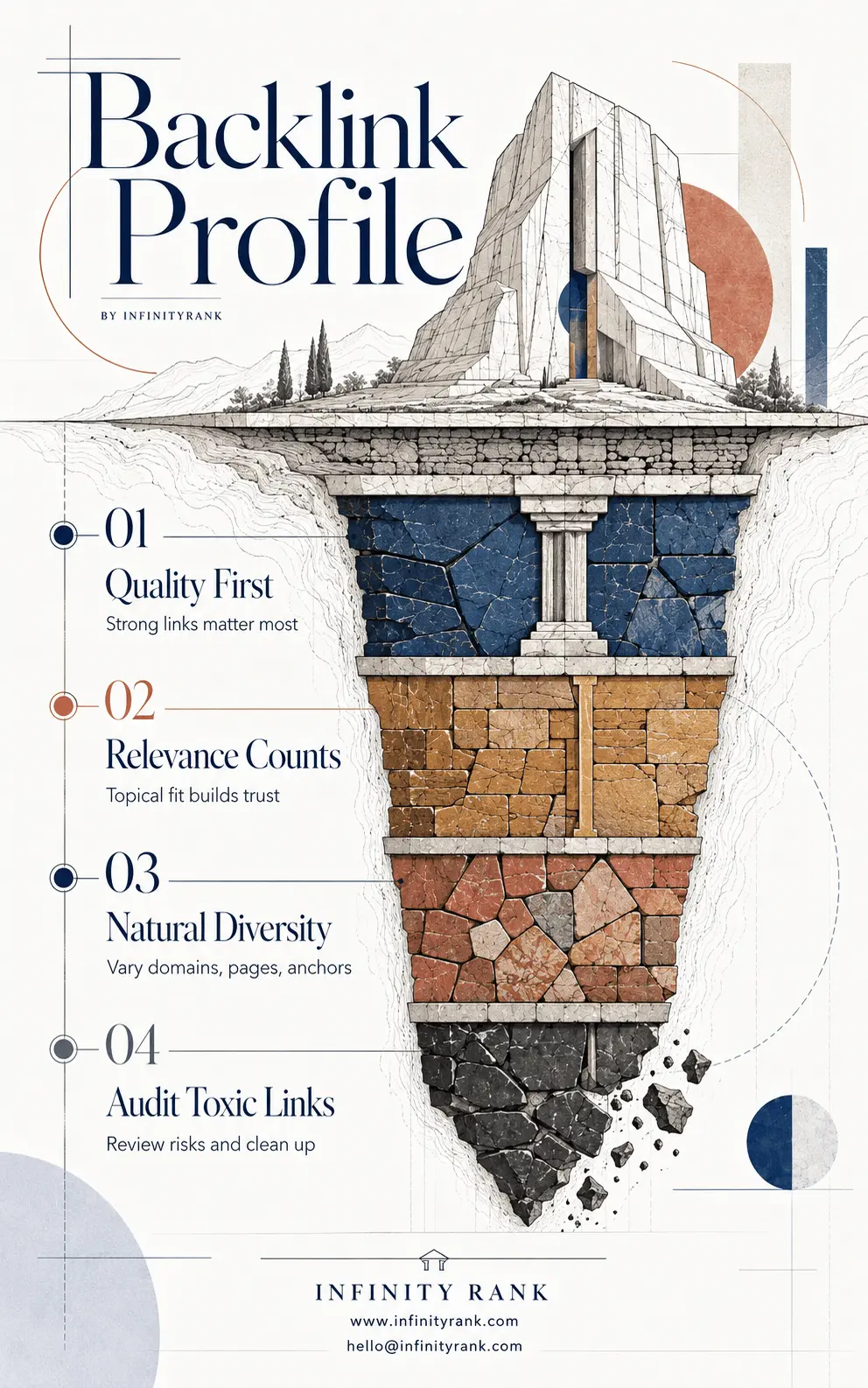
Protecting your search health isn’t just about earning new placements; it also requires proactive maintenance to audit toxic links and eliminate potential penalty risks. Routinely reviewing your incoming links allows you to clean up harmful connections before they damage your overall domain authority. Use these four core pillars as your strategic framework to keep your backlink profile clean, diverse, and built for lasting growth.
Why Your Backlink Profile Matters
A backlink profile matters for three main reasons.
Search visibility
Google can use links to find pages and understand their relationship to other content. Descriptive anchor text can also give users and search engines context about the destination page.
This does not mean every link improves rankings. Google evaluates links alongside many other signals, and it may ignore links that appear unhelpful or manipulative.
Referral traffic
A link can send visitors directly from the referring page to your website.
A relevant link from a page your target audience actually reads may therefore be useful even when its direct ranking effect cannot be measured.
Referral traffic can also show whether a placement reaches real people rather than existing only as an SEO entry in a backlink database.
Risk detection
A backlink audit can expose patterns created by:
- previous SEO providers
- paid-link campaigns
- private blog networks
- automated directory submissions
- comment or forum spam
- hacked websites
- excessive reciprocal linking
- keyword-rich sitewide links
- low-quality guest-post networks
Google defines link spam as links created primarily to manipulate search rankings. Examples include paid links used for ranking purposes, excessive exchanges and automated link creation.
The presence of one strange link does not prove that a website has a link-spam problem. The wider pattern, acquisition history and intent matter more.
What Does a Healthy Backlink Profile Look Like?
There is no universal backlink count, referring-domain ratio or anchor-text percentage that defines a healthy profile.
A small local business, an international news publisher and a software company will naturally attract very different links.
A generally credible backlink profile tends to contain:
- links from websites with a legitimate reason to mention the business or content
- referring pages related to the linked topic
- a mixture of branded, URL-based and descriptive anchor text
- links to useful internal pages as well as the homepage
- editorial links placed within relevant content
- links earned at a pace consistent with publicity, content publishing and business activity
- a mixture of follow and nofollow links
- few signs of large-scale automated or paid manipulation
A profile does not need to look mathematically balanced.
For example, a major press campaign may produce a sudden spike in links. A software company may receive many links to a free tool. A local business may receive most links to its homepage from directories, associations and local publications.
Context determines whether a pattern is reasonable.
Backlink Metrics You Should Understand
SEO platforms provide useful metrics, but they should be treated as filters and comparison tools rather than objective judgments.
Domain Rating, Domain Authority and Authority Score
Ahrefs Domain Rating, Moz Domain Authority and Semrush Authority Score are proprietary third-party metrics.
They are not Google metrics.
A high score does not guarantee that a link is relevant, editorial or valuable. A low score does not prove that a website is harmful.
Use authority metrics to organise large datasets, not to make final decisions.
Read our guide to Domain Rating versus Domain Authority before comparing these scores.
Referring domains
Referring-domain growth can indicate that a website is earning links from a broader range of sources.
However, the number alone says nothing about:
- relevance
- independence
- editorial quality
- ownership relationships
- traffic
- legitimacy
- manipulation
Ten relevant industry publications may be more useful than hundreds of unrelated domains created mainly to publish links.
Follow and nofollow links
A standard link does not require a dofollow attribute. “Dofollow” is an industry term used to describe a normal link without a restrictive relationship attribute.
Google supports attributes including:
rel="nofollow"rel="sponsored"rel="ugc"
Paid placements should be qualified with sponsored, while links in user-generated areas may use ugc.
Nofollow links can still provide referral traffic, visibility and discovery opportunities. A natural backlink profile may contain all of these link types.
See dofollow versus nofollow backlinks for a fuller explanation.
Anchor text
Anchor text is the visible, clickable wording of a link.
Common anchor categories include:
- Branded: Infinity Rank
- URL: infinityrank.com
- Generic: visit the website
- Partial match: professional link-building services
- Exact match: link-building services
- Article title: the complete title of the linked resource
- Image or empty anchor: a linked image with no visible text
Descriptive anchor text helps explain what the linked page contains. However, a large pattern of commercially valuable exact-match anchors can indicate deliberate manipulation, particularly when the links come from unrelated or low-quality websites.
Do not chase a fixed “ideal” anchor percentage. Compare your distribution with the nature of your brand, content, industry and historical campaigns.
Target-page distribution
A target page is the page on your website receiving the backlink.
Review whether links point mainly to:
- the homepage
- service or product pages
- blog posts
- research
- tools
- category pages
- location pages
- outdated or redirected URLs
- broken pages
A homepage-heavy profile is not automatically weak. It may be normal for a local company, established brand or business that receives directory and press mentions.
However, if useful internal resources receive almost no links, the website may lack assets that other publishers consider worth citing.
How to Check Your Backlink Profile
No single platform provides a complete record of every backlink on the web.
Third-party tools operate their own crawlers and link indexes. Google Search Console also states that its Links report shows a sample rather than a comprehensive list of every link Google has found.
For a serious audit, combine multiple sources.
Google Search Console
Open:
Search Console → Links → External links
The report includes:
- top linked pages
- top linking sites
- top linking text
Search Console is useful because the data comes directly from Google. However, the report is sampled, may include links that no longer exist and does not identify whether an individual link is nofollowed.
Use it as an important source, not as your only backlink database.
Ahrefs
In Ahrefs:
- Open Site Explorer.
- Enter your domain.
- Select the appropriate domain or URL mode.
- Review Backlinks.
- Review Referring Domains.
- Review Anchors.
- Review Best by Links.
- Review New and Lost Backlinks.
- Export the required reports.
Ahrefs reports links discovered by its own crawler and stored in its index. It cannot guarantee that it has found every backlink pointing to a website.
Semrush, Moz and Majestic
Other backlink tools can identify links that do not appear in your primary platform.
Different totals between tools are normal because each platform has its own:
- crawler
- index size
- recrawl schedule
- canonicalisation rules
- deduplication process
- treatment of redirects
- historical database
- domain-grouping method
Do not combine totals from different tools into one growth chart. Choose one platform for ongoing trend reporting and use other sources for additional discovery.
Previous campaign records
Collect historical records from:
- former agencies
- freelancers
- outreach teams
- paid placement vendors
- digital PR campaigns
- sponsorships
- affiliate partnerships
- directory campaigns
- domain migrations
A backlink database shows that a link exists. It may not show who created it, whether money changed hands or what agreement produced it.
That context can be decisive when assessing risk.
How to Audit a Backlink Profile Step by Step
1. Export the data
Export backlinks and referring domains from Google Search Console and at least one established third-party tool.
Your working spreadsheet should include:
- referring domain
- referring URL
- target URL
- anchor text
- link attribute
- first-seen date
- last-seen date
- live or lost status
- estimated referring-page traffic
- domain metric
- page metric
- relevance
- placement
- acquisition source
- risk assessment
- required action
- reviewer notes
Do not rely on a platform’s automatic “toxic” label as your final decision.
2. Remove duplicates and group repeated links
The same link may appear in exports from multiple platforms.
Normalise the data and identify:
- exact duplicate links
- redirected URLs
- canonical variations
- HTTP and HTTPS versions
- parameterised URLs
- repeated sitewide links
- multiple links from the same page
- links from different subdomains of the same organisation
This prevents repeated links from distorting the audit.
3. Review referring-domain distribution
Compare total backlinks with total referring domains.
A large difference may result from legitimate causes such as:
- sitewide navigation links
- footer links
- author biography links
- syndicated articles
- archive pages
- product feeds
- repeated citations from one publication
It may also come from automated templates or low-quality networks.
The ratio is a starting point for investigation, not a diagnosis.
4. Review the actual referring pages
Do not approve or reject a backlink solely because of a domain-level score.
Open the linking page and ask:
- Is the page accessible?
- Is the content original and readable?
- Is the page relevant to the linked topic?
- Does the link make sense in its surrounding sentence?
- Is the link editorial, sponsored or user-generated?
- Is the website transparent about its ownership or purpose?
- Does the page exist mainly to publish outbound links?
- Is the content copied, generated at scale or visibly neglected?
- Is the website linking to unrelated commercial sites repeatedly?
- Is the page hacked or compromised?
- Could the link send a relevant visitor?
A legitimate website can contain weak pages. A small website can contain a useful and credible editorial page.
Page-level review matters.
5. Analyse topical and contextual relevance
A backlink is easier to justify when the referring page has a clear reason to cite the destination.
For example:
- an industry report links to your original dataset
- a local newspaper links to a business opening
- a university resource links to your technical guide
- a supplier links to an authorised distributor
- a journalist links to an expert comment
- a software review links to the product discussed
Relevance does not require both websites to cover exactly the same subject.
A cybersecurity company may reasonably earn a link from a legal publication discussing data breaches. A construction company may receive a link from an insurance guide about property damage.
The link must make sense to a reader.
Read more about contextual backlinks and niche-relevant backlinks.
6. Analyse anchor text
Group anchors into branded, URL, generic, partial-match and exact-match categories.
Investigate:
- repeated commercial anchors
- anchors in a language unrelated to the site or audience
- adult, gambling or hacked-page anchors
- keyword-rich sitewide anchors
- identical anchors across unrelated domains
- sudden increases in one commercial phrase
- anchors pointing to the wrong destination page
An exact-match anchor is not automatically manipulative. The problem is usually a repeated pattern combined with questionable acquisition methods or irrelevant sources.
7. Review target-page distribution
Determine which pages attract links and whether those links still support useful destinations.
Look for:
- backlinks pointing to 404 pages
- links passing through unnecessary redirect chains
- links to outdated campaign URLs
- links to HTTP versions
- links to noncanonical duplicates
- links to discontinued products
- heavily linked pages that have been deleted
- strong pages receiving no relevant internal links
Recovering an existing lost destination can be easier than earning a new backlink.
Where appropriate:
- restore the deleted page
- redirect the old URL to the closest equivalent
- update the linked resource
- contact the publisher with the correct URL
- improve internal linking from the linked page
8. Review new and lost backlinks
Do not treat every increase as success or every decrease as failure.
A spike in new links may come from:
- a successful PR campaign
- a viral article
- syndicated content
- a sitewide footer
- spam pages
- automated scraper sites
- a link network
- a platform migration
A large number of lost links may result from:
- a referring site redesign
- deleted content
- changed canonical tags
- expired domains
- broken pages
- lost partnerships
- removed sitewide templates
- a tool recrawling old data
Review representative samples before drawing conclusions.
9. Compare competitors
A competitor backlink gap can reveal publications, associations and resources that link to competing websites but not yours.
Compare competitors using:
- referring domains
- linked content types
- target pages
- anchor text
- new-link velocity
- digital PR coverage
- resource-page links
- association memberships
- directory presence
- original research
- free tools or templates
Do not copy every link a competitor has.
Some competitor links may be paid, irrelevant, obsolete or manipulative. Use the data to identify legitimate patterns and missing opportunities.
10. Classify each link or domain
Use a simple action system:
- Keep: Legitimate and relevant enough to retain
- Monitor: Unclear, but no immediate evidence of risk
- Reclaim: Lost or broken link worth recovering
- Update: Destination or redirect needs correction
- Removal request: Link appears manipulative and can reasonably be removed
- Disavow candidate: Strong evidence of link-scheme risk and removal is not possible
- Ignore: Harmless spam or irrelevant noise requiring no action
This is more useful than labelling every imperfect link “good” or “toxic.”
Common Backlink Warning Signs
A pattern deserves closer review when it includes:
- paid links that pass ranking signals
- links from private blog networks
- large-scale guest-post networks
- exact-match commercial anchors across unrelated sites
- hacked-page links
- automated profiles or comments
- mass directory submissions with no business relevance
- excessive reciprocal links
- links hidden in themes, widgets or templates
- links from pages created mainly to link to commercial websites
- large clusters of domains with the same ownership, design or content
- links from expired domains repurposed only for SEO
- sudden link growth that cannot be connected to real publicity or publishing activity
These are warning signs, not automatic proof.
Review the acquisition history and the wider pattern before taking action.
Should You Remove or Disavow Bad Backlinks?
Most websites do not need to disavow every spammy link they find.
Google describes the disavow tool as an advanced feature that should be used cautiously. It recommends considering it when a site has a manual action for unnatural links or has a substantial pattern of paid or manipulative links likely to cause one. Incorrect use can harm search performance.
Consider removal or disavowal when:
- Search Console reports an unnatural-links manual action
- you know that your business or a former provider purchased manipulative links
- an old campaign created a large volume of automated links
- commercial anchor text was distributed across a clear network
- paid placements were not properly qualified
- the links violate Google’s link-spam policies
- the links cannot be removed after reasonable attempts
Do not disavow a link merely because:
- its DR or DA is low
- the website is small
- the link is nofollowed
- the website is in another language
- the page has little estimated traffic
- a tool displays a high toxicity score
- the link comes from a scraper
- you do not recognise the domain
- the design looks dated
A weak-looking backlink is not necessarily a harmful backlink.
For the full process, read how to disavow toxic backlinks safely.
How to Improve Your Backlink Profile
Improving a backlink profile does not mean maximising the number of links.
The goal is to earn legitimate links that support useful pages, visibility and referral traffic.
Create pages worth citing
Useful linkable assets may include:
- original research
- industry surveys
- statistics pages
- calculators
- free tools
- templates
- technical guides
- glossaries
- maps
- comparison resources
- expert commentary
- public datasets
- case studies with verifiable evidence
Generic articles that repeat existing search results rarely provide a strong reason for another publisher to link.
Reclaim lost backlinks
Review valuable links that have recently disappeared.
A link may be recoverable when:
- the publisher changed the URL
- your destination page returns a 404
- the link points to an old domain
- the publisher removed the link accidentally
- a quoted resource has moved
- an image or tool is no longer available
Contact the publisher only when you can clearly explain the error or offer an appropriate replacement.
Recover unlinked brand mentions
A publication may mention your brand, product, research or spokesperson without linking.
A link request is reasonable when it improves the citation or helps readers reach the referenced source.
Do not demand a link every time your brand is named. A passing mention may not justify one.
Use digital PR
Digital PR can earn links through:
- original data
- expert responses
- newsworthy company developments
- industry commentary
- surveys
- regional stories
- reports
- reactive analysis
The story must be useful to the publication’s audience. A press release alone does not guarantee editorial coverage or links.
Pursue relevant resource opportunities
Look for legitimate:
- industry associations
- professional directories
- local organisations
- supplier pages
- partner pages
- educational resources
- recommended-tool lists
- community projects
- event sponsorships
- trade publications
Avoid directories and resource pages created primarily to sell ranking links.
Improve internal destinations
External links are more valuable when they point to pages that remain useful.
Keep linked pages:
- accurate
- current
- accessible
- properly redirected
- internally connected
- free of intrusive barriers
- aligned with the claims made by referring pages
A backlink campaign cannot compensate for a weak destination.
How Often Should You Audit Your Backlink Profile?
The right frequency depends on the website.
A quarterly review is usually sufficient for a stable small business.
More frequent monitoring may be appropriate when:
- active link-building campaigns are running
- digital PR campaigns produce regular coverage
- the site has a history of manual actions
- several agencies or vendors build links
- rankings or organic traffic change sharply
- a domain migration has taken place
- the business operates in a highly competitive market
- negative SEO or hacked-link activity is suspected
The audit should answer specific questions rather than generate another spreadsheet that nobody uses.
Backlink Profile Audit Checklist
Use this checklist during each review:
- Export links from Search Console.
- Export backlinks and referring domains from a third-party tool.
- Merge and deduplicate the data.
- Compare backlinks with referring domains.
- Identify sitewide and repeated links.
- Review the actual referring pages.
- Classify topical relevance.
- Check link placement and context.
- Review follow, nofollow, sponsored and UGC attributes.
- Group anchor text by type.
- Investigate unusual exact-match patterns.
- Review homepage versus deep-page links.
- Find links pointing to broken or redirected pages.
- Review new and lost links.
- Compare legitimate competitor sources.
- Investigate known paid or automated campaigns.
- Check Search Console for manual actions.
- Separate harmless noise from genuine manipulation.
- Reclaim valuable lost links.
- Create a prioritised acquisition plan.
- Use disavowal only when the evidence justifies it.
For broader performance measurement, see our guide to link-building metrics that actually matter.
Frequently Asked Questions
How do I check my backlink profile?
Use Google Search Console and at least one third-party backlink platform such as Ahrefs, Semrush, Moz or Majestic.
Search Console provides a sample of links Google has found. Third-party tools provide data from their own crawlers and indexes. Combining sources gives you broader coverage, but no platform can guarantee a complete list of every backlink.
What is a good backlink profile?
A good backlink profile contains legitimate links from websites and pages that have a sensible reason to mention your business, content or expertise.
It normally includes varied anchor text, links to useful pages and few signs of deliberate manipulation. There is no universal backlink count or authority score that defines a good profile.
How many backlinks should a website have?
There is no correct number.
The appropriate volume depends on the website’s age, industry, audience, publishing activity, brand recognition and competition.
Compare the quality, relevance and distribution of links rather than chasing an arbitrary total.
Are low-authority backlinks bad?
No.
A low DR or DA score does not make a backlink harmful. A small specialist blog, local newspaper, professional organisation or new website may provide a legitimate and relevant link despite having a low third-party authority score.
Can spammy backlinks hurt SEO?
Random spam links are common and do not automatically require action.
Risk is more serious when a website has participated in paid, automated or manipulative link schemes, particularly at scale. Check the wider pattern, acquisition history and Search Console manual-actions report before removing or disavowing anything.
Should I disavow every toxic backlink reported by an SEO tool?
No.
Tool-generated toxicity scores are proprietary indicators, not Google penalties. Manually review the links and use Google’s disavow tool only when there is strong evidence of substantial manipulative linking or manual-action risk.
Are nofollow backlinks useless?
No.
Nofollow links may still send referral traffic, expose content to new audiences and lead to further citations. They should not be treated as worthless simply because they are not standard followed links.
Can I improve my backlink profile without buying links?
Yes.
You can earn links through useful resources, original research, digital PR, expert commentary, partnerships, unlinked mention reclamation and relevant industry participation.
Buying links for ranking purposes can violate Google’s spam policies.
Final Thoughts
A backlink profile audit should explain where your links come from, which pages receive them, how anchors are distributed and whether the overall pattern fits your website’s history and subject.
The goal is not to remove every link that looks weak.
The goal is to:
- identify genuine manipulation risks
- recover valuable lost links
- correct broken destinations
- understand what attracts legitimate citations
- find credible competitor opportunities
- build links that support useful content and real visibility
Backlink counts and authority scores can help organise the analysis. They cannot replace manual review.