Google Search Console not showing backlinks does not always mean Google ignored your links.
It usually means one of three things: Search Console is showing only a sample, you are looking at the wrong property, or the linking page has not been processed in the way you expect.
This is where many site owners panic for no reason. They build links, check the Links report, see nothing, and assume the campaign failed. That is the wrong conclusion.
Google Search Console is useful, but it is not a complete backlink database. It is not Ahrefs. It is not Semrush. It is not Majestic. It gives you a limited view of links Google has found and chosen to show in the report.
That limitation matters. If you use Search Console as your only backlink tracking tool, you will miss data, misunderstand link performance, and make bad SEO decisions.
This guide explains why backlinks may not appear in Search Console, what the Links report actually shows, and how to verify backlinks properly.
First, Understand What Search Console’s Links Report Actually Shows
The Links report in Google Search Console shows a sample of external and internal links connected to your verified property.
For external backlinks, it can show:
- Top linked pages
- Top linking sites
- Top linking text
- Specific linking pages from a selected site to a selected target page
- Recently discovered links through the export option
- More sample links through the export option
That sounds useful, and it is. But it is not complete.
Search Console does not promise to show every backlink pointing to your site. It may omit URLs, combine duplicate links, group pages by canonical URL, and limit visible table rows. That means your backlink count in Search Console will almost never match the count shown in a dedicated backlink tool.
This is normal.
The mistake is treating GSC as a complete backlink index. It is not. Treat it as one data source.
Quick Diagnosis: Why Your Backlinks Are Missing
| Issue | What It Means | What to Do |
| Search Console is sampling data | GSC does not show every backlink it knows about | Export Latest links and More sample links |
| Wrong property selected | You may be checking http, https, www, non-www, or a subfolder property | Use the correct Domain property |
| Link is new | Google may not have discovered or processed it yet | Wait, then recheck exports |
| Linking page is not indexed | Google may ignore or omit pages it does not index | Inspect the linking page manually |
| Link is hidden, blocked, or removed | The link may not be visible to Google anymore | Check the live page and rendered HTML |
| Canonical or redirect mismatch | GSC may group the link under a different target URL | Check canonical tags and redirects |
| Tool mismatch | Ahrefs, Semrush, Majestic, and Google crawl the web differently | Compare multiple tools, not just one |
GSC Link Blindness: Missing Data?
Opening Google Search Console only to find your hard-earned backlink data missing or incomplete can trigger immediate panic. Before assuming your campaigns failed or a penalty hit your domain, you need to recognize how Google samples technical metrics.
The platform intentionally restricts full data display, meaning tracking issues often stem from mismatched property types or crawl blockages rather than lost authority. This GSC link validation workflow uncovers four critical verification checks to help you diagnose and fix hidden technical signal blockages quickly.
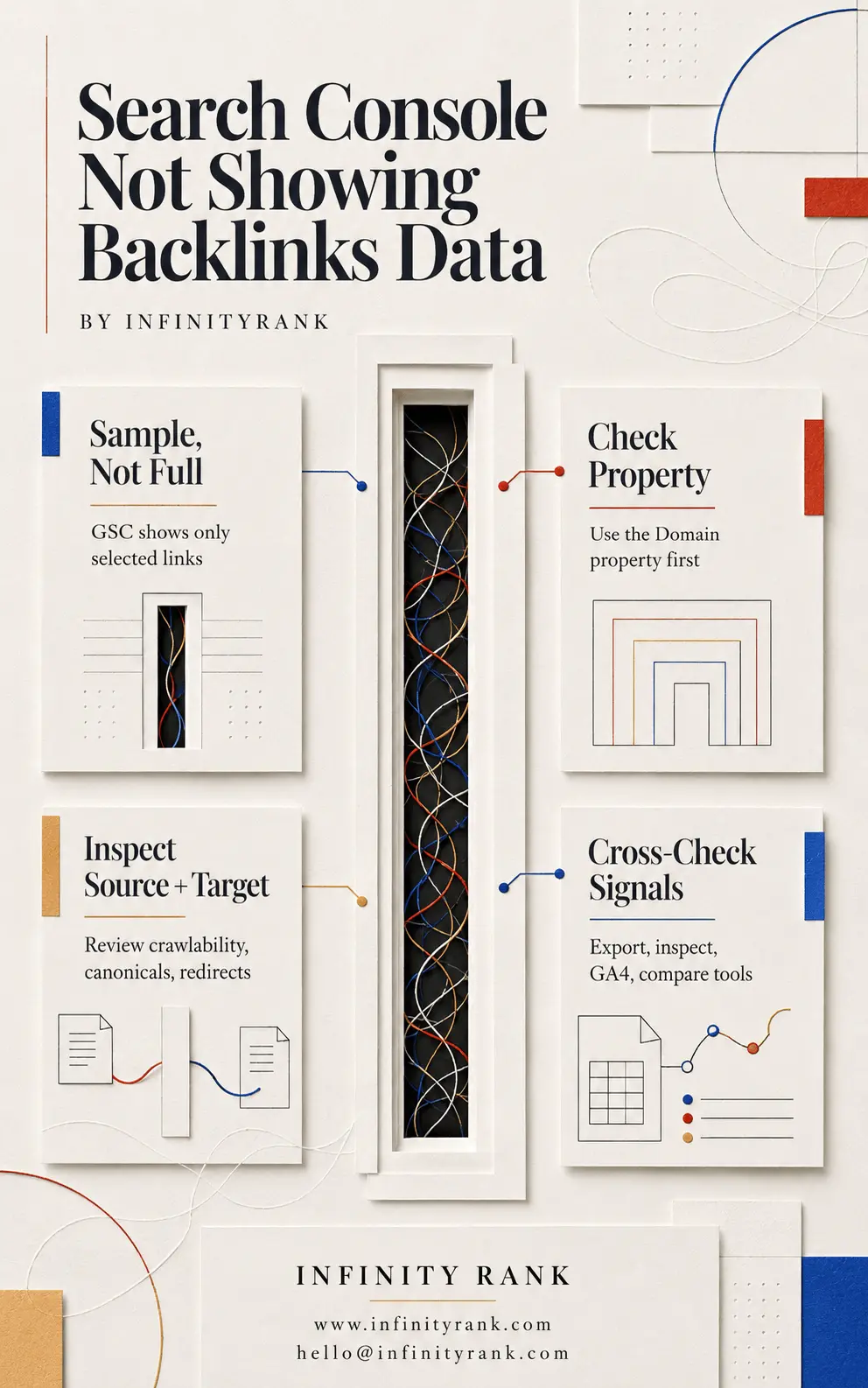
Resolving missing data discrepancies requires looking beyond surface-level dashboards and confirming your actual technical setup. By validating property configurations, checking source indexation, and comparing third-party index metrics, you ensure you never misread your site’s true search footprint.
Use the search-console-not-showing-backlinks-data-infographic to audit your profile setup and restore hidden tracking data safely.
Why Search Console Is Not Showing Your Backlinks
1. Search Console Only Shows a Sample of Backlinks
This is the most common reason.
Search Console’s Links report is not designed to be a full backlink inventory. It gives you a representative view of your link profile. For small sites, that sample may feel close to complete. For larger sites, it can look seriously incomplete.
That does not automatically mean Google missed the backlinks. It means Google is not showing all of them in the interface.
This is why you should never report backlink performance using Search Console numbers alone. If a client earned 40 links and GSC shows 9, that does not mean 31 links failed. It means GSC is showing limited data.
2. You Are Checking the Wrong Search Console Property
This is a basic mistake, but it happens constantly.
Search Console properties can be set up in different ways. A URL-prefix property only tracks URLs that match that exact prefix. That means these can behave differently:
https://example.com/http://example.com/https://www.example.com/https://blog.example.com/https://example.com/folder/
If you are checking only one URL-prefix property, you may miss backlink data connected to another version of the site.
A Domain property is usually better for backlink review because it includes all protocols and subdomains under the domain. If your site uses both www and non-www versions, or has important subdomains, check the Domain property first.
This is one of the first things to fix before assuming the data is missing.
3. The Linking Page Has Not Been Crawled or Processed Yet
A backlink cannot appear in Search Console until Google finds and processes the page containing the link.
If the linking page is new, buried deep on a site, blocked by robots.txt, orphaned, noindexed, or rarely crawled, the link may not appear quickly. In some cases, it may never show in the Links report.
Check the linking page directly. Ask:
- Is the page live?
- Is it indexable?
- Can Google access it?
- Is the link visible in the page HTML?
- Is the link still present after the page renders?
- Is the page internally linked on the source site?
- Is the page blocked by robots.txt or meta noindex?
A link on a weak, hidden, or unindexed page is not the same as a link on a clean, crawlable, indexed page.
4. Search Console Combines Duplicate Links
If the same source URL links to the same target URL multiple times, GSC may combine those duplicate links.
This can make the report look smaller than expected.
For example, if a linking page points to your homepage in the header, body, and footer, you should not expect Search Console to count that as three separate valuable links in the way some tools might display it.
The same problem appears with sitewide links. A backlink tool may show hundreds or thousands of links from one domain because the link appears across many pages. Search Console may reduce, group, or display that data differently.
Do not confuse “fewer displayed rows” with “zero SEO value.”
5. Google Groups Data by Canonical URL
Search Console groups pages by canonical URL in parts of the Links report.
That means the backlink may not appear under the exact URL you are checking. It may be grouped under another version of the page.
This happens when:
- The linked URL redirects to another URL
- The page has a canonical tag pointing elsewhere
- Parameters are stripped or normalized
- HTTP redirects to HTTPS
- Non-www redirects to www, or the reverse
- A trailing slash version redirects to a non-trailing slash version
Example:
A site links to:
https://example.com/page?id=123
But your canonical URL is:
https://example.com/page
Search Console may group the link under the canonical version, not the exact URL used in the backlink.
Before calling a backlink “missing,” check the canonical version of the target page.
6. The Link May Have Been Removed
Search Console can include links Google found over time, even if those links were later removed. The reverse can also happen: a tool may show a link that is no longer live because its crawler has not updated yet.
Do not assume any backlink report is perfectly current.
Manually open the source page and confirm the link still exists. Then check whether the link is visible in the rendered page, not only in an old cached snapshot or third-party database.
For paid placements, guest posts, niche edits, and directory links, this matters. Links get removed. Pages get updated. Sites change templates. Editors delete sections. Plugins break outbound links.
Verify the live page before drawing conclusions.
7. Search Console Does Not Show Follow vs Nofollow Status
This is a key limitation.
Search Console’s Links report does not tell you whether a backlink is follow, nofollow, sponsored, or UGC. So do not use GSC to confirm link attributes.
If you need to check whether a backlink is follow or nofollow, inspect the page source, use a browser extension, or check the link in a dedicated SEO tool.
Do not say, “The link is not in GSC, so it must be nofollow.”
That is not a reliable conclusion.
8. The Link Is on a Page Google Does Not Value
Some backlinks are technically live but practically useless.
Examples include:
- Auto-generated profile pages
- Low-quality scraper pages
- Spam directories
- Thin tag pages
- Pages blocked from indexing
- Pages with hundreds of outbound links
- Pages with no internal links
- Pages that exist only for link placement
Google may crawl some of these pages. It may ignore others. Search Console may show some of them and omit others.
The important point is this: visibility in Search Console is not the only measure of link value. A backlink should be judged by source quality, relevance, placement, indexability, traffic potential, and whether it is likely to be trusted.
How to Check Backlinks When Search Console Looks Incomplete
Use this workflow before assuming your backlinks are missing.
Step 1: Confirm the Correct Property
Open Google Search Console and check the property selector.
Use the Domain property where possible. This gives you the broadest view across protocols and subdomains.
If you only have URL-prefix properties, check each relevant version:
- HTTP
- HTTPS
- www
- non-www
- subdomains
- important subfolders
This step alone solves many false “missing backlink” problems.
Step 2: Open the Links Report
In Search Console, go to:
Links → External links
Review these areas:
- Top linked pages
- Top linking sites
- Top linking text
Do not stop at the dashboard view. Click More under each report where available.
The top-level tables are limited, so the dashboard view can hide useful details.
Step 3: Export Latest Links
Use the export option for Latest links.
This gives you a list of recently discovered backlinks. It is useful when you are checking links from a recent campaign, new guest posts, digital PR placements, or link insertions.
If you built links last week and they do not appear in the main report, the Latest links export is the first place to check.
Step 4: Export More Sample Links
Next, export More sample links.
This gives a broader sample from the full set of links Google knows about. It will still not be complete, but it can surface links that do not appear in the visible dashboard.
For backlink audits, use both exports:
- Latest links for recent discovery
- More sample links for broader review
Do not rely only on what you see in the main Links screen.
Step 5: Check the Target URL
If a specific backlink is missing, check the target URL.
Ask:
- Does the backlink point to the final canonical URL?
- Does the linked URL redirect?
- Does the target page have a canonical tag pointing elsewhere?
- Is the target page indexable?
- Is the target page inside the property you are checking?
If the link points to an old URL that redirects, GSC may show the data differently.
This is common after migrations, URL cleanups, content updates, and HTTPS changes.
Step 6: Check the Source Page
Now inspect the page that contains the backlink.
Confirm:
- The page is live
- The backlink is still present
- The link is in the HTML or rendered DOM
- The page is not noindexed
- The page is not blocked by robots.txt
- The source page has internal links pointing to it
- The source page is not buried in a low-quality archive
A link on a page Google cannot crawl or does not index is unlikely to be reliable backlink evidence.
Step 7: Check GA4 Referral Traffic
Search Console tells you about link data. Google Analytics tells you whether people actually clicked.
In GA4, go to:
Reports → Acquisition → Traffic acquisition
Then review traffic by source, medium, or source/medium. Look for referral traffic from the linking domain.
This will not prove SEO value, but it can confirm whether a backlink is sending users.
That matters because some links never show clearly in GSC but still send qualified referral traffic.
Step 8: Compare Third-Party Backlink Tools
Use dedicated backlink tools to cross-check the link.
Common options include:
- Ahrefs
- Semrush
- Majestic
- Moz
- Ubersuggest
Each tool has its own crawler and database. None of them will match Google perfectly. That is normal.
Use them to confirm whether a link exists, when it was first seen, whether it was lost, what anchor text was used, and whether the source page looks crawlable.
Do not obsess over matching numbers. Look for patterns.
If GSC shows 200 links, Ahrefs shows 1,500, and Semrush shows 900, that does not mean two tools are broken. It means they collect and display data differently.
GSC vs Backlink Tools: Why the Numbers Never Match
Search Console and backlink tools have different purposes.
Google Search Console shows selected link data from Google’s perspective. Its job is not to be a full competitive backlink research platform.
Backlink tools crawl the web independently and build their own link indexes. Their job is to help SEOs audit, compare, monitor, and research links.
That difference explains the mismatch.
| Tool Type | Best For | Weakness |
| Google Search Console | Seeing sampled link data from Google’s own system | Incomplete, limited exports, no follow/nofollow status |
| Ahrefs/Semrush/Majestic | Auditing, competitor research, link tracking | Third-party data, not identical to Google |
| GA4 | Confirming referral traffic from links | Does not measure backlink authority |
| Manual inspection | Verifying whether a link exists | Slow and not scalable |
Use all of them together.
A serious backlink audit should not depend on one source.
What Not to Do
Do not panic when a new backlink does not appear immediately.
Do not assume a link has no value just because it is missing from GSC.
Do not assume Google ignored a link just because Ahrefs found it first.
Do not use Search Console to check whether a link is follow or nofollow.
Do not report GSC backlink numbers as your total backlink count.
Do not compare GSC directly against Ahrefs or Semrush as if they use the same database.
That is how bad SEO reporting starts.
When Missing Backlink Data Is Actually a Problem
Sometimes missing backlink data does point to a real issue.
Investigate deeper if:
- A large number of known links disappeared suddenly
- Your Domain property shows far less data than expected
- Important links are live but never appear in any tool
- Links point to redirected or broken URLs
- Your site recently migrated domains or changed URL structures
- Your site has canonical conflicts
- Your backlink campaign uses low-quality placements
- GA4 shows no referral traffic from links that should send visits
- The source pages are not indexed or crawlable
In these cases, the issue may not be Search Console. It may be the link source, the target URL, your migration setup, or the quality of the links.
Better Ways to Track Backlink Campaigns
If you are building links, do not wait for Search Console to validate everything.
Track links in a separate sheet or backlink monitoring system.
Include:
- Source domain
- Source URL
- Target URL
- Anchor text
- Link attribute
- Placement date
- Link type
- Status
- Indexability of source page
- Referral traffic
- First seen date in backlink tools
- Notes on removals or changes
This gives you a cleaner record than Search Console alone.
For link building campaigns, the goal is not just to see links in GSC. The goal is to earn relevant, crawlable, indexable links that support rankings, authority, and referral traffic.
Final Thoughts
Google Search Console not showing backlinks is usually not a crisis.
In most cases, the Links report is incomplete because it is sampled, grouped, delayed, or tied to a property setup issue. That is normal.
The fix is not to refresh Search Console every day. The fix is to verify the right property, export the available link data, inspect the source and target pages, check GA4 referral traffic, and compare dedicated backlink tools.
Search Console is useful, but it is not your full backlink database.
Use it as one signal, not the whole story.
FAQs
Why is Google Search Console not showing my backlinks?
Search Console may not show your backlinks because the Links report is sampled, the link is new, the linking page has not been crawled, the wrong property is selected, or the data is grouped under a canonical URL.
Does Search Console show all backlinks?
No. Search Console does not show every backlink pointing to your site. It shows a sample of external and internal links.
How long does it take for backlinks to show in Search Console?
There is no fixed timeline. New backlinks can take time to be discovered, crawled, processed, and displayed. Some may never appear in the visible report.
Can a backlink help SEO if it does not show in Search Console?
Yes, it can. A backlink does not need to appear in Search Console to have value. However, you should still verify that the link is live, crawlable, indexable, relevant, and placed on a quality page.
Does Search Console show nofollow backlinks?
Search Console’s Links report does not specify whether a backlink is follow, nofollow, sponsored, or UGC. Use page inspection or a backlink tool to check link attributes.
Why does Ahrefs show backlinks that Search Console does not?
Ahrefs uses its own crawler and database. Search Console uses Google’s data but only shows a limited sample. The two tools will not match.
Why did backlinks disappear from Search Console?
Backlinks can disappear from GSC because Google changed the sample, the link was removed, the source page changed, the page was deindexed, or the data was grouped differently. A drop in visible GSC links does not always mean all those links were lost.
What is the best way to check missing backlinks?
Use a combined workflow: check the correct Search Console property, export Latest links and More sample links, inspect the source page, check the target URL, review GA4 referral traffic, and compare backlink tools.