Backlinks and referring domains measure different parts of a website’s link profile.
A backlink is an individual link from an external page to your website. A referring domain is the website that supplies one or more of those backlinks.
For example, if one website links to five of your pages, an SEO tool may report:
- 5 backlinks
- 1 referring domain
If five different websites each link to you once, it may report:
- 5 backlinks
- 5 referring domains
Neither metric tells the full story on its own. Backlink totals show link volume, while referring-domain totals show how widely those links are distributed across different websites.
This guide explains how the two metrics differ, why SEO tools report different numbers, and how to evaluate them without relying on misleading ratios or arbitrary targets.
What Is a Backlink?
A backlink is a link from a page on an external website to a page on your website.
For example:
- A news article linking to your homepage creates one backlink.
- A blog post linking to one of your guides creates another backlink.
- A partner website linking to three different service pages creates three backlinks.
Google uses links to discover pages and as one of the signals for understanding page relevance. For Google to crawl a standard link reliably, it generally needs to be an HTML <a> element with an href attribute.
However, not every backlink has the same potential SEO value. Its usefulness can depend on factors such as:
- The relevance of the linking page
- The context surrounding the link
- The link’s placement
- The anchor text
- Whether the page is crawlable and indexable
- Whether the link is editorial, sponsored, or user-generated
- Whether the link can send relevant referral traffic
A raw backlink total does not account for all these differences.
What Is a Referring Domain?
A referring domain is a domain that contains at least one backlink pointing to your website.
If example.com links to your website 20 times, it normally counts as:
- 20 backlinks
- 1 referring domain
If example.com, sample.org, and website.net each link to you once, they normally count as:
- 3 backlinks
- 3 referring domains
Ahrefs uses this same basic distinction: a domain remains one referring domain even when it supplies multiple backlinks.
Referring-domain totals are useful because they show how diverse your backlink profile is. They prevent thousands of repeated links from one website from being mistaken for thousands of independent endorsements.
However, a referring-domain count is still only a quantity. It does not prove that the linking websites are relevant, trustworthy, independent, or valuable.
Link Metrics: Volume or Diversity?
Boasting about thousands of live backlinks is meaningless if those links are generated from just a handful of repetitive domain templates. Many brands fall into the trap of tracking raw connection counts, completely missing the fact that search engine algorithms value unique editorial sources far more than repetitive URL repetition.
Understanding how scale interacts with domain diversity is the only way to build a profile that genuinely moves the needle for your rankings. This profile diversity blueprint outlines four critical pillars to help you balance scale with unique placements while filtering for top-tier quality signals.
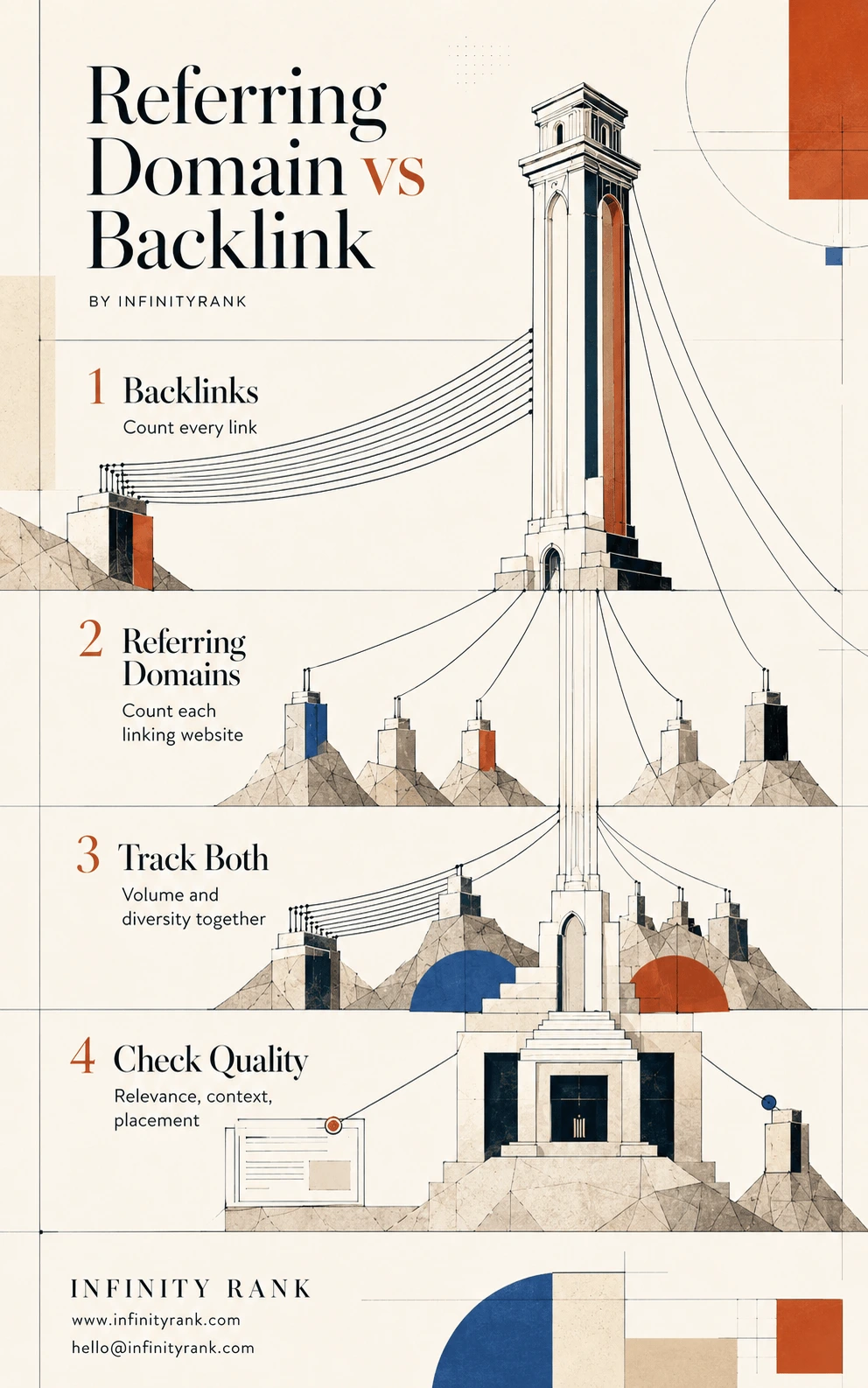
Scaling your visibility requires shifting your focus from raw volume to a wide network of distinct, unique sources. By tracking both datasets simultaneously and insisting on strict contextual relevance, you ensure your campaign builds real, lasting ranking authority. Use the referring-domain-vs-backlink-infographic to audit your current profile metrics and optimize your link-building priorities today.
Backlinks vs Referring Domains: Quick Comparison
| Feature | Backlinks | Referring Domains |
| Definition | Individual external links pointing to your website | Distinct domains supplying one or more backlinks |
| Example | Five links from one blog equal five backlinks | Those five links usually equal one referring domain |
| Main use | Measuring total link volume | Measuring the diversity of linking websites |
| Common source of inflation | Sitewide, navigation, footer, archive, and syndicated links | Networks of low-quality or related domains |
| Main limitation | Repeated links can make totals look larger than they are | The count does not show the quality of each link |
| Best evaluated with | Linking page, placement, anchor text, target URL, and attributes | Relevance, legitimacy, topical fit, and individual referring pages |
Referring Domain vs Referring Page
A referring domain and a referring page are not the same thing.
The referring domain is the website supplying the backlink. The referring page is the specific URL on that website where the backlink appears.
For example:
- Referring domain:
example.com - Referring page:
example.com/blog/seo-resources
One domain can contain hundreds or thousands of referring pages. That is why a domain-level metric should not replace page-level analysis.
A strong-looking domain can contain:
- High-quality editorial pages
- Thin archive pages
- User-generated profiles
- Sponsored articles
- Irrelevant content
- Broken or abandoned pages
Evaluate the actual referring page instead of approving or rejecting a backlink solely because of a domain-level authority score.
Which Is More Important: Backlinks or Referring Domains?
Neither metric is automatically more important.
Referring domains are often more informative when measuring link diversity because a high backlink total can be generated by only a few websites. Backlinks remain important because individual pages, placements, and target URLs determine where those links appear and what they support.
Consider two websites:
Website A
- 10,000 backlinks
- 25 referring domains
Website B
- 500 backlinks
- 180 referring domains
Website B has links from a wider range of domains. That may indicate broader coverage or recognition.
However, the numbers alone are not enough to declare Website B stronger. Website A’s links may come from respected, highly relevant industry resources, while Website B’s domains may be irrelevant, automated, or created primarily for link placement.
Google confirms that links can help it discover pages and understand relevance. It does not publicly state that a particular referring-domain count, backlink ratio, or third-party authority score guarantees better rankings.
The practical conclusion is simple:
Track both metrics, but judge the actual links behind them.
Why Backlink Counts Differ Between SEO Tools
It is normal for Google Search Console, Ahrefs, Semrush, Moz, and other platforms to report different backlink and referring-domain totals.
Each platform has its own:
- Web crawler
- Link database
- Recrawl schedule
- Canonicalization rules
- Deduplication process
- Treatment of redirects
- Method for grouping subdomains
- Rules for displaying lost or historical links
A tool may also discover a link that another platform has not crawled yet.
How Google Search Console Counts Linking Sites
Google Search Console’s Links report groups linking sites by root domain. Protocols, subdomains, and subdirectories are removed from the displayed grouping.
For example, these may all appear under example.com:
http://example.comhttps://example.comwww.example.comnews.example.comexample.com/resources/
The report also provides a sample rather than a complete export of every link Google knows about. It can include links found over time that have since disappeared, and it does not state whether an individual link has a nofollow attribute.
Search Console should therefore be treated as one source of backlink information, not as a complete link-audit database.
How Third-Party SEO Tools Differ
Third-party tools use proprietary indexes and metrics. They may distinguish between:
- Live and historical links
- New and lost links
- Dofollow and nofollow links
- One link per domain
- One link per page
- Root domains and subdomains
- Redirected and direct links
When comparing your link growth over time, use the same tool and filters consistently. Switching between platforms can make normal database differences look like sudden gains or losses.
When Many Backlinks From One Domain Are Normal
A high number of backlinks from a small number of referring domains is not automatically a problem.
Legitimate causes include:
- Sitewide navigation links
- Footer attribution
- Partner or supplier listings
- Author biography links
- Product feeds
- Syndicated content
- Pagination and archive pages
- Links from multiple articles on the same publication
- A website repeatedly citing different resources from your domain
For example, one sitewide footer link could appear across thousands of pages and produce thousands of backlinks from one referring domain.
That pattern deserves investigation, but the ratio alone does not prove manipulation.
Review the source, placement, anchor text, relevance, and acquisition method before deciding whether the links are useful or risky. For a deeper analysis, see our guide to sitewide backlinks.
What Makes a Backlink Worth Evaluating?
Do not judge backlinks using only Domain Rating, Domain Authority, Authority Score, or another proprietary metric.
Those scores can help filter large datasets, but they are not Google metrics and should not make the final decision for you.
Evaluate the following factors instead.
1. Topical Relevance
The linking page should have a sensible relationship with your website, page, product, research, or expertise.
A relevant industry publication is generally a more logical source than an unrelated website that happens to have a high third-party authority score.
2. Editorial Context
A contextual link placed naturally within useful content is usually more meaningful than a link inserted into:
- A generic author box
- A crowded directory
- An unrelated footer
- A spun article
- A page created only to host outbound links
Ask whether the link genuinely helps the reader.
3. Referring-Page Quality
Inspect the actual page containing the link.
Check whether it:
- Contains original, useful content
- Appears maintained
- Is accessible without errors
- Has a clear editorial purpose
- Receives relevant visibility or traffic
- Links to legitimate resources
- Avoids excessive advertising or outbound links
A reputable domain does not make every page on that domain equally valuable.
4. Link Placement
Links placed prominently within the main content are easier for readers to notice than links buried in templates, footers, or long lists.
Placement also helps reveal why the link exists. A contextual citation usually has a clearer editorial purpose than an unexplained sitewide link.
5. Anchor Text
Anchor text should describe the destination naturally.
A healthy profile can contain a mixture of:
- Brand names
- Page titles
- Descriptive phrases
- Partial-match terms
- Plain URLs
- Generic anchors where context makes the destination clear
Repeated keyword-heavy anchor text can warrant closer inspection, especially when it appears across unrelated websites.
6. Link Attributes
Sponsored or paid placements should be qualified appropriately. User-generated links may also require qualification.
Google defines link spam as creating links to or from a website primarily to manipulate search rankings. Its examples include buying ranking links, excessive link exchanges, automated link creation, and advertorial links that pass ranking credit.
7. Target-Page Relevance
The backlink should point to the most useful destination.
A citation about original research should normally link to the research, not automatically to the homepage. Deep links can help users reach the exact resource being referenced.
8. Referral Value
Some links are valuable because they send qualified visitors, build brand recognition, or place the business in front of the right audience—even when their direct ranking effect cannot be measured.
SEO value should not be reduced to a single tool score.
How to Check Backlinks and Referring Domains
Use more than one view when auditing your link profile.
Google Search Console
Open:
Links → External links
Review:
- Top linked pages
- Top linking sites
- Top linking text
Remember that the report is sampled and groups linking sites by root domain.
Ahrefs Site Explorer
Review:
- Backlinks
- Referring domains
- New and lost links
- Referring pages
- Anchor text
- Linked target pages
- Link attributes
Semrush Backlink Analytics
Review:
- Referring domains
- Backlink types
- Anchor distribution
- New and lost links
- Referring categories
- Network or authority indicators
Moz Link Explorer
Review:
- Inbound links
- Linking domains
- Anchor text
- Spam indicators
- Page Authority and Domain Authority
Do not compare proprietary scores as though they use the same scale. Each provider calculates its metrics differently.
A Practical Backlink Audit Workflow
1. Record Both Headline Metrics
Start with:
- Total backlinks
- Total referring domains
Then calculate the average only as a descriptive figure:
Backlinks ÷ referring domains
Do not treat the result as a health score. Its purpose is to identify profiles that deserve closer inspection.
2. Review Referring-Domain Relevance
Group domains into categories such as:
- Industry publications
- News websites
- Partners
- Associations
- Directories
- Blogs
- Forums
- User-generated platforms
- Suspected link networks
This gives the raw total context.
3. Inspect the Referring Pages
For each important domain, review the pages supplying the links.
Determine:
- Why the page links to you
- Where the link appears
- Whether the content remains live
- Whether the link points to the correct URL
- Whether the anchor text is natural
- Whether the page is relevant
4. Separate Repeated and Sitewide Links
Filter repeated links from the same domain.
This helps you distinguish between:
- Genuine coverage across multiple articles
- One sitewide template link
- Syndicated duplicates
- Archive and pagination links
- Repeated low-value placements
5. Review New and Lost Links
A lost-link report does not automatically mean outreach is required.
The source page may have:
- Been deleted
- Changed its URL
- Removed the citation intentionally
- Replaced your resource
- Added a redirect
- Become temporarily unavailable
- Been recrawled differently by the tool
Investigate the cause before contacting the publisher. Our link reclamation guide explains how to recover links that are genuinely worth restoring.
6. Compare Competitor Referring Domains
Identify relevant websites that link to competing pages but not to yours.
Then evaluate whether each domain is:
- Relevant to your audience
- Editorially legitimate
- Likely to reference your type of content
- Independent of the competitor
- Worth approaching with a genuine resource or story
A competitor’s referring domain is a prospect—not automatically a good link target.
7. Build Links Around Useful Assets
Instead of setting an arbitrary target such as “ten new domains every month,” create reasons for websites to cite you.
Examples include:
- Original research
- Industry statistics
- Free tools
- Detailed guides
- Templates
- Expert commentary
- Visual resources
- Case studies
- Unique datasets
Relevant links should result from useful content, credible outreach, partnerships, or legitimate publicity—not from trying to increase a dashboard number at any cost.
Common Mistakes to Avoid
Chasing Backlink Volume
Thousands of repeated, irrelevant, or automated links do not automatically create a strong profile.
Focus on why each link exists.
Treating Every New Domain as a Win
A new referring domain can be irrelevant, artificial, compromised, or part of a low-quality network.
Domain diversity without quality control is not a sound objective.
Rejecting Repeated Links Automatically
Multiple editorial links from one relevant publication can be useful, especially when they cite different pages for legitimate reasons.
The problem is not repetition by itself. The problem is manipulation, irrelevance, or lack of editorial purpose.
Relying Only on Authority Scores
Third-party metrics are estimates built for comparison. They are not direct measurements of how Google evaluates a link.
Use them for prioritization, then inspect the domain and referring page manually.
Assuming Every Unfamiliar Link Is Toxic
Websites naturally attract links they did not request. A low metric or unfamiliar domain does not automatically make a link harmful.
Investigate patterns before taking action. See our guide to disavowing toxic backlinks before submitting a disavow file.
Which Metric Should You Track?
Track both.
Use backlinks to understand:
- Total link volume
- Which pages attract links
- Where repeated links originate
- Which links are new or lost
- How anchor text is distributed
Use referring domains to understand:
- How widely your links are distributed
- Whether growth comes from new websites
- Which types of websites reference you
- How your domain coverage compares with competitors
Then move beyond the headline totals.
The most useful questions are not:
- How many backlinks do we have?
- How many referring domains do we have?
They are:
- Which pages are earning links?
- Why are websites linking to them?
- Are those websites relevant?
- Are the links editorial and useful?
- Are we attracting links from a broader range of legitimate sources over time?
- Are those links supporting the pages that matter?
Backlinks and referring domains are measurements. They are not objectives by themselves.
Frequently Asked Questions
What is the difference between backlinks and referring domains?
A backlink is an individual external link pointing to your website. A referring domain is the website supplying one or more of those backlinks.
Ten links from one website can therefore equal ten backlinks but only one referring domain.
Are referring domains more important than backlinks?
Not automatically.
Referring domains are useful for measuring link diversity. Backlinks show total link volume and where individual links appear. The quality, relevance, context, and legitimacy of the links matter more than either raw total alone.
Do multiple backlinks from one domain help?
They can.
Multiple links from one domain may be useful when they appear naturally on relevant pages and point to appropriate resources. Repeated template, footer, syndicated, or automated links should not be mistaken for multiple independent endorsements.
What is a good backlink-to-referring-domain ratio?
There is no universal good ratio.
A website with a legitimate sitewide link may have thousands of backlinks from one domain. Another website may earn mostly one editorial link per domain.
Use the ratio to locate unusual patterns, then investigate:
- Link relevance
- Referring pages
- Anchor text
- Sitewide placement
- Domain quality
- Sudden growth
- Acquisition methods
Do not use a fixed ratio as a pass-or-fail benchmark.
Why do different SEO tools show different backlink totals?
SEO platforms operate different crawlers, databases, recrawl schedules, and grouping rules. They may also handle redirects, duplicate URLs, historical links, canonical pages, and subdomains differently.
Compare trends within the same platform rather than expecting exact agreement between tools.
Does Google Search Console show every backlink?
No. Google describes the Links report as a sample of the links known to Google. The report may also include links found historically that have since been removed.
How can I get more referring domains?
Create resources that relevant websites have a legitimate reason to cite, then promote them to suitable publishers, partners, journalists, associations, and content creators.
Effective assets can include original research, tools, statistics, templates, expert commentary, and detailed guides.
Avoid links created primarily to manipulate rankings, including paid links that pass ranking credit, automated links, and excessive link exchanges.
Final Takeaway
Backlinks count individual links. Referring domains count the distinct websites supplying them.
Backlink totals help you assess volume and page-level distribution. Referring-domain totals help you assess diversity. Neither metric proves quality, authority, or ranking potential on its own.
Use both numbers as starting points. Then inspect the referring domains, referring pages, relevance, placement, anchor text, link attributes, target URLs, and reason each link exists.
That is what turns a backlink report into a useful SEO analysis.