Website redesign can improve navigation, performance, conversions, and brand presentation. It can also damage organic visibility when SEO requirements are ignored during development.
Risk usually comes from what changes behind design: URLs, internal links, content, metadata, canonical tags, structured data, rendering, page speed, mobile usability, and crawlability.
Good redesign process protects those signals before launch instead of trying to recover them afterward.
This guide explains how to redesign a website without losing SEO, which elements need protection, and what to check before, during, and after launch.
Website Redesign SEO Strategy: 5-Step Infographic Framework
Updating your website design should enhance user experience without destroying your existing organic search performance. Safe migration begins when you audit first, running a full site crawl and creating complete backups of all current assets and data. Identifying and taking extra precautions to protect core pages ensures high-traffic URLs, top backlink targets, and key conversion paths remain intact. To preserve search equity, keeping URLs stable is essential, altering permalinks only when structural changes are strictly necessary. This simple guide breaks down five essential steps to execute a site redesign seamlessly while protecting your rankings.
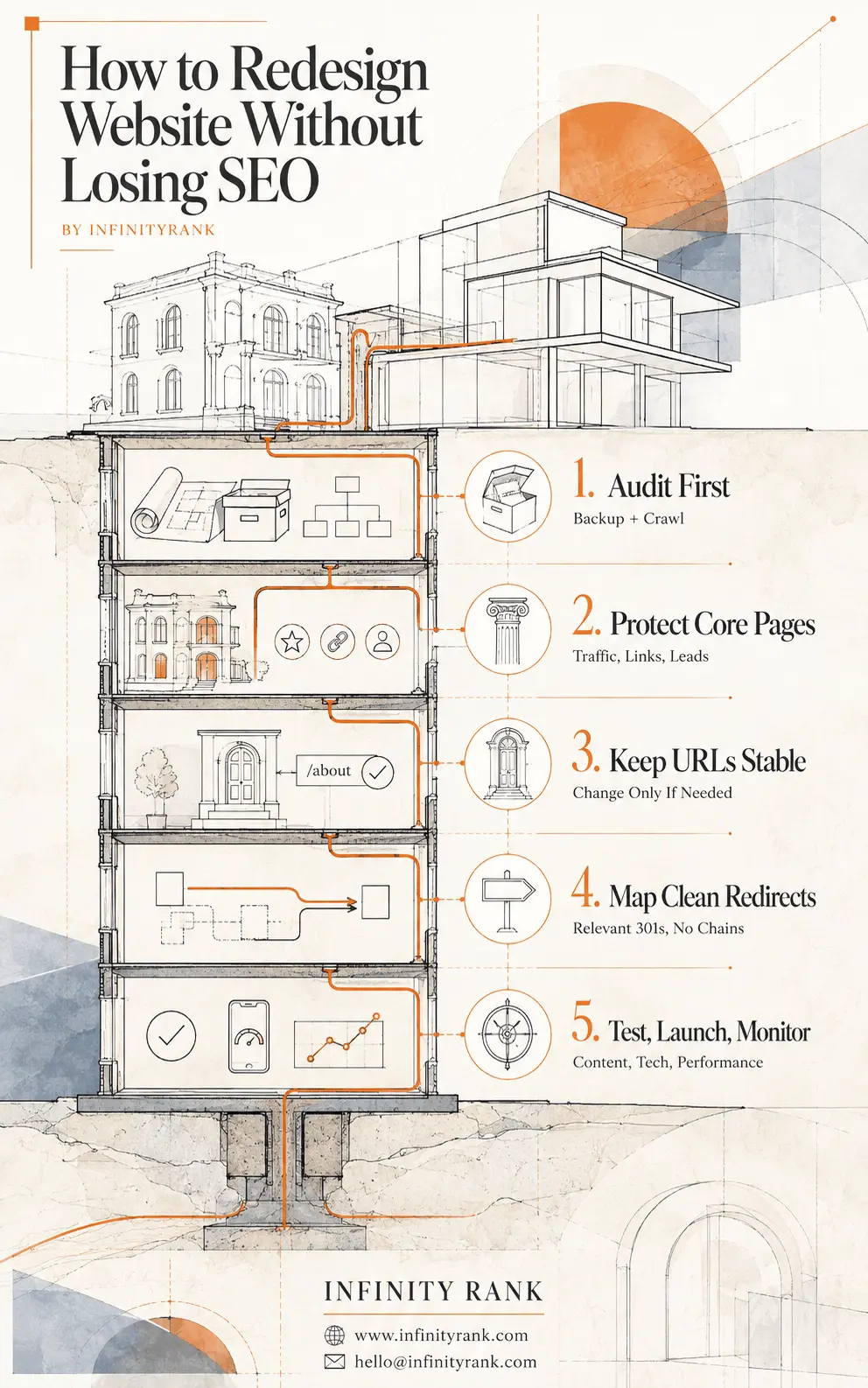
When URL modifications cannot be avoided, mapping clean redirects using direct 301 rules ensures link equity passes smoothly without creating damaging redirect chains. Completing the migration requires a rigorous cycle to test, launch, and monitor all content, technical elements, and site performance before and after going live. Use these five core pillars as your strategic framework to deliver a modern website design while preserving your organic search authority.
Why Website Redesigns Can Hurt SEO
Google does not care whether website has new colors, fonts, or animations. Problems start when redesign changes how search engines discover, crawl, understand, or index pages.
Common redesign mistakes include:
- Changing URLs without redirects
- Deleting pages that already receive organic traffic
- Removing useful content to make layouts cleaner
- Breaking internal links
- Changing canonical URLs incorrectly
- Losing title tags, meta descriptions, headings, or structured data
- Accidentally leaving noindex directives or staging restrictions active
- Creating slower pages with heavier images, JavaScript, fonts, or animations
- Breaking mobile navigation, forms, or key content
- Publishing XML sitemaps containing old or incorrect URLs
- Changing domain, CMS, URL structure, content, and design simultaneously
Significant site changes can cause temporary search fluctuations while Google recrawls and reprocesses URLs. Google recommends changing one major thing at a time when practical, particularly when domain, CMS, and layout changes are all planned.
Risk depends on redesign scope.
A visual redesign that keeps URLs, content, metadata, internal links, and technical setup largely unchanged carries less SEO risk than rebuilding website on new CMS with new URLs.
Domain migration combined with CMS migration, URL restructuring, and major content changes carries much greater risk.
1. Back Up Website and Create SEO Baseline
Before changing anything, preserve current site.
You need more than database backup. You also need record of SEO configuration and current performance.
Save technical backup
Keep copies of:
- Website files
- Database
- CMS configuration
- Theme or template files
- Server configuration
- Redirect rules
- Analytics configuration
- Tag-manager configuration
Make sure backup can be restored. Backup that has never been tested is weak rollback plan.
Crawl existing site
Use crawler such as Screaming Frog, Sitebulb, or equivalent tool.
Export:
- Indexable URLs
- HTTP status codes
- Title tags
- Meta descriptions
- H1 headings
- Canonical tags
- Robots directives
- Internal links
- Image URLs
- Image alt text
- Structured data
- Hreflang annotations, where relevant
- Redirects
- XML sitemap URLs
This becomes reference point for comparing old and new versions.
Record organic performance
Export data from Google Search Console and analytics platform.
For important landing pages, record:
- Organic clicks
- Impressions
- Queries
- Conversions
- Revenue or leads, where available
- Backlinks
- Internal links
Do not rely only on keyword rankings. Page can lose important search traffic even when handful of tracked keywords appear stable.
2. Identify Pages You Cannot Afford to Break
Not every URL carries same value.
Find pages responsible for meaningful organic visibility, backlinks, conversions, or topical coverage before redesign starts.
Priority pages often include:
- Service pages
- Product or category pages
- High-traffic blog posts
- Location pages
- Landing pages with strong backlinks
- Pages ranking for valuable search queries
- Pages generating leads or sales
- Evergreen resources earning links over time
Mark these URLs in migration sheet.
For each page, decide:
Keep: URL and page remain.
Update: URL stays, content or layout changes.
Redirect: Existing URL moves to genuinely equivalent replacement.
Consolidate: Multiple related pages merge into one relevant page.
Remove: Page has no useful replacement and should return appropriate 404 or 410 response.
Do not delete valuable pages because they look old. Redesign their presentation while preserving useful content and search intent.
3. Preserve URLs Wherever Practical
Keeping existing URLs is safest option when current structure already works.
Changing:
example.com/services/seo/
to:
example.com/solutions/search-engine-optimization/
creates migration work without necessarily creating user or SEO benefit.
Change URLs when there is clear reason, such as:
- Fixing poor legacy architecture
- Consolidating duplicate pages
- Moving to cleaner permanent structure
- Changing domains
- Reorganizing large site
- Replacing obsolete URLs generated by old CMS
If URL stays same, no redirect is needed.
If URL changes, map old URL directly to most relevant new destination.
4. Build Proper Redirect Map
Redirects are one of most important controls in redesign involving URL changes.
Google recommends server-side permanent redirects such as 301 or 308 when URLs move permanently. Permanent redirects do not inherently cause PageRank loss.
Create mapping like:
| Old URL | New URL | Action |
/old-service/ | /new-service/ | 301 |
/guide-a/ | /complete-guide/ | 301 |
/guide-b/ | /complete-guide/ | 301 |
/obsolete-page/ | None | 404/410 |
Redirect to relevant destinations
Do not redirect every deleted URL to homepage.
Google warns that redirecting many unrelated URLs to one irrelevant destination can confuse users and may be treated as soft 404.
If old content has genuine replacement, redirect it.
If no meaningful replacement exists, returning 404 or 410 is cleaner than forcing irrelevant redirect.
Avoid redirect chains
Bad:
Old URL → Intermediate URL → Another URL → Final URL
Better:
Old URL → Final URL
Google can follow redirect chains, but direct redirects reduce latency and complexity.
Keep redirects long enough
Google recommends keeping migration redirects for at least one year and notes that keeping them longer can continue helping users who follow old links.
5. Protect Content and On-Page SEO
Redesign often becomes accidental content rewrite.
Designer removes copy because page looks cleaner. Developer changes heading structure. Template replaces custom titles with defaults. Important internal links disappear.
These changes can alter what page communicates.
For high-performing pages, compare old and new versions carefully.
Check:
- Search intent remains same
- Main topic remains clear
- Important supporting sections remain
- Unique information is not removed without reason
- Title tag remains relevant
- H1 accurately describes page
- Heading hierarchy remains logical
- Important images remain where useful
- Image alt text survives migration
- Internal links remain contextual
- Structured data remains valid where applicable
Word count itself is not ranking target. Do not preserve 1,500 words merely because old page had 1,500 words.
Preserve useful information that made page satisfy search intent.
If content needs major rewrite, consider separating that work from redesign when possible. It becomes much harder to diagnose ranking changes when design, URLs, templates, and content all change simultaneously.
6. Check Canonicals, Robots Directives, and Indexability
Technical mistakes can wipe out otherwise successful redesign.
Canonical tags
New pages should reference correct preferred URLs.
For URLs staying unchanged, canonical usually stays unchanged.
For moved URLs, canonical annotation on new page should point to appropriate new canonical URL rather than old destination.
Google uses redirects, sitemap inclusion, rel="canonical" annotations, HTTPS status, and other signals when determining canonical URLs.
Staging site controls
Staging site should not become competing indexable copy of live website.
Common methods include access controls or temporary indexing restrictions.
Before launch, verify those restrictions do not carry over to production.
One forgotten sitewide:
<meta name="robots" content="noindex">
can create serious indexing problems.
Google specifically warns site owners to remove temporary noindex directives or robots restrictions used during migrations.
Robots.txt
Check production robots.txt.
Make sure important:
- CSS
- JavaScript
- pages
- resources
are not blocked unintentionally.
7. Preserve Internal Linking
Redirects should not become substitute for updating internal links.
If navigation still links:
/old-service/
which redirects to:
/new-service/
change internal link directly to:
/new-service/
Google recommends updating internal links after site move based on URL mapping.
Check:
- Header navigation
- Footer
- Breadcrumbs
- Contextual body links
- Related-post modules
- Category pages
- HTML sitemaps
- Image links
- Calls to action
Also check whether redesign creates orphan pages: useful URLs with no crawlable internal links pointing to them.
8. Preserve Hreflang on International Sites
If site targets multiple countries or languages, redesign must preserve hreflang relationships.
Check that:
- Language/region URLs still exist
- Hreflang URLs use final new URLs
- Return annotations remain correct
- Canonical and hreflang signals do not conflict
- Old URLs are removed from annotations after migration
Google recommends hreflang alongside appropriate canonicalization for regional variants containing similar same-language content.
9. Test Performance and Mobile UX Before Launch
Do not wait until production to discover redesign is slow.
Google’s current Core Web Vitals are:
- Largest Contentful Paint (LCP): loading performance
- Interaction to Next Paint (INP): responsiveness
- Cumulative Layout Shift (CLS): visual stability
FID is no longer current Core Web Vital.
Google recommends good Core Web Vitals, but perfect scores do not guarantee rankings. Page experience involves more than one metric.
Test representative templates, not homepage alone.
Test:
- Homepage
- Service pages
- Blog posts
- Category pages
- Product pages
- Location pages
- Conversion pages
Look for:
- Oversized images
- Excessive JavaScript
- Unused CSS
- Slow web fonts
- Layout shifts
- Heavy animation
- Third-party scripts
- Delayed interaction
- Broken mobile menus
- Hard-to-tap controls
- Forms that fail on mobile
- Content hidden behind interactions
Good design should not make website harder to use.
10. Validate Structured Data
Redesign can remove structured data when templates change.
Compare old and new markup for relevant page types.
Depending on site, this could include:
- Organization
- Article
- Breadcrumb
- Product
- LocalBusiness
- Event
- Video
- Other supported structured data
Validate implementation with Google’s Rich Results Test where relevant.
Structured data can make pages eligible for supported search features. It does not guarantee enhanced result will appear.
11. Verify Analytics and Conversion Tracking
SEO migration is not complete if rankings survive but reporting breaks.
Before launch, test:
- Analytics tracking
- Google Search Console verification
- Google Tag Manager
- Form submissions
- Phone tracking
- Email clicks
- Ecommerce events
- Checkout
- Lead events
- Consent management
- Advertising pixels, where used
Save baseline conversion data before launch.
Traffic without working conversion measurement gives incomplete picture.
12. Crawl Staging Site Before Launch
Run full crawl of staging version and compare it against old site.
Look for:
- Missing pages
- Unexpected
404errors - Wrong redirects
- Redirect chains
- Broken internal links
- Duplicate titles
- Missing titles
- Missing H1s
- Incorrect canonicals
noindexdirectives- Blocked resources
- Missing structured data
- Missing hreflang
- Missing images
- Invalid sitemap URLs
Every important old URL should have intentional outcome.
Nothing important should disappear by accident.
Website Redesign SEO Checklist
Before Redesign
- Back up files and database
- Crawl existing site
- Export Search Console data
- Export analytics and conversion data
- Identify top organic landing pages
- Identify pages with valuable backlinks
- Record metadata, canonicals, structured data, and hreflang
- Decide which URLs stay, move, consolidate, or disappear
- Create rollback plan
During Development
- Keep important URLs unchanged where practical
- Preserve valuable content and search intent
- Preserve internal-link relationships
- Preserve metadata
- Preserve structured data
- Preserve hreflang where applicable
- Set correct canonical URLs
- Build redirect map
- Protect staging site from unintended indexing
- Test mobile layouts and forms
- Test Core Web Vitals
Before Launch
- Crawl staging site
- Compare staging crawl with old-site crawl
- Test redirects
- Check redirect chains and loops
- Check robots directives
- Check
robots.txt - Check canonical tags
- Check XML sitemap
- Check structured data
- Check analytics
- Check forms and conversion events
- Verify Search Console ownership
- Confirm production site will be indexable
Launch Day
- Deploy final site
- Activate redirects
- Crawl production site
- Test priority URLs manually
- Remove temporary
noindexrules - Verify
robots.txt - Verify canonical tags
- Submit updated XML sitemap in Search Console
- Check analytics in real time
- Test forms and conversions
- Check server errors
If domain changes, use Search Console Change of Address where applicable. Google says this tool is for domain or subdomain moves, not normal path changes on same domain.
First Week After Launch
Monitor:
- Organic clicks and impressions
- Page indexing
- XML sitemap processing
- Important landing pages
404errors- Redirect errors
- Server errors
- Canonical selection
- Crawl activity
- Core Web Vitals
- Conversions
Investigate sharp page-level losses rather than assuming every decline is normal.
Following Weeks
Keep comparing performance against pre-launch baseline.
Significant site moves can create temporary ranking fluctuations while Google recrawls and processes new URLs. Google says small-to-medium moves can take a few weeks for most pages, while larger migrations can take longer. There is no universal recovery deadline.
When Should You Roll Back?
Rollback should not be automatic response to small ranking fluctuation.
Consider rollback when launch creates major technical failure such as:
- Large sections returning errors
- Sitewide indexing blocked
- Critical application functions broken
- Redirect implementation badly corrupted
- Major content missing
- Production site unusable
- Tracking or transactions seriously compromised and cannot be fixed quickly
Smaller SEO problems are often safer to repair on live version than reverse entire migration.
That is why tested backup and rollback plan matter before launch.
Redesign vs. Migration: What Is Difference?
Website redesign primarily changes presentation, templates, navigation, or UX.
Migration changes underlying site location or architecture.
Examples include:
- Moving to new domain
- Changing CMS
- Changing hosting infrastructure
- Moving HTTP to HTTPS
- Changing URL structure
Real projects often combine both.
Risk rises when multiple major systems change at once. Where practical, separate changes so problems are easier to identify and Google has fewer signals to process simultaneously. Google specifically recommends changing one major element at a time when feasible.
Can Website Redesign Improve SEO?
Yes, but improvement is not automatic.
Redesign can create better foundation by improving:
- Crawlability
- Internal linking
- Site architecture
- Mobile usability
- Content presentation
- Page performance
- Accessibility
- Conversion paths
Google says its core ranking systems seek to reward content offering good overall page experience, but good Core Web Vitals or other individual technical scores do not guarantee higher rankings.
Goal is not to redesign “for Google.”
Goal is to preserve existing search value while making website better for users and easier for search engines to crawl and understand.
Final Thoughts
Website redesign should be treated as SEO project as well as design project.
Protect what already works.
Keep useful URLs where possible. Map unavoidable URL changes. Preserve important content and internal links. Check canonicals, robots directives, structured data, and hreflang. Test Core Web Vitals and mobile UX before launch. Crawl site before and after deployment. Monitor indexing, traffic, and conversions after launch.
Most serious redesign losses come from preventable technical mistakes rather than design itself.
Build SEO requirements into redesign from first planning session, and launch becomes controlled migration instead of repair job.
FAQs
Will my rankings drop after a website redesign?
Not necessarily. Small fluctuations can occur after significant site changes while search engines recrawl and process pages. Larger sustained losses should be investigated for issues such as missing content, incorrect redirects, indexing blocks, broken internal links, or canonical errors.
How long does SEO recovery take after redesign?
There is no fixed recovery period. Google says small-to-medium site moves can take a few weeks for most URLs to be processed, while larger sites may take longer. Timing depends on number of URLs, server capacity, crawl activity, and scope of changes.
Should I change URLs during redesign?
Keep existing URLs when they already work and there is no strong reason to change them. If URLs must change, map old URLs to relevant new destinations using appropriate permanent redirects.
Should every deleted URL redirect somewhere?
No. Redirect URL when relevant replacement exists. If content is permanently gone and has no meaningful replacement, proper 404 or 410 response can be correct. Avoid redirecting unrelated deleted pages to homepage.
Do 301 redirects lose PageRank?
Google states that 301 and other permanent redirects do not cause PageRank loss. Correct implementation still matters: use relevant destinations, avoid unnecessary chains, and update internal links to final URLs.
Do I need an SEO specialist for a redesign?
Not every small redesign needs outside support. SEO involvement becomes more important when site receives meaningful organic traffic, changes URLs, moves domains or CMS platforms, contains many pages, or generates substantial leads or revenue from search.
Can redesign improve SEO?
It can improve technical foundation, usability, internal linking, site architecture, and performance. Those improvements may support stronger search performance, but redesign itself does not guarantee higher rankings.
What Core Web Vitals should I check in 2026?
Current Core Web Vitals are Largest Contentful Paint (LCP), Interaction to Next Paint (INP), and Cumulative Layout Shift (CLS). FID has been replaced by INP.