SEO can bring consistent leads to a small business, but only when the basics are done properly. Most small business owners do not fail at SEO because they ignore one secret ranking trick. They fail because their site has weak pages, unclear keywords, poor local signals, slow performance, thin content, bad tracking, or low-quality links.
That is the real problem.
Google’s own SEO guidance is clear: SEO is about helping search engines understand your content and helping users decide whether your page is worth visiting. There are no shortcuts that automatically rank a site first. The work is usually practical, repetitive, and fixable.
Below are the most common SEO mistakes small business owners make, why they hurt rankings, and what to fix first.
Quick SEO Mistake Checklist
| SEO Mistake | Why It Hurts | Quick Fix | Tool to Use |
| No keyword research | You target phrases customers do not search | Map one main keyword to each important page | Google Keyword Planner, Ahrefs, Semrush |
| Weak titles and meta descriptions | Low click-through and unclear relevance | Write unique, concise page titles | Google Search Console |
| Thin service pages | Pages do not answer buyer questions | Add services, pricing context, FAQs, proof, and locations | Google Docs, Surfer, Clearscope |
| Ignoring local SEO | Local buyers find competitors first | Complete and optimize Google Business Profile | Google Business Profile |
| Poor technical SEO | Google and users struggle with your site | Fix crawl, speed, mobile, and index issues | Search Console, PageSpeed Insights |
| Low-quality backlinks | Spam links create risk and weak authority | Earn relevant links from real sites | Ahrefs, Semrush |
| No internal linking | Important pages stay buried | Link related pages together naturally | Screaming Frog |
| Generic AI content | Content sounds copied and adds no value | Add expert input, examples, screenshots, and proof | Manual review |
| Bad user experience | Visitors leave before converting | Improve navigation, CTAs, speed, and mobile layout | GA4, Hotjar |
| No conversion tracking | You cannot tell what SEO produces | Track calls, forms, bookings, and sales | GA4, Search Console |
Why SEO Matters for Small Businesses
SEO matters because your customers are already searching for what you sell. A plumber, dentist, law firm, contractor, SaaS startup, ecommerce store, or local consultant does not need “traffic” in the abstract. They need qualified visitors who are actively looking for a solution.
Good SEO helps your business:
- Show up when buyers search for your services.
- Compete against larger brands in local or niche searches.
- Build trust before a customer contacts you.
- Reduce dependence on paid ads over time.
- Turn your website into a lead source instead of a brochure.
But SEO is not free. It costs time, content, tools, technical work, and link building. A better way to describe it is recurring non-paid organic traffic, not “free traffic.”
5 Pillars of a Profitable Small Business Website
Running a small business keeps you busy enough without the added stress of a website that stays hidden on page ten. Most of the time, it isn’t a lack of effort holding you back—it’s a few common SEO mistakes that are easily fixed. You don’t need a corporate-sized budget to win at local search; you just need to focus on these five foundational pillars to start turning your website into a lead-generation machine.
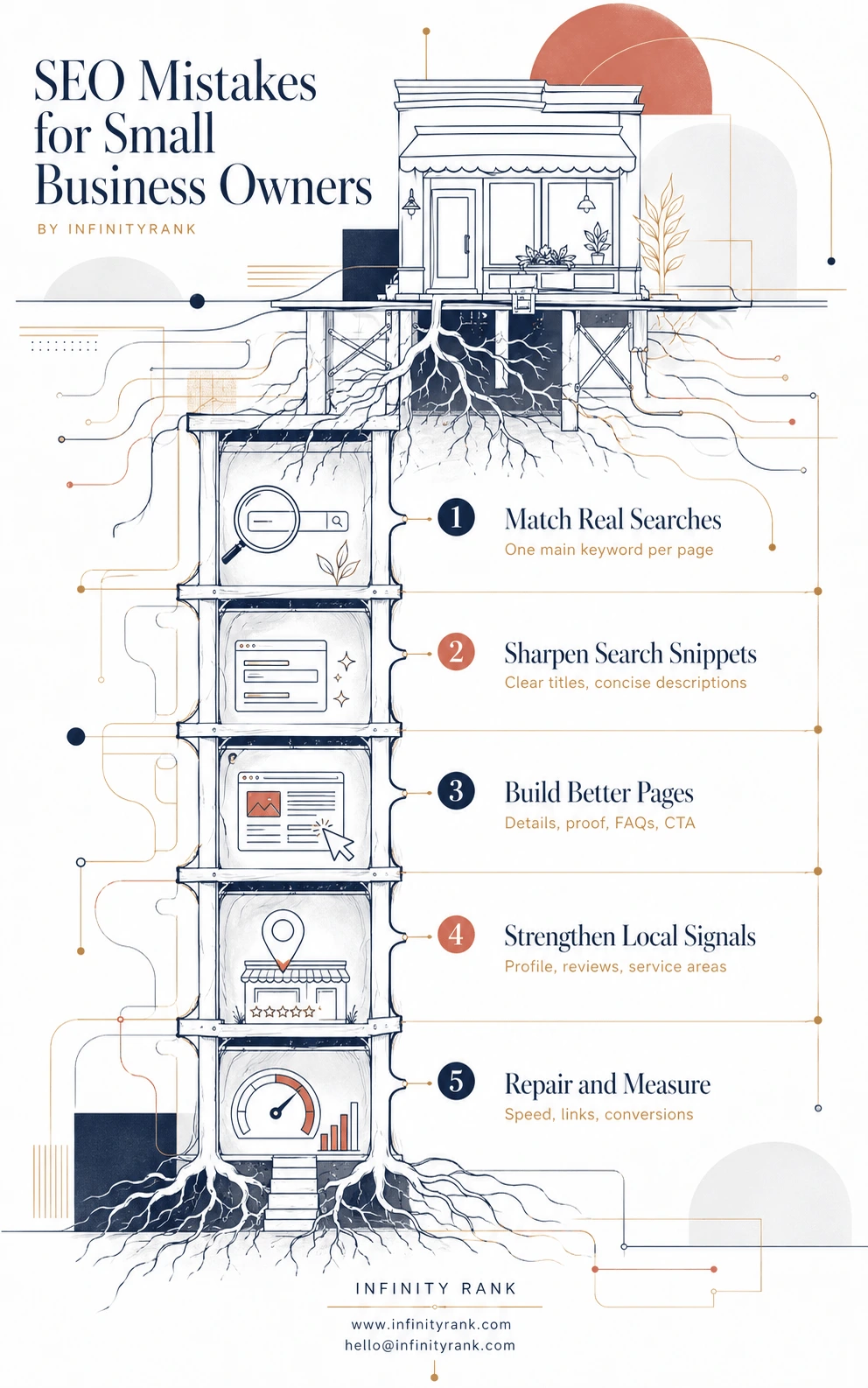
SEO isn’t a one-time project; it’s about making smart, consistent choices that help Google trust your business. By focusing on these five areas, you’ll stop shouting into the void and start showing up exactly where your customers are looking. Let’s take a closer look at the specific habits you should change today to start seeing results.
1. Skipping Keyword Research
Many small business owners build service pages based on how they describe their work, not how customers search for it.
That creates a mismatch.
A business might call its offer “residential exterior surface restoration,” while customers search for “house pressure washing near me.” A dentist might write about “restorative dental solutions,” while patients search for “dental crowns cost” or “emergency dentist near me.”
That gap kills SEO performance.
Why This Hurts
Without keyword research, you may:
- Target phrases with no search demand.
- Use broad keywords that are too competitive.
- Miss buyer-intent keywords.
- Publish blog posts that do not support revenue.
- Create multiple pages competing for the same keyword.
How to Fix It
Start with your core money pages. These are the pages tied directly to leads or sales.
For each important page, define:
- One primary keyword.
- Two to five secondary keywords.
- Search intent.
- Target location, if local.
- The next action you want the visitor to take.
Example:
| Page | Primary Keyword | Search Intent |
| Dental implants service page | dental implants in Austin | Local commercial |
| Emergency plumbing page | emergency plumber near me | Urgent local |
| SEO service page | small business SEO services | Commercial |
| Blog article | SEO mistakes small business owners | Informational |
Do not start by writing random blog posts. Start by making sure your homepage, service pages, location pages, and highest-value blog posts target real searches.
2. Using Weak Page Titles and Meta Descriptions
Your title tag is one of the most important on-page SEO elements because it helps searchers understand what your page is about. Google says title links are often the main piece of information people use to decide which result to click, and it recommends writing descriptive, concise title text instead of vague or bloated titles.
A lot of small business websites waste this space with generic branding, repeated keywords, or titles that say nothing specific.
Bad Title Example
Home | Best Dental Clinic | Affordable Dentist | Family Dentist | Teeth Whitening | Dental Implants
Too cluttered. Too broad. No location. No clear page focus. It tries to target everything and ends up targeting nothing well.
Better Title Examples
For a homepage:
Family Dentist in Austin, TX | Bright Smile Dental
For a service page:
Dental Implants in Austin, TX | Bright Smile Dental
For an emergency page:
Emergency Dentist in Austin, TX | Same-Day Appointments
These are clearer because each title focuses on one search intent, one service or page type, and one location.
How to Fix It
Every important page should have:
- A unique title tag.
- A clear primary keyword.
- A location if the business serves a local market.
- A reason to click.
- No keyword stuffing.
- No repeated boilerplate across dozens of pages.
Google specifically warns against vague, overly long, repetitive, and keyword-stuffed title elements.
For meta descriptions, write a short summary that sells the click.
Bad meta description:
We are the best dentist offering dental services, implants, whitening, cleaning, emergency dental care, and more. Call today.
Better meta description:
Need a family dentist in Austin? Bright Smile Dental offers cleanings, implants, emergency care, and same-day appointments for local patients.
3. Publishing Thin Service Pages
This is one of the biggest small business SEO mistakes.
A thin service page says something like:
“We offer professional roofing services. Contact us today for a free estimate.”
That is not enough.
A customer wants to know what you do, where you do it, what problems you solve, how your process works, what it costs, what makes you credible, and what to do next.
Why Thin Pages Fail
Thin pages usually lack:
- Specific service details.
- Location relevance.
- Proof of experience.
- FAQs.
- Photos or examples.
- Internal links.
- Clear calls to action.
- Trust signals.
- Helpful explanations.
Google’s helpful content guidance pushes site owners to assess whether content demonstrates first-hand expertise, depth of knowledge, and enough information for a reader to achieve their goal.
How to Fix It
For each service page, add:
- Who the service is for.
- Problems it solves.
- What is included.
- What is not included.
- Pricing factors or starting ranges, where possible.
- Service area details.
- Before-and-after examples.
- Customer objections.
- FAQs.
- Internal links to related services.
- A clear CTA.
Example structure:
H1: Emergency Plumbing Services in Dallas
H2: Fast Help for Burst Pipes, Leaks, and Clogged Drains
H2: What Our Emergency Plumbing Service Includes
H2: Common Plumbing Problems We Fix
H2: Emergency Plumbing Costs in Dallas
H2: Why Choose [Business Name]
H2: Areas We Serve
H2: FAQs
H2: Request Emergency Plumbing Help
A service page should answer buyer questions before the sales call.
4. Ignoring Local SEO
If your business serves a city, region, or neighborhood, local SEO is not optional.
Google says local results are mainly based on relevance, distance, and prominence. Relevance depends on how well your Business Profile matches a search. Distance depends on the searcher’s location. Prominence depends partly on signals such as links, reviews, and how well-known the business is.
Common Local SEO Mistakes
Small businesses often:
- Leave Google Business Profile incomplete.
- Use inconsistent business names, addresses, and phone numbers.
- Ignore reviews.
- Forget service areas.
- Use the wrong business category.
- Add no photos.
- Create no local landing pages.
- Fail to mention neighborhoods or nearby cities naturally.
How to Fix It
Start with Google Business Profile.
Add or improve:
- Correct business name.
- Primary and secondary categories.
- Accurate address or service area.
- Phone number.
- Website link.
- Business hours.
- Services.
- Products, if relevant.
- Photos and videos.
- FAQs.
- Review responses.
- Regular updates.
Then fix local signals on your website.
Add your location naturally to:
- Title tags.
- H1s.
- Service pages.
- Contact page.
- Footer.
- Schema markup.
- Case studies.
- Testimonials.
- Location pages.
Do not create fake city pages with copied text. Create useful local pages only when you genuinely serve that area and can add specific details.
5. Overlooking Technical SEO
You do not need to be a developer to care about technical SEO. You do need a site that Google can crawl, index, understand, and display properly.
Search Console helps site owners understand how their site performs in Google Search, how Google crawls and indexes pages, and which issues may affect search visibility.
Common Technical SEO Problems
Watch for:
- Pages blocked by noindex.
- Broken internal links.
- Missing XML sitemap.
- Slow page speed.
- Poor mobile layout.
- Duplicate pages.
- Redirect chains.
- Missing canonical tags.
- Images without alt text.
- Broken images.
- 404 errors.
- Important pages buried too deep.
How to Fix It
At minimum, check:
- Indexing: Are important pages indexed?
- Crawlability: Can Google access your pages?
- Speed: Do pages load quickly on mobile?
- Mobile usability: Can users read and tap easily?
- Broken links: Are internal links working?
- Security: Is the site HTTPS?
- Sitemap: Is your XML sitemap submitted?
Use Google Search Console monthly. Check it after major site edits, redesigns, migrations, or content updates.
6. Writing for Search Engines Instead of People
Keyword stuffing is still common. It just looks slightly more polished now.
Instead of repeating a keyword awkwardly, some businesses publish content that technically includes the right terms but says nothing useful.
Example:
“Our small business SEO services help small businesses with SEO because SEO for small businesses is important.”
That is not optimization. That is filler.
Why This Hurts
Search-first content usually:
- Repeats obvious points.
- Gives no original examples.
- Avoids specifics.
- Makes claims without proof.
- Feels interchangeable with competitor pages.
- Leaves the reader needing another source.
Google’s guidance warns against content made primarily to attract search visits, mass-produced content, automation without value, and summarizing others without adding much new value.
How to Fix It
Before publishing, ask:
- Does this answer the query better than competing pages?
- Did we add examples from real work?
- Did we include screenshots, data, templates, or checklists?
- Is the advice specific enough to act on?
- Would a customer trust us more after reading it?
- Does the page lead naturally to the next step?
Good SEO content should help the user first and help Google understand the page second.
7. Relying Too Much on AI Content
AI is useful. Lazy AI content is not.
Google does not ban AI-generated content. Google’s position is that content quality matters more than how the content is produced, and appropriate use of AI is not against its guidelines. The problem is using automation mainly to manipulate rankings or mass-produce low-value pages.
Bad AI Use
Small businesses get into trouble when they use AI to:
- Generate dozens of generic city pages.
- Rewrite competitor articles without adding expertise.
- Publish unverified claims.
- Create fake authority.
- Produce bland blog posts with no examples.
- Skip human editing.
Google’s guidance on generative AI content says AI can help with research and structure, but using it to generate many pages without adding user value may violate spam policies.
Better AI Use
Use AI for:
- Outlines.
- Drafting FAQs.
- Summarizing customer questions.
- Creating content briefs.
- Finding content gaps.
- Rewriting unclear sections.
- Generating schema drafts.
Then add the human value:
- Real customer examples.
- Internal expertise.
- Screenshots.
- Photos.
- Case studies.
- Original opinions.
- Pricing context.
- Local details.
- Fact-checking.
AI should speed up the work, not replace expertise.
8. Ignoring Backlinks and Brand Mentions
Backlinks are still important, but not all links are worth having.
A backlink from a relevant local news site, trade publication, partner, supplier, association, or respected niche blog can support discovery, credibility, and authority. A backlink from a spam directory or irrelevant link farm can create risk and little value.
Common Link Building Mistakes
Small businesses often:
- Buy cheap bulk links.
- Ignore local link opportunities.
- Never ask partners for mentions.
- Avoid digital PR.
- Publish content nobody would link to.
- Build links only to the homepage.
- Use exact-match anchor text too aggressively.
How to Fix It
Build links that make sense in the real world.
Good small business link opportunities include:
- Local chamber of commerce pages.
- Supplier and vendor pages.
- Local sponsorships.
- Industry associations.
- Podcasts.
- Guest articles.
- Local news features.
- Testimonials.
- Case studies.
- Resource pages.
- Digital PR campaigns.
Also track brand mentions. If another website mentions your business without linking, ask them to add the link where appropriate.
Do not chase volume first. Chase relevance, trust, and referral value.
9. Forgetting Internal Links
Internal links are underrated because they are not as exciting as backlinks. That does not make them optional.
Internal links help users find related pages. They also help search engines understand your site structure and discover important URLs.
Common Internal Linking Mistakes
Small businesses often:
- Link only from the menu.
- Never link blog posts to service pages.
- Use vague anchor text like “click here.”
- Leave important pages orphaned.
- Publish posts that do not support business goals.
- Fail to link between related services.
How to Fix It
Every new article should link to:
- One relevant service page.
- One related blog post.
- One supporting guide.
- One conversion-focused page, when appropriate.
Example:
An article about “SEO mistakes small business owners make” should internally link to:
- Small business SEO service page.
- Link building service page.
- Content marketing service page.
- SEO glossary.
- Technical SEO checklist, if available.
- Local SEO guide, if available.
Use descriptive anchor text.
Bad:
Click here.
Better:
small business SEO audit
Better anchor text helps users and search engines understand what the linked page is about.
10. Not Measuring What Matters
Traffic alone does not pay the bills.
A page can get more organic visitors and still produce no leads. Another page can get modest traffic but drive booked calls, purchases, or quote requests.
Small businesses need to track outcomes.
Google Analytics 4 allows site owners to configure additional events to measure specific user behavior beyond automatic tracking. Google also explains that key events measure actions important to business success, such as lead-generation actions.
What to Track
Track:
- Form submissions.
- Phone clicks.
- Email clicks.
- Appointment bookings.
- Quote requests.
- Purchases.
- Newsletter signups.
- Live chat starts.
- Google Business Profile actions.
- Organic landing page conversions.
What to Check Monthly
Review:
- Which pages get impressions.
- Which keywords drive clicks.
- Which pages convert.
- Which pages have traffic drops.
- Which forms or CTAs perform best.
- Which local searches lead to calls.
- Which content needs updating.
Use Search Console for search visibility. Use GA4 for user behavior and key events. Use call tracking if phone leads matter.
SEO Fix Priority: What to Do First
Not every SEO mistake has the same urgency. Fix the problems that block revenue first.
| Priority | Fix | Why It Comes First |
| 1 | Indexing and crawl issues | Pages cannot rank if Google cannot access them |
| 2 | Core service page quality | These pages drive leads and sales |
| 3 | Google Business Profile | Critical for local businesses |
| 4 | Page titles and headings | Fast on-page relevance improvement |
| 5 | Conversion tracking | You need to know what works |
| 6 | Internal links | Easy authority and usability improvement |
| 7 | Content refreshes | Improves outdated or declining pages |
| 8 | Backlink building | Builds authority over time |
Final Thoughts
Most SEO mistakes small business owners make are fixable. The hard part is knowing what to fix first.
Do not waste time chasing hacks. Start with the basics: keyword research, strong service pages, local SEO, clean technical setup, helpful content, internal links, quality backlinks, and proper tracking.
SEO works best when your website is useful to customers and easy for search engines to understand. Get that foundation right before chasing advanced tactics.
Need a clear SEO audit? InfinityRank can review your backlinks, content, technical SEO, and local visibility so you know exactly what to fix first.
Frequently Asked Questions
What is the biggest SEO mistake small business owners make?
The biggest mistake is building pages without a clear keyword, search intent, or conversion goal. A page should target a real query, answer the user’s question, and guide the visitor toward a useful next step.
How long does it take to fix SEO mistakes?
Some fixes, such as title tags, internal links, and broken links, can be completed quickly. Ranking improvements may take weeks or months because Google needs time to crawl, process, and evaluate changes. Google says some changes can take hours, while others may take several months.
Can AI-generated content hurt SEO?
AI content does not automatically hurt SEO. Low-quality, generic, inaccurate, or mass-produced content can hurt performance. Use AI for support, but add human expertise, examples, fact-checking, and original value.
Do small businesses still need backlinks?
Yes, but quality matters more than quantity. Relevant links from trusted websites, local organizations, industry publications, partners, and real media are far better than cheap bulk links.
What SEO tools should small businesses use?
Start with Google Search Console, Google Analytics 4, Google Business Profile, and PageSpeed Insights. Paid tools like Ahrefs, Semrush, Screaming Frog, or Surfer can help once the basics are in place.
How often should I review my SEO?
Review Search Console and GA4 monthly. Review service pages quarterly. Update important blog posts at least once or twice per year, especially if rankings, search intent, pricing, tools, or industry practices have changed.