People rarely register for an event the first time they see its name.
They search for events in their city. They compare dates, speakers, prices, venues, agendas, and travel requirements. They may visit several event pages before deciding whether to register.
SEO for event marketing helps your event appear during that research process.
A proper event SEO strategy covers more than adding keywords to a landing page. It requires a crawlable event page, accurate event details, structured data, useful supporting content, relevant mentions, local visibility, and reliable conversion tracking.
This guide explains how to build that system without relying on vague claims, temporary Google Business Profiles, or low-quality directory links.
What Is Event Marketing SEO?
Event marketing SEO is the process of improving an event’s visibility in organic search results.
It can help an event rank for searches related to:
- The event name
- The topic or industry
- The city or venue
- Speakers and performers
- Dates and schedules
- Tickets and registration
- Travel and accommodation
- Comparisons with similar events
SEO can support conferences, workshops, trade shows, festivals, exhibitions, networking events, public seminars, and other events that people actively search for.
It does not replace paid advertising, email, partnerships, or social promotion. It captures demand from people already using search engines to find information or compare their options.
The commercial goal is not simply to generate more traffic. It is to attract qualified visitors who may register, buy a ticket, join a waiting list, contact the organizer, or subscribe for future announcements.
SEO Guide for Event Marketing Strategy
Driving ticket sales and attendee registrations requires positioning your gathering right in front of people actively looking for relevant experiences. Success starts with thorough keyword research to target exactly what your audience searches, followed by building a dedicated event landing page that informs and converts visitors. Optimizing for local visibility ensures your venue and event details rank prominently in map results and geographically targeted searches. This simple guide breaks down five essential steps to capture search demand and maximize attendance.
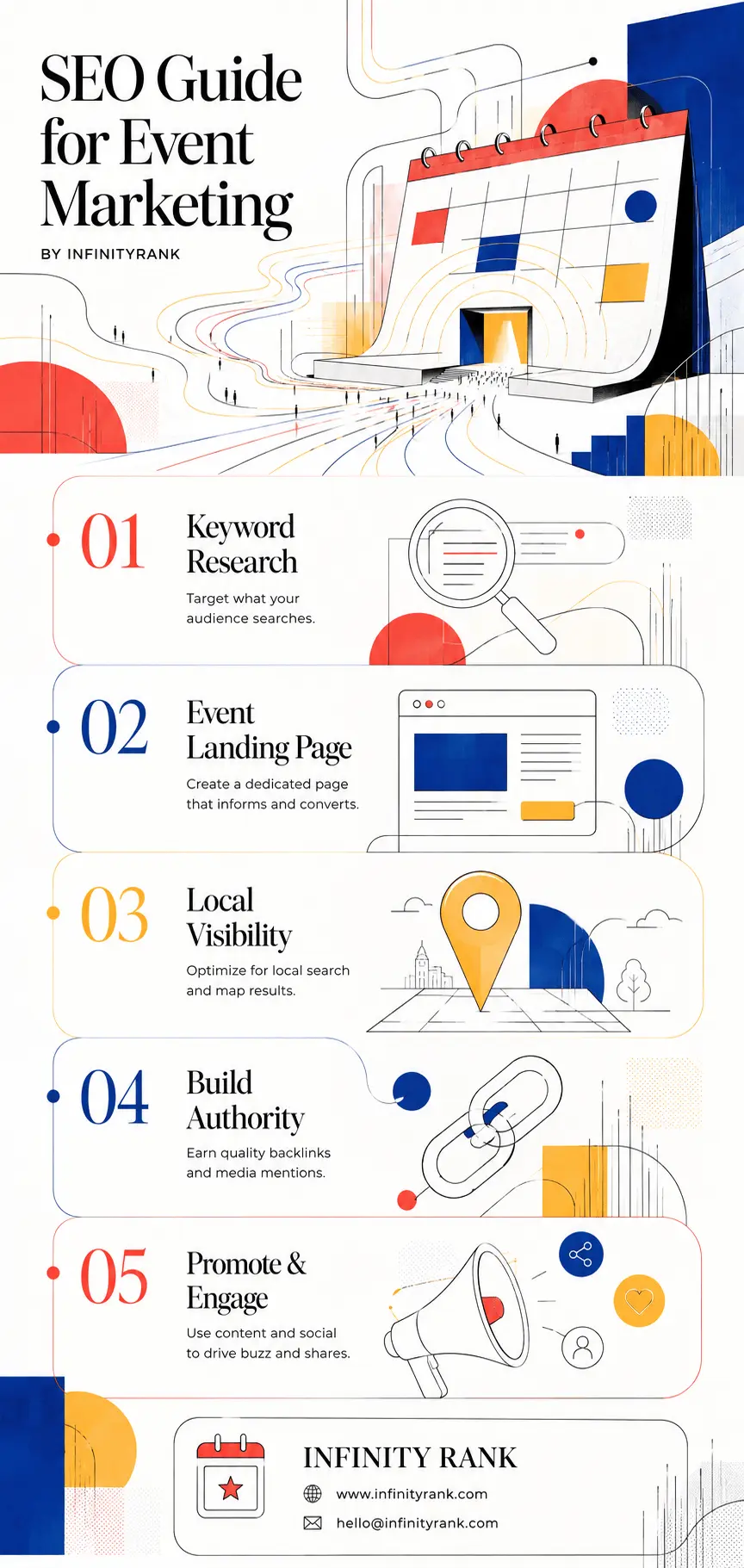
Scaling your event’s digital presence relies on building authority by earning quality backlinks and media mentions from local press, sponsors, and industry directories. Combining search optimization with active promotion and social engagement creates the momentum needed to drive buzz, shares, and viral interest. Use these five core pillars as your strategic roadmap to outrank competing events and consistently fill your venues.
1. Research Keywords Based on Search Intent
Do not begin by searching for the highest-volume keyword related to your industry.
A broad phrase may generate traffic without attracting people who are likely to attend. Event keyword research should focus on what someone is trying to find and how close that person is to registering.
Common Event Keyword Categories
| Search intent | Example keyword | What the searcher needs |
| General discovery | marketing events in Chicago | A list of relevant local events |
| Industry discovery | cybersecurity conferences 2027 | Upcoming events within a specific industry |
| Local discovery | business workshops near me | Events within travelling distance |
| Comparison | best SaaS conferences in the US | Help comparing several events |
| Transactional | buy tickets for B2B Growth Summit | A registration or ticket page |
| Informational | B2B Growth Summit speakers | Specific event details |
| Travel planning | hotels near McCormick Place | Accommodation near the venue |
| Branded | B2B Growth Summit 2027 | The official event website |
Build your keyword list around these stages rather than forcing one broad phrase into every section of the page.
Use the Language Attendees Actually Use
An organizer may call an event an “executive knowledge exchange.” Potential attendees may search for “leadership conference,” “CEO networking event,” or “business summit.”
Review:
- Google autocomplete suggestions
- Related searches
- Search Console queries from previous event pages
- Competitor event titles and headings
- Industry calendars
- Relevant forums and professional communities
- Keyword research platforms
- Questions sent to the sales or support team
The final keyword set should reflect the event type, audience, topic, location, and year.
Do Not Ignore Branded Search
As promotion increases, more people will search for the event by name.
Make sure the official event page ranks clearly for combinations such as:
[event name][event name] tickets[event name] speakers[event name] agenda[event name] location[event name] reviews[event name] 2027
The official page should answer these searches without forcing visitors to hunt through several menus or external ticketing platforms.
2. Create a Dedicated Page for Each Event
Every significant event should have its own permanent, crawlable URL.
Do not place all event details inside a calendar widget, image, PDF, social media post, or JavaScript modal. Search engines and users need a normal page containing the complete information.
Google’s event search guidelines require each eligible event to have a unique page URL focused on that individual event. Pages listing several events are not a substitute for individual event detail pages.
A strong event page should include:
- Full event name
- Date and start time
- End date and time
- Timezone
- Venue name
- Complete address
- Map and transport information
- Ticket prices
- Ticket availability
- Registration deadline
- Agenda or schedule
- Speaker or performer details
- Organizer information
- Accessibility information
- Parking details
- Accommodation guidance
- Refund or cancellation policy
- Contact details
- Clear registration buttons
- Frequently asked questions
Keep critical event information in visible HTML text. Do not hide dates, locations, or prices exclusively inside banners or images.
Use a Clear URL
A descriptive URL is easier to understand and manage.
For example:
/events/b2b-growth-summit-2027/
Avoid URLs such as:
/event?id=7841
or:
/page-6-final-new/
Create a Sensible Structure for Recurring Events
For an annual event, use a permanent event hub alongside separate edition pages.
For example:
/b2b-growth-summit//b2b-growth-summit-2026//b2b-growth-summit-2027/
The permanent hub can explain the event series and link to the current edition. Each yearly page should contain the details, speakers, tickets, and results for that edition.
Do not overwrite the previous year’s page with new dates while leaving old articles, links, and search snippets pointing to it. That creates confusion and can destroy useful historical content.
3. Optimize the Event Page for Search and Registrations
The event page must satisfy both search intent and conversion intent.
A page can rank and still fail if the event details are unclear, the registration process is slow, or the ticket button is difficult to find.
Write a Descriptive Title Tag
Include the event name, main topic, location, or year where useful.
Weak:
Home | BGS
Better:
B2B Growth Summit 2027 | Chicago Marketing Conference
Do not stuff the title with several near-identical keywords.
Use One Clear H1
The H1 should identify the event immediately.
For example:
B2B Growth Summit 2027: Chicago's B2B Marketing Conference
Avoid vague headings such as:
Join Us for Something Special
Answer the Main Questions Early
The opening section should state:
- What the event is
- Who it is for
- Where it takes place
- When it takes place
- Why someone should attend
Do not begin with several paragraphs about the organizer’s history before explaining the event.
Use Descriptive Headings
Useful H2 sections may include:
- Who Should Attend?
- Event Agenda
- Confirmed Speakers
- Ticket Prices
- Venue and Travel Information
- Accessibility
- Frequently Asked Questions
These headings help visitors scan the page and create clear topical sections for search engines.
Write a Useful Meta Description
The meta description should summarize the event and give the searcher a reason to visit the page.
For example:
Join B2B Growth Summit 2027 in Chicago for expert sessions, workshops, and networking. View the agenda, speakers, venue details, and ticket options.
Do not fill the description with empty phrases such as “an unforgettable experience you will not want to miss.”
Optimize Images Properly
Use original photographs, speaker headshots, venue images, agenda graphics, and event highlights where they help visitors make a decision.
Alt text should describe the image’s purpose.
Useful:
Keynote speaker presenting at the 2026 B2B Growth Summit
Poor:
best SEO conference marketing event tickets Chicago
Decorative graphics should generally use empty alt text rather than keyword-heavy descriptions.
Add Internal Links
Link to the event page from relevant:
- Blog articles
- Service pages
- Speaker profiles
- Venue guides
- Industry reports
- Previous event recaps
- Resource pages
- Website navigation
Do not rely on the XML sitemap as the event page’s only discovery route.
4. Add Event Structured Data
Event structured data provides search engines with explicit information about an event.
Google requires a unique event page containing valid event markup for eligibility in its event search experience. Required information includes the event name, start date, and physical location. Recommended properties include the end date, status, images, ticket offers, performers, and organizer.
Structured data does not guarantee a rich result or higher rankings. It helps Google understand the page and may make the event eligible for enhanced search presentation when all requirements are met.
Basic Event Schema Example
Replace every sample value with accurate information from the visible event page.
<script type="application/ld+json">
{
  "@context": "https://schema.org",
  "@type": "BusinessEvent",
  "name": "B2B Growth Summit 2027",
  "startDate": "2027-04-16T09:00:00-05:00",
  "endDate": "2027-04-16T17:30:00-05:00",
  "eventStatus": "https://schema.org/EventScheduled",
  "location": {
    "@type": "Place",
    "name": "Lakeside Conference Center",
    "address": {
      "@type": "PostalAddress",
      "streetAddress": "100 Example Avenue",
      "addressLocality": "Chicago",
      "addressRegion": "IL",
      "postalCode": "60601",
      "addressCountry": "US"
    }
  },
  "image": [
    "https://example.com/images/b2b-growth-summit-2027.jpg"
  ],
  "description": "A one-day conference for B2B marketing and sales leaders covering demand generation, content strategy, revenue operations, and growth.",
  "offers": {
    "@type": "Offer",
    "url": "https://example.com/events/b2b-growth-summit-2027/tickets/",
    "price": "149.00",
    "priceCurrency": "USD",
    "availability": "https://schema.org/InStock",
    "validFrom": "2026-11-01T09:00:00-05:00"
  },
  "organizer": {
    "@type": "Organization",
    "name": "Example Events",
    "url": "https://example.com/"
  }
}
</script>
The schema must match the visible page. Do not mark up prices, speakers, dates, or locations that visitors cannot find on the page.
Update the Event Status
Do not delete an event page when plans change.
Use the appropriate eventStatus value:
| Situation | Schema value |
| Event is proceeding normally | EventScheduled |
| Event has been cancelled | EventCancelled |
| Event has been postponed without a new date | EventPostponed |
| Event has a confirmed new date | EventRescheduled |
When an event is cancelled or postponed, Google advises keeping the original identifying information and updating the status rather than removing the start date and location.
Understand Google’s Eligibility Limits
Google’s current event search documentation states that eligible events must be bookable by the general public. Invitation-only and membership-dependent events are not eligible for the event experience.
The documentation also states that online-only events without a real-world component are not supported by that specific Google event experience.
Online events can still have normal indexable pages and use relevant schema.org markup. Do not promise that they will appear in Google’s dedicated event search features.
Test the Markup
Before publication:
- Run the page through Google’s Rich Results Test.
- Correct all critical errors.
- Check the rendered page through Search Console’s URL Inspection tool.
- Confirm that the page is not blocked by
robots.txtor anoindexdirective. - Request indexing after the final version is live.
- Monitor enhancement reports for errors.
Google recommends validating structured data, inspecting the live URL, and submitting updated URLs through Search Console. Repeated indexing requests do not force faster crawling.
5. Fix Technical Problems Before Promotion Begins
Promoting a page that search engines cannot crawl or users cannot complete is wasted work.
Run a technical review before announcing the event.
Check Indexability
Confirm that:
- The page returns a
200status code - The page is not marked
noindex - The canonical points to the correct URL
- The page is not blocked in
robots.txt - The event is included in the XML sitemap
- Internal links point to the final URL
- HTTPS works without certificate errors
- Test or staging versions are not indexed
Make the Mobile Page Complete
Google uses the mobile version of a page for indexing and ranking. The mobile page should contain the same primary event information, headings, images, metadata, and structured data as the desktop version.
Test the full registration process on a phone.
Check whether a visitor can:
- Read the agenda
- Compare ticket types
- Open speaker information
- Select a ticket
- Complete payment
- Receive confirmation
A mobile-friendly layout is useless if the checkout form breaks or a sticky banner hides the registration button.
Improve Page Speed Without Removing Useful Content
Compress oversized event images, reduce unnecessary scripts, delay non-critical third-party widgets, and remove plugins that do not support the registration process.
Pay particular attention to:
- Hero videos
- Ticketing embeds
- Chat widgets
- Tracking scripts
- Countdown timers
- Image carousels
- Social media embeds
- Large speaker photographs
Google recommends assessing page experience across several factors rather than treating one performance score as a guaranteed ranking lever. Core Web Vitals matter, but perfect scores do not guarantee top rankings.
Check JavaScript-Rendered Details
Some ticketing tools load dates, prices, or availability through JavaScript.
Use URL Inspection to confirm that Google can see the final rendered information. Keep essential event details in the page’s main HTML wherever possible rather than depending entirely on an external widget.
6. Use Local SEO Without Creating a Fake Event Location
Local SEO matters when attendance depends on the event’s city, region, or venue.
Build location relevance into the event page through useful information, not repeated city keywords.
Include:
- Venue name
- Complete street address
- City and region
- Public transport options
- Parking information
- Nearby landmarks
- Accessibility information
- Recommended hotels
- Airport or station guidance
- A map
- Local contact details where appropriate
Do Not Create a Temporary Google Business Profile
A rented venue does not automatically become the event organizer’s business location.
Google states that a Business Profile should represent the business’s real-world operating location. Rented addresses where the business does not operate are not eligible. Businesses displaying an address should normally have permanent signage and operate from that location.
Use the legitimate profile of the permanent venue or organizer where applicable.
A real venue may publish information through its existing website and Business Profile. A permanent organizer may promote the event through its established profile if the content accurately represents the business.
Do not:
- Create a new profile for a one-day conference
- Change the organizer’s address to a rented venue
- Add event keywords to the business name
- Ask attendees to review a temporary event as though it were a permanent business
- Create duplicate profiles for each event
Submit to Relevant Local Calendars
Local calendars can help people discover the event and may provide a useful citation or referral link.
Prioritize:
- City tourism websites
- Local newspapers
- Chambers of commerce
- Universities
- Libraries
- Professional associations
- Convention bureaus
- Community organizations
- Industry-specific calendars
Do not submit the event to hundreds of unrelated directories simply because they accept free listings.
7. Earn Links and Mentions From Relevant Websites
Links can help search engines discover the event page and understand its relationship to an industry or location.
The strongest event links usually come from organizations already involved with the event.
Ask Speakers to Link to Their Session Pages
Create a page or section for each confirmed speaker containing:
- Speaker biography
- Session title
- Session summary
- Date and time
- Registration link
- Approved photographs
- Promotional copy
Give speakers a simple media kit and ask them to link from their website, company profile, or resource page where appropriate.
Use Sponsor and Partner Relationships
Sponsors, exhibitors, vendors, associations, and community partners often maintain event or news sections.
Provide accurate copy and the preferred event URL. Do not demand keyword-rich anchor text. A branded or descriptive link is usually more natural.
Pitch Useful Stories to the Media
“Company announces event” is rarely enough to earn strong coverage.
A better digital PR angle may involve:
- Original survey findings
- New industry data
- A notable speaker
- A local economic contribution
- A scholarship or community initiative
- A major partnership
- A new product demonstration
- Expert commentary on a current issue
- A strong regional business story
The article or report should provide value even to someone who does not attend the event.
For further guidance, see Infinity Rank’s resources on manual link building, blogger outreach, and link baiting.
Treat Event Directories as Distribution Channels
A listing on Eventbrite, an industry calendar, or a local event site may produce visibility and referral traffic.
Do not assume every directory link passes authority or improves rankings. The link may be redirected, nofollowed, duplicated, blocked, or ignored.
Evaluate a directory based on:
- Audience relevance
- Location relevance
- Search visibility
- Editorial quality
- Listing accuracy
- Referral potential
- Indexability
- Absence of obvious link-selling spam
8. Build Supporting Content Around the Event
A single landing page cannot rank for every question potential attendees ask.
Create supporting content before and after the event.
Before the Event
Useful topics include:
- What attendees will learn
- Who should attend
- Speaker interviews
- Session previews
- Industry trend reports
- Venue guides
- Travel guides
- Accommodation recommendations
- Event preparation checklists
- Comparisons with other conferences
- Explanations of specialist topics on the agenda
Each supporting article should link naturally to the event page.
During the Event
Publish content that remains useful beyond the day itself:
- Live summaries
- Key quotes
- Session notes
- Photographs
- Short interviews
- Data visualizations
- Announcement coverage
Do not sacrifice accuracy for speed. A weak live blog full of partial notes is less useful than a clear summary published later.
After the Event
The end of the event does not mean the page has lost all value.
Publish:
- Event recap
- Presentation summaries
- Video recordings
- Speaker slides
- Research findings
- Attendee questions
- Photograph galleries
- Winners or award results
- Information about the next edition
Link the completed event page to the next scheduled edition when it becomes available.
9. Use Social Media and Email for Distribution, Not Ranking Claims
Social media referral traffic is not a direct Google ranking factor.
Social promotion still supports event SEO indirectly by increasing reach and creating more opportunities for branded searches, editorial coverage, links, mentions, registrations, and repeat visits.
Use social channels to distribute:
- Speaker announcements
- Session clips
- Deadlines
- Agenda changes
- Venue information
- Research findings
- Interview excerpts
- Attendee questions
- Post-event recordings
Email the same assets to subscribers, previous attendees, sponsors, exhibitors, and relevant partners.
Add tracking parameters to campaign links so that social, email, partner, and speaker traffic can be measured separately.
Do not judge a campaign only by likes or impressions. Track whether each channel produces registration-page visits, completed purchases, newsletter signups, or qualified enquiries.
10. Measure Registrations and Revenue
Organic traffic is useful only when it contributes to a meaningful outcome.
Set up measurement before promotion begins.
Track Search Visibility
Use Google Search Console to monitor:
- Total organic clicks
- Search impressions
- Click-through rate
- Average position
- Branded queries
- Non-branded queries
- Location-based queries
- Speaker-related queries
- Indexing status
- Event structured data errors
Search Console can also help confirm how Google sees the page and whether updated pages have been recrawled.
Track Commercial Actions
Your analytics platform should record:
- Ticket purchases
- Registration form completions
- Ticket-button clicks
- Checkout starts
- Checkout abandonment
- Waiting-list signups
- Newsletter subscriptions
- Contact-form submissions
- Sponsor enquiries
- Exhibitor applications
Where possible, connect ticket revenue and lead value to the original traffic source.
Use Consistent Campaign Tracking
Apply UTM parameters to links distributed through:
- Email campaigns
- Speaker websites
- Sponsor websites
- Partner newsletters
- Social posts
- Press releases
- Paid campaigns
- QR codes
- Affiliate promotions
Without consistent tracking, partner and PR traffic may be grouped incorrectly as direct or referral traffic.
Report on Outcomes, Not Backlink Counts
A useful event SEO report should answer:
- Did qualified organic traffic increase?
- Which queries generated registrations?
- Which content assisted ticket sales?
- Which referring websites sent buyers?
- Where did users leave the checkout process?
- Did branded demand increase?
- Which pages should be retained for the next edition?
The number of links built is not a business outcome.
Suggested Event SEO Timeline
The correct lead time depends on the age of the website, competition, existing demand, publication schedule, and event size.
Use this as a planning framework rather than a guaranteed ranking timetable.
Six or More Months Before
- Confirm the permanent URL structure
- Publish the event page
- Research keywords and competing events
- Add initial Event schema
- Create the content calendar
- Plan media and partner outreach
- Set up analytics and conversion tracking
Three to Six Months Before
- Publish speaker and agenda content
- Begin digital PR outreach
- Secure relevant directory listings
- Add internal links
- Promote travel and accommodation content
- Review mobile registration performance
One to Three Months Before
- Update speakers, tickets, and availability
- Publish interviews and session previews
- Increase email and social distribution
- Check indexing and structured data
- Improve pages receiving impressions but few clicks
- Follow up with partners and publications
Final Four Weeks
- Verify every date, price, address, and CTA
- Test checkout on mobile and desktop
- Update ticket availability
- Publish deadline and logistics content
- Monitor branded queries
- Prepare post-event content
After the Event
- Update the event status where required
- Publish the recap and resources
- Keep useful pages accessible
- Link to the next edition
- Review registrations by source
- Document what should change next time
Event SEO Checklist
Before publishing an event page, confirm that:
- The event has a dedicated URL
- The title and H1 clearly identify the event
- The date, time, and timezone are visible
- The venue name and full address are accurate
- Ticket prices and availability are current
- The registration button works
- The page works on mobile
- Essential content is visible without an external widget
- The page is indexable
- The canonical URL is correct
- The page appears in the XML sitemap
- Event structured data is valid
- Schema values match visible information
- Internal links point to the page
- Images have useful alt text
- Conversion tracking works
- Partner links use tracking parameters
- Cancellation and refund details are clear
- A post-event content plan exists
Frequently Asked Questions
What is SEO for event marketing?
SEO for event marketing is the process of improving an event’s visibility in organic search results. It covers keyword research, event-page content, structured data, technical SEO, local relevance, internal links, external promotion, and conversion tracking.
How early should I begin event SEO?
Publish the event page as soon as the core details are confirmed. Competitive or new events may need several months to build visibility. Established annual events can benefit from historical pages, existing links, branded demand, and a permanent event hub.
There is no universal three- or six-month guarantee.
Does every event need its own page?
Every significant event should have a dedicated page. Google’s event search guidelines require a unique URL focused on one event for eligibility in the event experience. Multi-event calendars can support discovery, but they should link to individual event pages.
Do event directory links improve rankings?
Not automatically.
A relevant directory may provide discovery, referral traffic, citations, or a crawlable link. Its value depends on the site’s quality, relevance, indexability, audience, and linking method.
Should I create a Google Business Profile for a temporary event?
No, not unless the event organization itself operates as an eligible permanent business at that location.
Do not create a Business Profile for a conference, workshop, or festival simply because it has rented a venue. Use the legitimate organizer and venue profiles where appropriate.
Does social media improve event SEO?
Social media does not directly increase Google rankings through likes, shares, or referral traffic.
It can expand distribution and create opportunities for branded searches, registrations, press coverage, mentions, and links.
Should I delete an event page after the event finishes?
Usually not.
Keep pages that contain useful information, links, photographs, recordings, reports, or historical value. Add a recap, clarify that the event has ended, and link to the next edition.
Is Event schema enough to make an event rank?
No.
Structured data helps search engines interpret the event, but it does not replace useful content, technical accessibility, relevance, links, authority, or a functional registration experience. Google does not guarantee that valid markup will produce a rich result.
Final Thoughts
Effective event marketing SEO connects search visibility with the full registration process.
Start with a dedicated event page. Make the event details complete and easy to verify. Add valid structured data. Fix crawling and mobile problems before promotion. Build supporting content that answers real attendee questions. Earn relevant mentions from speakers, sponsors, associations, and publications. Track registrations and revenue instead of reporting traffic and backlink totals in isolation.
The result is not guaranteed ticket sales. It is a stronger system for reaching people who are already searching for an event like yours and giving them enough information to act.