Image link building is the process of earning backlinks by creating original visuals that other websites want to use, cite, and reference.
It is not passive “autopilot SEO.” That is the lazy version of the strategy. A visual earns links only when it is useful, easy to embed, properly hosted, and promoted to people who actually publish content.
Links still matter because Google uses links to discover pages and understand page relevance. Google also recommends making links crawlable with standard <a href> HTML so search engines can follow them properly.
Done well, image link building can help you earn editorial backlinks from blogs, journalists, resource pages, industry sites, and content teams that need strong visuals to support their own articles.
Image Link Building: Turning Visuals into High-Value Backlinks
Creating original graphics, charts, and diagrams takes real effort, but leaving them unoptimized means you’re missing out on one of the easiest ways to earn natural authority. Bloggers and journalists constantly borrow high-quality visuals to support their own articles, often forgetting to credit the original creator with a link.
When you actively monitor and reclaim these opportunities, you transform standard creative assets into an automated engine for growth. This visual asset acquisition strategy outlines the exact steps to identify, protect, and claim the rankings your media assets deserve.
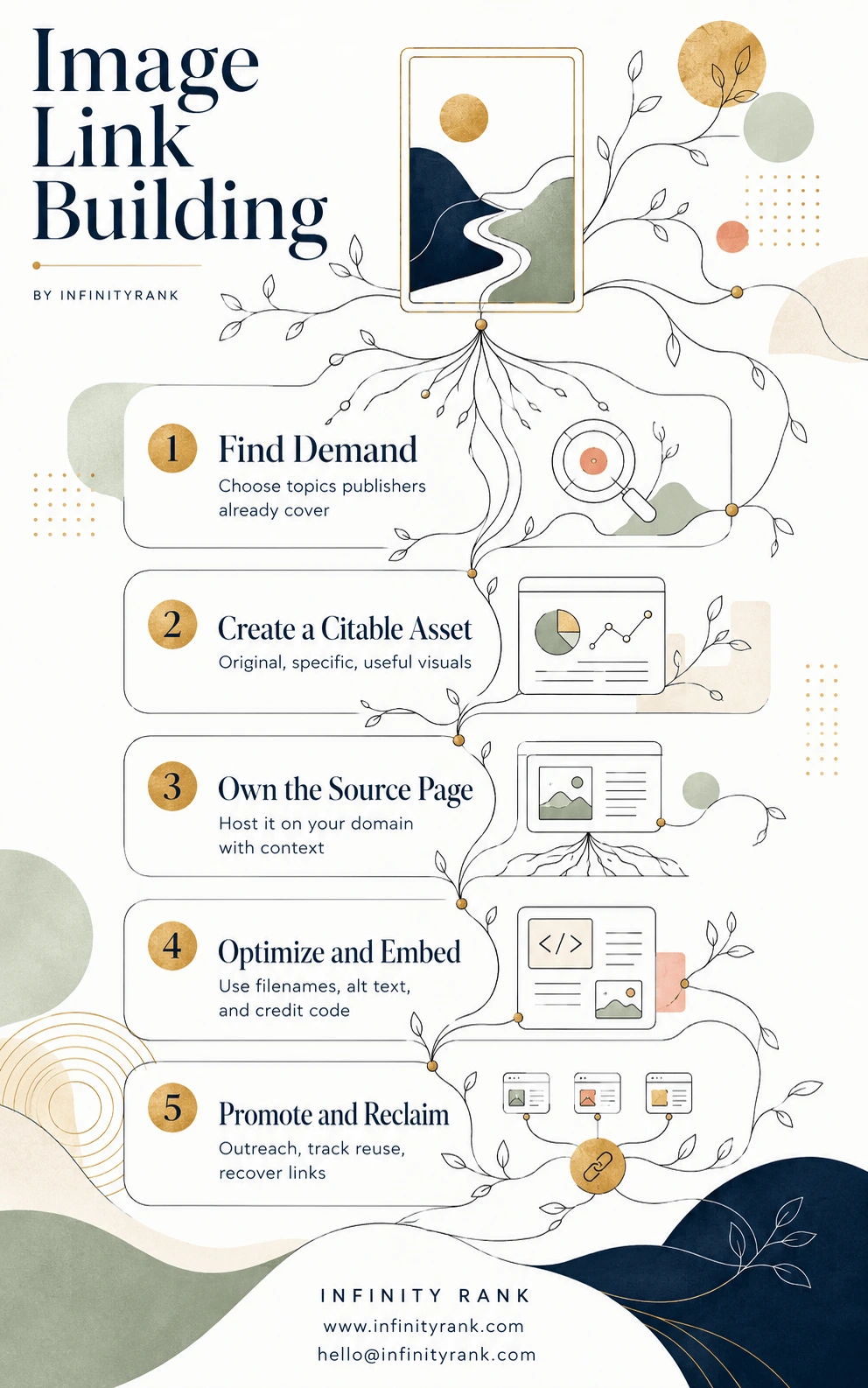
Visual content represents a massive equity leak if you aren’t tracking where your assets end up. By systematically reclaiming proper credit, you convert simple brand impressions into high-impact, contextually relevant editorial links. Use the image-link-building-infographic as your core workflow to start auditing your site’s graphics today.
What Is Image Link Building?
Image link building is a backlink strategy where you create original images and encourage other websites to use them with attribution.
The backlink usually points to the original source page where the image is hosted. That page can be a blog post, research report, statistics page, infographic page, visual asset library, or data study.
Example:
A cybersecurity company publishes a visual map of phishing attack trends by country. Bloggers, journalists, and SaaS companies writing about cybersecurity use the map in their articles and credit the original source with a backlink.
That is image link building.
The image does the outreach work only after you create something worth citing.
Why Image Link Building Works
Image link building works because publishers need visuals.
Most articles are harder to read without examples, charts, screenshots, diagrams, maps, or graphics. A good visual helps explain a point faster than a paragraph. That makes it useful for writers, editors, and content marketers.
It also works because original visuals create a clear attribution path. If someone uses your image, the natural source to credit is your page.
Google’s image SEO guidance also stresses the importance of using descriptive filenames, relevant surrounding text, captions where useful, and helpful alt text instead of keyword stuffing. That means your image page needs proper optimization, not just a pretty graphic uploaded into WordPress.
The best image backlinks usually come from visuals that are:
- Original
- Useful
- Data-backed
- Easy to understand
- Easy to embed
- Relevant to a specific audience
- Better than the visuals already ranking
Types of Images That Earn Backlinks
Not every image deserves links. Stock photos rarely work because anyone can find similar images elsewhere. The strongest assets usually give publishers something they cannot easily recreate.
| Image Type | Best Use Case | Link Potential |
| Infographics | Explaining a process, timeline, checklist, or comparison | High if the topic is evergreen and specific |
| Data charts | Turning statistics or survey data into visual proof | High when backed by credible data |
| Maps | Local SEO, travel, real estate, logistics, demographics | High if the map shows original insight |
| Diagrams | Explaining workflows, systems, funnels, or technical concepts | Strong for B2B, SaaS, and educational content |
| Templates | Checklists, worksheets, frameworks, calculators | Strong if downloadable or reusable |
| Original photos | Product, event, location, or brand photography | Medium to high if unique |
| Screenshots | Software tutorials, tool comparisons, UI explainers | Medium, especially in SaaS content |
| Comparison graphics | Side-by-side visual breakdowns | Strong for commercial and educational keywords |
The mistake most sites make is creating “nice-looking” images. Nice is not enough. Linkable images need a reason to exist.
How to Build Links With Images
1. Choose a Topic With Link Intent
Start with topics that writers already cover.
Bad topic: “Our company values infographic.”
Good topic: “Average SaaS churn rate by company size.”
Better topic: “SaaS churn rate benchmarks by company size, contract length, and industry.”
The better topic gives publishers something specific to cite.
Use these angles:
- Statistics people search for
- Industry benchmarks
- “X vs Y” comparisons
- Step-by-step processes
- Mistakes and checklists
- Maps by country, state, or city
- Timelines of industry changes
- Visual definitions of complex topics
Before creating the image, search the topic manually. Look at the top-ranking pages. If the current visuals are weak, outdated, generic, or missing, there is an opportunity.
2. Create a Visual Worth Citing
The visual has to solve a content problem.
Ask these questions before designing it:
- Does this image explain something faster than text?
- Does it include original or well-sourced information?
- Would a journalist, blogger, or editor have a reason to embed it?
- Is it clear without needing a long explanation?
- Can it stay useful for at least 12–24 months?
Avoid oversized decorative graphics. They look good but rarely earn links.
Better options include:
- A compact infographic with one focused idea
- A chart based on original research
- A map with a clear takeaway
- A process diagram that simplifies a confusing topic
- A checklist that users can save or share
For SEO, avoid putting all important information only inside the image. Search engines and assistive technologies need surrounding text, captions, and alt text to understand context. Google recommends useful, information-rich alt text and warns against keyword stuffing.
3. Host the Image on Your Own Domain
Do not make a third-party image platform the main source.
You can share visuals on social platforms, design platforms, or communities, but the original asset should live on your website. That gives you control over:
- The URL people credit
- The page title
- The image filename
- The surrounding copy
- The caption
- The internal links
- The call to action
- The tracking setup
Create a dedicated source page for each major visual. Do not just upload the image to your media library and leave it there.
A strong image source page should include:
- Clear H1
- Short intro explaining the visual
- The image near the top of the page
- Descriptive alt text
- Caption with source context
- Data sources, if used
- Embed code
- Usage instructions
- Internal links to related services or guides
- FAQ section if the topic needs explanation
4. Optimize the Image for Search
Image SEO matters because discovery is part of link building.
Use this checklist:
- Use a descriptive filename:
image-link-building-process.png - Use accurate alt text: “Six-step image link building process from topic research to link reclamation”
- Add a caption when the source or takeaway needs context
- Place the image near relevant text
- Compress the file for page speed
- Use WebP where appropriate
- Keep the image large enough to be useful
- Add structured data if the page type supports it
- Make sure the image URL is crawlable
- Add the page to your XML sitemap if needed
Do not stuff keywords into alt text. Alt text should describe the image for users and search engines, not repeat the target keyword ten times.
5. Add Copy-Paste Embed Code
If you want people to credit you correctly, make it easy.
Add a short embed code below the image. Use a crawlable link with a normal anchor tag. Google says links should use an <a> element with an href attribute so they can be crawled reliably.
Example:
<a href="https://yourdomain.com/image-link-building-study/">
  <img src="https://yourdomain.com/wp-content/uploads/image-link-building-process.png" alt="Image link building process from visual research to backlink reclamation" style="width:100%; height:auto;">
</a>
<p>Source: <a href="https://yourdomain.com/image-link-building-study/">Your Brand</a></p>
Keep the attribution simple. Do not force exact-match anchor text. That looks unnatural and can create risk.
Good attribution anchor:
- Source: Your Brand
- Image credit: Your Brand
- Data source: Your Brand
Bad attribution anchor:
- Best image link building agency for powerful SEO backlinks
That is not natural. Do not do it.
6. Promote the Visual to the Right People
Publishing is not promotion.
Build a prospect list of sites that already write about the topic. Prioritize pages where your image improves the article.
Good prospects include:
- Blog posts with outdated visuals
- Articles with no images
- Statistics roundups
- Resource pages
- Journalists covering your industry
- SaaS blogs
- University or nonprofit resources, if relevant
- Niche newsletters
- Industry reports
Use search operators like:
keyword + infographickeyword + statisticskeyword + chartkeyword + datakeyword + "source:"keyword + "image credit"keyword + "resources"
Your outreach should be short and specific.
Example outreach email:
Subject: Visual resource for your article on [topic]
Hi [Name],
I found your article on [specific article topic]. The section on [specific point] is useful, but it currently explains the idea only in text.
We created a simple visual showing [what the image explains]. It may help readers understand that section faster.
You can view it here:
[URL]
If you use it, please credit the source page.
Best,
[Name]
Do not mass-send vague emails. “I loved your article” is worthless if you clearly did not read it.
7. Track Uncredited Image Use
Some websites will use your image without credit. That is normal. Your job is to find those uses and ask for attribution.
Use reverse image search tools to locate copies of your visuals. TinEye says its reverse image search can find where images appear online and search from an uploaded image or image URL.
Use this workflow:
- Upload your image or paste the image URL into Google Images or TinEye.
- Export or record pages using the image.
- Check whether each page links back to your source page.
- Ignore low-quality spam sites.
- Contact legitimate sites using your image without credit.
- Ask for a source link, not removal, unless the use is clearly harmful.
- Track responses and added links.
Reclamation email:
Subject: Image credit request
Hi [Name],
I noticed your article uses our image about [topic]:
[Their URL]
The original source is here:
[Your URL]
Could you add a credit link to the source page so readers can find the original context?
Thanks,
[Name]
Keep it polite. You are asking for a correction, not starting a fight.
Image Licensing and Copyright Rules
Do not use images you do not have permission to use. That includes “free” images from Google Images.
If you use Creative Commons images, follow the license terms. Creative Commons recommends attribution that includes title, author, source, and license. This is often called TASL.
For your own linkable images, make the usage terms clear.
Add a line such as:
You may republish this image in editorial content if you credit Infinity Rank and link back to this source page.
That removes friction. It tells publishers what they can do and what credit you expect.
For commercial assets, legal-sensitive industries, or client-owned visuals, get permission in writing before offering images for reuse.
Common Image Link Building Mistakes
Using Generic Stock Images
Stock photos do not earn many links because they are not unique. Publishers can get the same type of image from dozens of places.
Create original visuals instead.
Publishing Without Promotion
A great image buried on a new blog post will not magically attract backlinks.
Build a promotion list before publishing. If there is no outreach angle, the visual probably is not strong enough.
Using Weak Alt Text
Alt text like “infographic” or “chart” is lazy.
Use specific alt text that describes the image accurately.
Bad: image link building
Better: Flowchart showing the image link building process from research to link reclamation
Forgetting the Source Page
Do not ask people to link directly to an image file. Ask them to link to the source page. The source page gives context, internal links, and conversion opportunities.
Chasing Quantity Over Relevance
A backlink from a relevant industry article is usually more valuable than a random low-quality site embedding your image.
Avoid spammy image directories, automated embeds, and manipulative link schemes. Google’s spam policies warn against tactics designed to manipulate search systems.
Not Tracking Results
Track more than backlink count.
Measure:
- Referring domains
- Link quality
- Link relevance
- Referral traffic
- Image impressions
- Rankings of the source page
- Assisted conversions
- Reclaimed links
- Outreach response rate
If the visual earns no links after promotion, the problem is usually one of three things: weak topic, weak asset, or weak prospect list.
Image Link Building Example
Let’s say you run a project management SaaS company.
Weak idea:
“Benefits of Project Management Software” infographic
Too generic. Thousands of versions already exist.
Stronger idea:
“Project Management Workflow: From Intake Request to Final Approval”
This works better because it solves a specific problem. Agencies, SaaS blogs, operations teams, and productivity writers can use it when explaining project workflows.
The source page could include:
- A workflow diagram
- Step-by-step explanation
- Downloadable PNG
- Embed code
- Internal link to your project management templates
- FAQ section
- CTA for a demo or template download
That is how a visual becomes a linkable asset instead of decoration.
Image Link Building Checklist
Before publishing, confirm:
- The image explains something useful
- The topic has existing publisher demand
- The image is original
- The source page has supporting text
- The file name is descriptive
- The alt text is accurate
- The image is compressed
- The page includes embed code
- Usage terms are clear
- Internal links are added
- Outreach prospects are prepared
- Reverse image tracking is scheduled
If any of these are missing, fix them before launch.
Final Thoughts
Image link building is not about making pretty graphics. It is about creating visual assets that publishers have a reason to cite.
The strongest results come from original research, useful diagrams, clear charts, maps, templates, and visuals that make a topic easier to explain.
Create the asset. Host it on your domain. Optimize it properly. Promote it to relevant publishers. Track uncredited use. Reclaim missing links.
That is the full strategy.
FAQs
Is image link building white hat?
Yes, when the links are earned through useful visuals and proper attribution. It becomes risky when you use spammy embeds, forced exact-match anchors, or automated link schemes.
Can infographic link building still work?
Yes, but generic infographics are weak. Infographics work best when they show original data, simplify a complex process, or provide a useful reference that publishers want to cite.
How do I ask someone to credit my image?
Send a short email with the page where they used the image, the original source URL, and a polite request to add a credit link. Do not threaten them in the first message.
Should I watermark linkable images?
Use light branding if needed, but do not make the watermark intrusive. Heavy watermarks reduce shareability and make the asset harder for publishers to use.
What file format is best for SEO images?
Use the format that fits the image type. WebP is often useful for compression, PNG works well for graphics with sharp text, and JPEG works well for photos. The bigger priority is that the image loads quickly and remains clear.
Should the backlink point to the image file or the source page?
The backlink should point to the source page. The source page gives users context and gives your site more SEO value than a direct image-file link.
How often should I check for uncredited image use?
For major visuals, check monthly. For smaller assets, quarterly is enough. Prioritize real websites with relevant audiences, not scraped spam pages.