.edu backlinks have a reputation for being unusually powerful.
That reputation is only partly deserved.
A backlink does not become valuable simply because it comes from a .edu domain. Google explicitly says a website’s top-level domain does not receive a ranking advantage simply because of the extension. What matters is the quality of the linking page, its relevance, the context of the link, and whether the link was earned naturally.
That does not mean university backlinks are worthless.
A relevant link from a respected university department, research page, resource guide, alumni profile, or academic project can still be extremely useful. These pages can attract real visitors, have strong external link profiles of their own, and provide legitimate editorial references to your business or content.
The problem is that many old .edu backlink tactics were built around exploiting the domain extension rather than earning a useful link.
In this guide, we will explain how to get .edu backlinks in 2026 using 10 practical strategies, how to evaluate opportunities, and which tactics you should avoid.
What Are .EDU Backlinks?
A .edu backlink is simply a backlink from a website using the .edu top-level domain.
In the United States, new .edu registrations are generally restricted to qualifying U.S.-based postsecondary institutions with institutional accreditation recognized by the U.S. Department of Education. There are also older grandfathered registrations that predate the current eligibility rules.
Examples of .edu websites include universities, colleges, university departments, research centers, student resources, alumni sections, libraries, and other institution-operated properties.
The important distinction is this:
.edu describes the domain. It does not describe the quality of the backlink.
A contextual link from a useful university research page may be valuable.
A link from an abandoned student profile, spammed forum page, or user-generated directory on the same domain may provide little or no meaningful value.
EDU Backlink Acquisition Visual Roadmap
Earning high-authority academic citations starts when you publish useful student resources, developing educational guides, practical calculators, and free learning tools tailored for university audiences. To attract academic citations, your content team must publish original research, providing credible and citable data points that faculty members and researchers naturally reference. Building long-term value depends on establishing genuine academic relationships, leveraging alumni networks, guest lectures, and internship programs to create legitimate domain connections. This simple guide breaks down five essential steps to acquire powerful .edu backlinks safely.
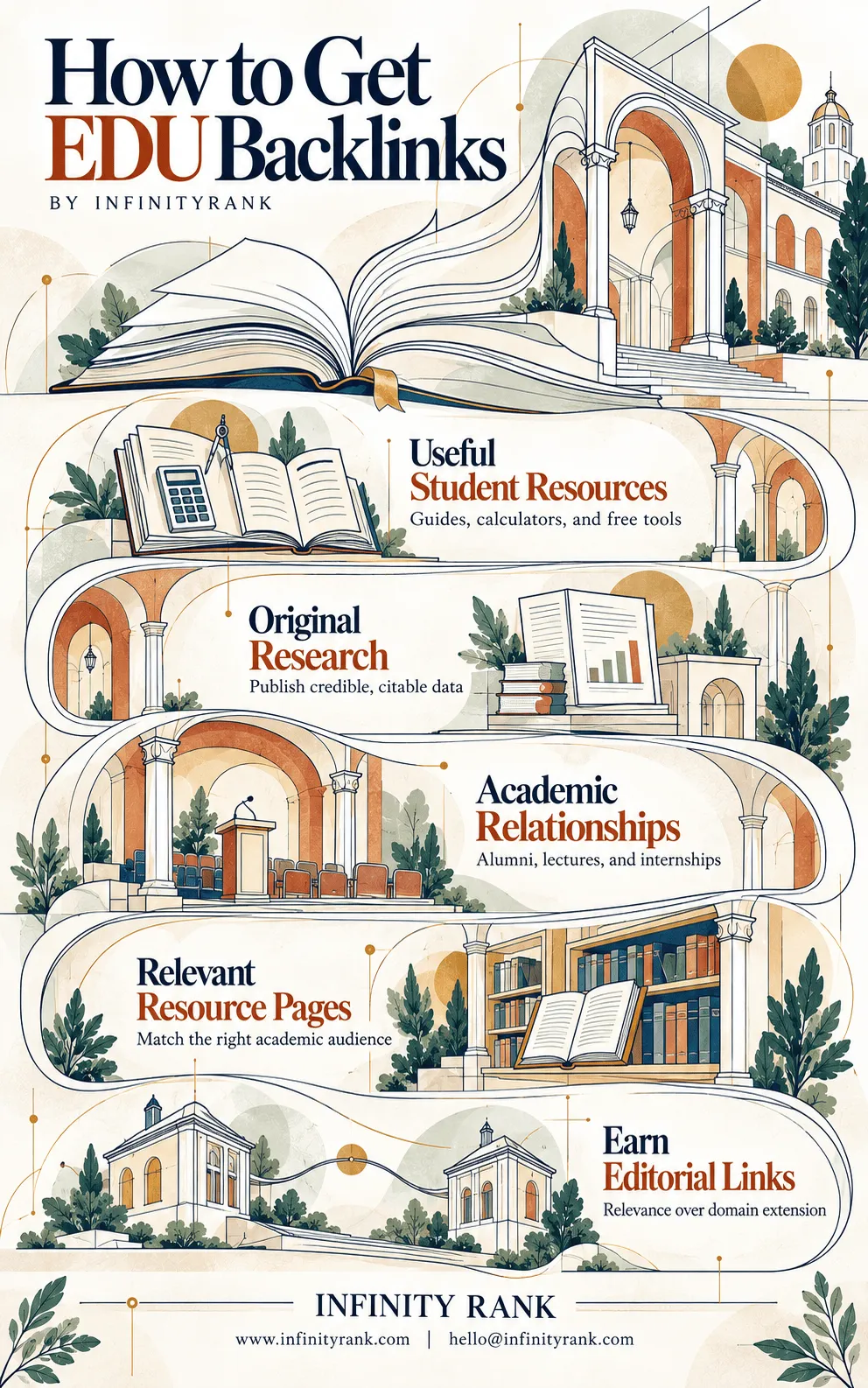
Maximizing outreach conversion rates requires targeting relevant resource pages, matching your assets directly to the right academic department and student audience. True search engine authority comes when you earn editorial links, prioritizing contextual relevance and genuine educational merit over the domain extension alone. Use these five core pillars as your strategic framework to build high-trust academic citations that elevate your website authority.
Are .EDU Backlinks Better Than Regular Backlinks?
Not automatically.
Google says it aims to return the best and most relevant results regardless of the top-level domain being used. In other words, .edu, .org, .com, or another extension does not receive an automatic ranking bonus just because of the TLD.
That means you should not evaluate backlinks like this:
.edu link = powerful
Instead, evaluate the actual page.
A good university backlink typically has several of these characteristics:
- The page is relevant to your business, research, product, or resource.
- The link was added editorially rather than created by you.
- The page is publicly accessible and indexable.
- The link appears naturally within useful content.
- The page receives real traffic or serves a real audience.
- The institution has a legitimate reason to reference your website.
- The anchor text is natural rather than aggressively optimized.
A strong editorial .com backlink can easily be more useful than a weak .edu backlink.
The domain extension should therefore be a secondary consideration, not the reason you pursue the link.
What Makes a University Backlink Valuable?
Before spending time on .edu link building, check whether the opportunity actually makes sense.
Relevance
A cybersecurity company being included in a university’s online-safety resources makes sense.
The same cybersecurity company appearing in an unrelated literature department directory probably does not.
Editorial Placement
Links placed naturally by an editor, professor, department, researcher, or university administrator are generally more meaningful than links you can create yourself.
Page Quality
Check whether the page:
- is indexed;
- contains substantial content;
- has legitimate external links;
- appears maintained;
- receives organic traffic;
- is part of the institution’s main website rather than an abandoned subdomain.
Real Audience
One of the most overlooked benefits of university links is referral traffic.
A career page, research guide, student resource, or alumni feature may actually send potential users, applicants, customers, journalists, researchers, or partners to your site.
Legitimate Reason for the Link
The strongest question is simple:
Why should this university page link to you?
If you cannot give a convincing answer without mentioning SEO, the opportunity is probably weak.
10 Ways to Get .EDU Backlinks in 2026
1. Get Listed on University Resource Pages
Resource-page outreach remains one of the most practical ways to earn .edu backlinks.
Universities maintain resource pages covering thousands of subjects, including:
- cybersecurity;
- financial literacy;
- entrepreneurship;
- mental health;
- career development;
- accessibility;
- study tools;
- sustainability;
- research databases;
- business resources;
- software tools.
If you have something genuinely useful for the page’s audience, you can suggest it to the person responsible for maintaining that resource.
For example, imagine your company has produced a detailed calculator showing students how different repayment options affect student-loan costs.
A financial-aid or financial-literacy resource page may have a legitimate reason to reference it.
The key is resource fit.
Do not find every .edu resource page you can and send the same pitch.
Look for pages where your resource genuinely improves what already exists.
Useful searches include:
site:.edu "resources" "your topic"
site:.edu intitle:resources "your topic"
site:.edu inurl:resources "your topic"
site:.edu "recommended resources" "your topic"
Before contacting anyone, check the page manually and identify exactly where your resource would fit.
2. Publish Original Research or Useful Data
Original data is one of the strongest assets you can create for both traditional link building and digital PR.
Researchers, students, university departments, faculty members, journalists, and academic publications need credible sources.
If your business has access to useful proprietary data, turn it into something people can reference.
Examples include:
- industry benchmarks;
- salary data;
- consumer surveys;
- market trends;
- pricing studies;
- software adoption statistics;
- ecommerce datasets;
- cybersecurity incident data;
- local economic data.
The research needs to be transparent.
Explain:
- where the data came from;
- the sample size;
- the collection period;
- your methodology;
- important limitations.
Do not publish a thin blog post containing a few invented statistics and call it research.
The goal is to create a resource strong enough that someone writing a paper, article, lecture resource, or university report might choose to cite it.
This approach can produce links from universities without specifically targeting .edu domains at all.
That is usually a good sign.
3. Get Featured Through Your Alumni Network
If you or someone on your team attended a university, your alumni relationship can create legitimate editorial opportunities.
Universities regularly publish:
- alumni interviews;
- founder profiles;
- career stories;
- startup spotlights;
- alumni awards;
- entrepreneurship features;
- graduate success stories.
These are real editorial formats, not theoretical link-building tactics.
For example, the University of Washington Information School operates an Alumni Startup Spotlight series and invites nominations from its community.
Its profile of graduate Nathanael Elongo includes a direct link to his company, OpsFrame.
Another University of Washington startup profile links directly to Flying Comet Games, the company founded by alumnus Eden Ghirmai.
The University of Illinois also publishes dedicated entrepreneur profiles through its alumni sections.
If you have a genuine story, contact your:
- alumni office;
- former department;
- entrepreneurship center;
- university communications team;
- alumni magazine.
Do not email them asking for a backlink.
The backlink should be a natural part of identifying the company or project being discussed.
4. Offer Genuine Internships and Job Opportunities
Universities want to connect students with legitimate employment opportunities.
If your company is actually hiring, university career services can therefore become a natural source of visibility.
Possible opportunities include:
- internships;
- graduate roles;
- apprenticeships;
- research positions;
- entry-level jobs;
- remote student positions.
Start by identifying universities whose students match the skills you need.
A software company could approach computer science departments.
An accounting firm could work with business schools.
An engineering company could contact relevant engineering faculties.
Provide everything the career team needs:
- job title;
- responsibilities;
- location;
- compensation where appropriate;
- eligibility requirements;
- application process;
- closing date.
The job must be genuine.
Creating fake internships purely to generate backlinks would be both deceptive and unnecessary.
Also remember that many universities now use third-party career platforms instead of publishing every vacancy directly on their .edu website. The recruitment value should come first; any backlink is a secondary benefit.
5. Create a Real Student Discount
Student discounts can earn mentions from university student-benefit pages, software-resource pages, student unions, departments, or other education-related websites.
The offer needs to be real.
Examples could include:
- 25% off software;
- a free student plan;
- reduced professional membership fees;
- discounted training;
- free access to educational resources.
Create a dedicated landing page explaining:
- who qualifies;
- what the discount includes;
- how students verify eligibility;
- whether the offer expires;
- any restrictions.
Then identify institutions where the offer is genuinely relevant.
A developer tool, for example, could be useful to computer science students.
A design platform may be relevant to art or architecture students.
Do not condition the discount on receiving a followed backlink.
The value proposition should be:
“We have something useful for your students.”
Not:
“We will provide this discount if you link to us.”
6. Give Guest Lectures, Webinars, or Workshops
Universities regularly invite outside practitioners to discuss subjects that complement academic teaching.
This works particularly well if your company has genuine expertise.
Topics might include:
- technical SEO;
- entrepreneurship;
- cybersecurity;
- software engineering;
- digital advertising;
- law;
- accounting;
- ecommerce;
- artificial intelligence;
- public relations;
- data science.
Start with universities where you already have a connection.
That could be:
- your former university;
- a professor you know;
- an existing client relationship;
- an industry association connected to a department.
If the event is published on a university event calendar, department page, or news section, the university may naturally include your company’s website in the speaker information.
Even if it does not, the relationship can create other opportunities later.
The lecture itself should be worthwhile without the backlink.
That distinction matters.
7. Build a Free Tool, Calculator, or Template
Useful tools can attract links for years.
For university audiences, examples might include:
- budgeting calculators;
- statistics tools;
- citation helpers;
- accessibility checkers;
- financial calculators;
- cybersecurity checklists;
- research templates;
- data-visualization tools;
- career-planning worksheets;
- educational databases.
The tool should solve a specific problem better than what universities are already linking to.
Once it is live, find resource pages covering that problem and contact the relevant department.
Your outreach can be simple:
I noticed your page includes several resources for students working on [topic]. We recently created a free [tool] that helps users [specific result]. I thought it might be useful to students using this page. Either way, thanks for maintaining the resource.
Do not ask for anchor text.
Do not tell them the link must be followed.
Do not send 500 identical emails.
Show them why the resource belongs on their page.
8. Use Broken Link Building on University Resource Pages
University websites can contain thousands or even millions of pages.
Some external resources eventually disappear, move, or become outdated.
That creates broken-link opportunities.
The process is straightforward:
- Find relevant university resource pages.
- Check their external links.
- Identify resources returning errors or pointing to obsolete information.
- Determine what the missing resource originally covered.
- Create or identify a genuinely suitable replacement.
- Contact the page owner and report the broken link.
Tools such as Ahrefs or browser-based broken-link checkers can help identify dead external pages.
The critical mistake is treating every dead link as an invitation to promote whatever article you already have.
Your replacement should satisfy approximately the same user need.
If the original link was a detailed government cybersecurity guide and your replacement is a 600-word commercial blog post, it is not a strong substitute.
9. Create a Genuine Scholarship, Grant, or Educational Program
Scholarship link building used to be heavily promoted as an easy way to acquire .edu backlinks.
That is no longer a tactic you should approach casually.
A legitimate scholarship is perfectly reasonable if your company genuinely wants to fund students.
But creating a token scholarship primarily because you expect universities to provide followed links creates an obvious link-manipulation problem.
Google defines buying or selling links for ranking purposes broadly and includes exchanging money, goods, or services for links.
So if you create a scholarship:
- make it a real educational initiative;
- establish clear eligibility requirements;
- publish legitimate terms;
- actually select recipients;
- pay the award;
- maintain records;
- never require a followed backlink;
- do not dictate anchor text.
The scholarship should still make sense if it produced zero SEO value.
The same principle applies to grants and educational funding programs.
If your primary calculation is:
“$1,000 scholarship = 20 .edu links”
you are approaching it from the wrong direction.
10. Build University Partnerships or Sponsor Relevant Programs
Companies and universities collaborate constantly.
Possible partnerships include:
- research projects;
- student competitions;
- hackathons;
- entrepreneurship programs;
- conferences;
- academic events;
- capstone projects;
- mentorship programs;
- community initiatives.
These collaborations can produce legitimate company mentions on university websites.
However, there is an important distinction between editorial recognition and paid placement.
If you pay for sponsorship and the university includes a link as part of that commercial arrangement, Google recommends qualifying paid links using rel="sponsored" or nofollow.
That does not make the sponsorship worthless.
You may still receive:
- referral traffic;
- branding;
- recruiting opportunities;
- industry relationships;
- PR exposure;
- customer awareness.
But you should not sponsor an event purely because you expect a followed backlink to manipulate rankings.
How to Find .EDU Backlink Opportunities
You do not need a giant database of universities.
Start with relevance.
Search Google Manually
Useful search operators include:
site:.edu "resources" "your topic"
site:.edu "useful links" "your topic"
site:.edu "recommended websites" "your topic"
site:.edu intitle:resources "your keyword"
site:.edu "alumni spotlight"
site:.edu "student discounts"
site:.edu "guest speaker" "your industry"
site:.edu "career services" employers
Do not automatically contact every result.
Build a shortlist.
Analyze Competitor Backlinks
Run competitors through Ahrefs, Semrush, Moz, or another backlink-analysis platform.
Filter referring domains for .edu.
Then inspect each link manually.
Ask:
- Why did the university link to this competitor?
- Could we realistically earn the same type of placement?
- What asset or relationship created the link?
- Is the page still maintained?
This is essentially a focused backlink gap analysis.
The goal is not to copy every backlink your competitors have. It is to identify repeatable patterns.
Search University Departments, Not Just Entire Domains
A pitch sent to a generic university contact address will usually go nowhere.
Identify the department responsible for the page.
Possible contacts include:
- librarians;
- department administrators;
- professors;
- career-services staff;
- alumni teams;
- communications officers;
- resource-page editors;
- program coordinators.
Contact the person who can actually evaluate your suggestion.
How to Evaluate an .EDU Backlink Before Pursuing It
Not every .edu backlink deserves your time.
Before outreach, ask:
Is the Page Relevant?
The closer the connection between your resource and the page’s purpose, the better.
Is the Page Indexed?
If Google cannot or does not index the page, its SEO usefulness may be limited.
Is It a Real Editorial Page?
Prefer:
- department resources;
- research pages;
- news stories;
- alumni profiles;
- institutional guides;
- events;
- legitimate partner pages.
Be cautious with:
- public user profiles;
- forums;
- abandoned subdomains;
- open wikis;
- automatically generated directories.
Does the Link Make Sense for Users?
This is one of the easiest quality tests.
Imagine SEO did not exist.
Would the link still make sense on the page?
If yes, you probably have a legitimate opportunity.
.EDU Backlink Tactics to Avoid
The .edu backlink market attracts plenty of bad tactics.
Avoid the following.
Buying Followed .EDU Links
Google’s spam policies specifically identify buying or selling links for ranking purposes as link spam.
A seller promising:
“DA 90 .edu backlink — $50”
is not offering some hidden SEO shortcut.
At best, the link may be ignored.
At worst, you are deliberately participating in a manipulative link scheme.
Fake Scholarships
Do not create a scholarship you have no intention of properly operating just to collect links from university financial-aid pages.
Student Profile Spam
Some university platforms allow students, alumni, faculty, or users to create profiles.
That does not mean you should manufacture accounts to insert backlinks.
Self-created links on low-value profiles are not equivalent to editorial references from a university.
Comment and Forum Spam
Dropping keyword-rich links into university forums or comment sections is still spam.
The domain extension does not change that.
Hacked University Pages
Links inserted into compromised .edu websites are obviously not legitimate.
Do not buy them.
Automated Outreach
Sending thousands of generic emails to every .edu address you can scrape usually produces poor results and damages your reputation.
University outreach works better when the match between the page and your resource is obvious.
Keyword-Rich Anchor Text Demands
Do not ask a university to link using anchors such as:
best SEO agency USA
or:
cheap link building services
A natural branded, URL, title, or descriptive anchor is usually more appropriate.
How to Track Your .EDU Backlinks
Once you begin outreach, track both opportunities and actual links.
A simple spreadsheet can include:
- university;
- target page;
- department;
- contact;
- email;
- resource pitched;
- outreach date;
- follow-up date;
- status;
- live link;
- anchor text;
- target URL;
- notes.
You can monitor new backlinks using tools such as:
- Ahrefs;
- Semrush;
- Moz Link Explorer;
- Google Search Console.
Do not judge the campaign purely by the number of .edu links acquired.
Track:
- referral traffic;
- rankings;
- organic visibility;
- relevant referring domains;
- conversions;
- relationships created.
One relevant university link that sends qualified visitors may be more useful than 20 forgotten profile links.
Final Thoughts
.edu backlinks are not an SEO cheat code.
Google does not give a page an automatic ranking advantage simply because the link comes from a .edu domain.
The useful opportunities come from something else:
Universities publish a lot of credible, useful, editorial content.
If your company has a legitimate reason to appear in that content, a university backlink can be worth pursuing.
The strongest strategies are usually the same strategies that work across the rest of link building:
- publish something genuinely useful;
- create original data;
- build real relationships;
- contribute expertise;
- solve a problem;
- give the publisher a legitimate editorial reason to reference you.
Do that first.
Treat the .edu extension as a bonus, not the strategy.
If you are unsure whether university links are actually the biggest gap in your backlink profile, start with a backlink gap analysis before investing time in outreach.
Frequently Asked Questions
Are .EDU backlinks good for SEO?
They can be, but not because they end in .edu.
A relevant editorial link from a strong university page may provide useful authority signals, referral traffic, discovery, and visibility. A low-quality profile or spam page on the same .edu domain may offer very little value.
Evaluate the page and context rather than the domain extension alone.
Does Google trust .EDU domains more?
Google does not state that .edu websites receive an automatic ranking advantage because of their top-level domain.
Google’s Search documentation says its goal is to return the most relevant results regardless of the TLD being used.
How do I get .EDU backlinks?
The best methods include:
- university resource pages;
- original research;
- alumni features;
- internship listings;
- student discounts;
- guest lectures;
- free tools;
- broken-link outreach;
- legitimate scholarships;
- university partnerships.
The common factor is providing something useful to the institution or its audience.
Can I buy .EDU backlinks?
You can pay for legitimate advertising, sponsorships, or university partnerships, but buying followed backlinks specifically to manipulate rankings violates Google’s spam policies.
Google recommends marking paid placements with rel="sponsored" or nofollow.
Are .EDU profile backlinks valuable?
Usually not very.
A self-created profile backlink is fundamentally different from an editorial link added by a university department, researcher, journalist, librarian, or administrator.
Do not pursue profile links simply because the domain ends in .edu.
Are scholarships still good for .EDU link building?
A genuine scholarship can generate legitimate university mentions, but you should not create scholarships primarily as a way to exchange money for followed links.
Run the scholarship because you actually want to fund students. Treat any backlinks as a secondary benefit.
How many .EDU backlinks do I need?
There is no target number.
You do not need a certain quantity of .edu links to rank.
Focus on building a diverse backlink profile containing relevant, legitimate links from websites that make sense for your business.
How do I check my .EDU backlinks?
Use a backlink-analysis platform such as Ahrefs, Semrush, or Moz and filter your referring domains by .edu.
Google Search Console can also show samples of sites linking to your website, although it is not designed specifically for filtering .edu domains.