Moz Pro and Google Analytics 4 are often compared, but they do fundamentally different jobs.
Google Analytics 4 measures what users do after reaching your website or app. It tracks traffic sources, engagement, customer journeys, ecommerce activity, and important business actions.
Moz Pro is an SEO platform. It helps you research keywords, monitor search rankings, analyse backlinks, audit technical issues, and compare your search visibility with competitors.
The simple answer is:
Use Google Analytics 4 to measure traffic, user behaviour, campaigns, and conversions.
Use Moz Pro to research and monitor organic search performance.
Use Google Search Console alongside either platform for first-party Google Search data.
Use all three when SEO is an important acquisition channel and the budget justifies Moz Pro.
“Moz Analytics” is an older term that some users still search for. Moz’s current SEO platform is called Moz Pro.
Moz Pro vs Google Analytics 4: Quick Comparison
| Feature | Google Analytics 4 | Moz Pro |
| Primary purpose | Website and app measurement | SEO research and monitoring |
| Main data type | First-party behavioural data | Third-party SEO data |
| Traffic reporting | Strong | Limited |
| User behaviour | Strong | Not its purpose |
| Key events and conversions | Strong | Not its purpose |
| Ecommerce measurement | Strong | Not its purpose |
| Keyword rank tracking | Limited without Search Console | Strong |
| Backlink research | No dedicated backlink suite | Strong |
| Technical site crawling | No | Yes |
| Competitor SEO research | Limited | Yes |
| Paid campaign measurement | Strong, with correct setup | Not a paid-media analytics platform |
| Google Search query data | Available through Search Console linking | Third-party keyword and ranking data |
| Price | Free standard version; paid Analytics 360 available | Paid subscription |
| Best suited to | Marketers, product teams, ecommerce businesses and site owners | SEO professionals, agencies and businesses investing in organic search |
Google Analytics 4 and Moz Pro are not substitutes. GA4 tells you how people reached and used your site. Moz Pro provides additional data about how your site may be performing in organic search.
What Is Google Analytics 4?
Google Analytics 4, usually called GA4, is Google’s current website and app analytics platform. It replaced Universal Analytics, which stopped processing new data for standard properties on July 1, 2023.
GA4 uses an event-based measurement model. Instead of organising most reporting around sessions and Universal Analytics “goals,” it records user interactions as events across websites and apps. Important events can then be marked as key events and used for business and advertising measurement.
GA4 can help you answer questions such as:
- Which channels bring users to the website?
- Which landing pages attract organic traffic?
- What do users do after arriving?
- Which pages or screens do they view?
- Where do users leave a funnel?
- Which campaigns generate key events or revenue?
- How do mobile and desktop users behave differently?
- Which products are viewed, added to carts, or purchased?
GA4 automatically collects some interactions when the Google tag or Firebase SDK is correctly installed. Businesses can also configure recommended and custom events for actions that matter to them, such as quote requests, form submissions, account registrations, downloads, and purchases.
However, GA4 is only as reliable as its implementation. Incorrect tags, missing consent configuration, duplicate events, internal traffic, referral problems, and poor ecommerce setup can all produce misleading reports.
What Is Moz Pro?
Moz Pro is a paid SEO platform designed to support keyword research, rank tracking, backlink analysis, site auditing, competitive research, and on-page optimisation.
Its core functions include:
- Researching keyword opportunities
- Monitoring selected keyword rankings
- Auditing websites for technical SEO problems
- Analysing backlinks and linking domains
- Comparing search visibility with competitors
- Reviewing metrics such as Domain Authority
- Creating and scheduling SEO reports
Current software listings describe Moz Pro as an SEO suite covering keyword research, ranking monitoring, backlink analysis, and website auditing.
Moz Pro does not directly observe every interaction on your website. Its SEO metrics are generated from Moz’s own crawls, databases, models, and search-results tracking.
That distinction matters. GA4 records activity from your implemented analytics property. Moz Pro estimates and monitors search-related performance using third-party data.
Moz vs. Google Analytics: Which Data Do You Need?
Choosing between Moz and Google Analytics can be confusing if you do not know what each tool actually tracks. Google Analytics (GA4) focuses on user behavior, showing how people move through your site and complete conversions. On the other hand, Moz Pro is built strictly for SEO, monitoring your keyword rankings, backlinks, and health audits. This simple guide breaks down how both platforms—along with Google Search Console—work together to give you a complete picture of your search performance.
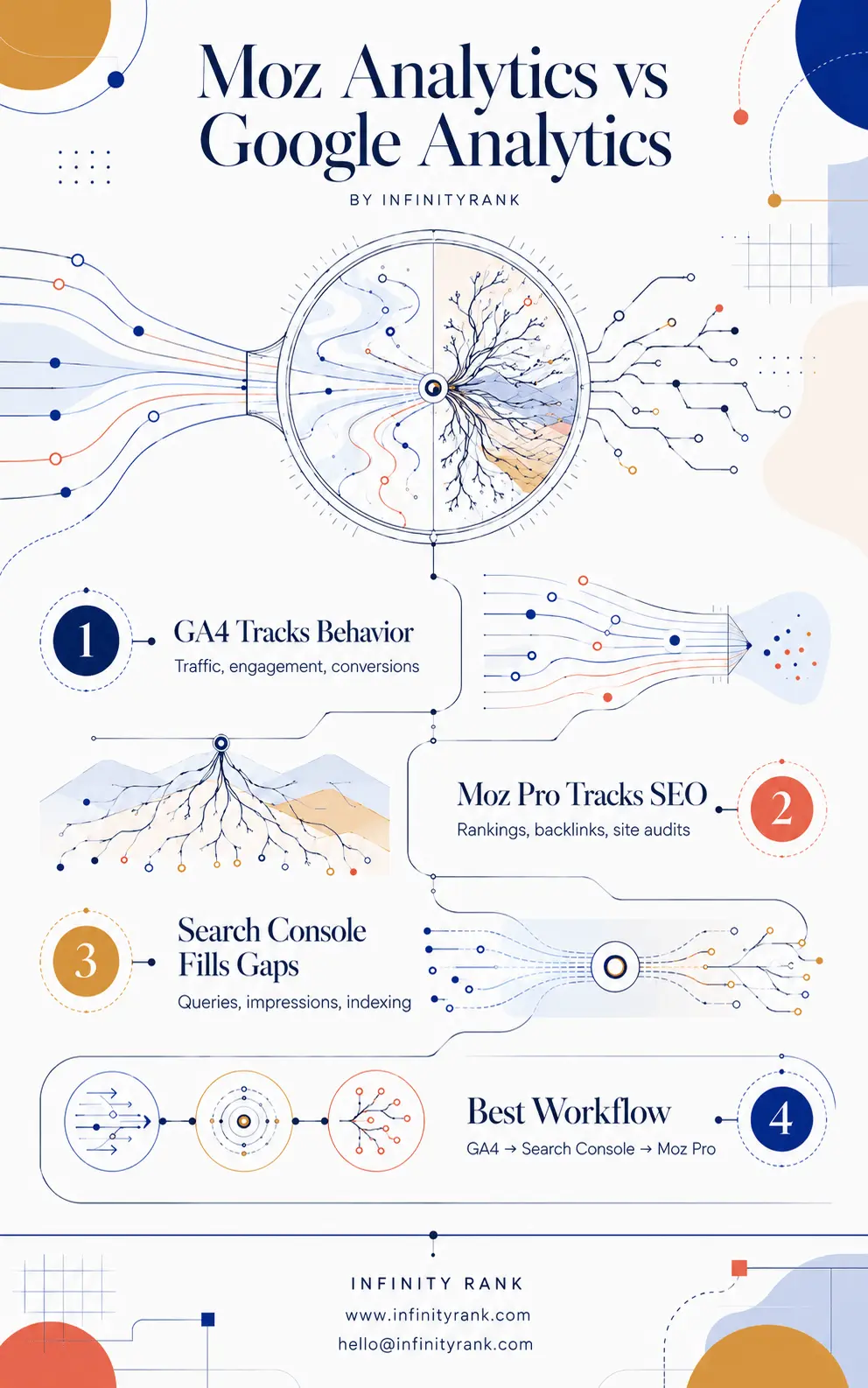
You do not have to choose just one platform to manage your digital growth. Combining Google’s user data with Moz’s deep SEO metrics lets you fix technical bugs and track real business results at the same time.
Google Analytics Measures On-Site Behaviour
GA4 is the stronger tool when the question involves what users do on your website.
For example, an ecommerce business could use GA4 to analyse:
- Product views
- Add-to-cart events
- Checkout progression
- Purchases
- Revenue by acquisition channel
- Funnel abandonment
- Repeat customer behaviour
A lead-generation company could track:
- Contact-form submissions
- Calls from tracked links
- Quote requests
- File downloads
- Newsletter registrations
- Visits to confirmation pages
This is where the original distinction between the products becomes clear. Moz Pro cannot replace a properly configured website analytics platform because it does not provide the same user-level event, funnel, revenue, or campaign reporting.
GA4 can also be linked with Google Ads. This allows relevant Analytics audiences and key-event information to be used across the two products, subject to the account’s configuration, permissions, consent settings, and advertising features.
Moz Pro Measures and Researches SEO Performance
Moz Pro is stronger when the question involves rankings, links, keyword opportunities, technical SEO, or competitor visibility.
For example, Moz Pro can help investigate:
- Whether tracked keyword positions changed
- Which competitors rank above your pages
- Which websites link to a domain
- Whether backlinks have been gained or lost
- Which pages have crawl-related problems
- Which keywords may be worth targeting
- How a domain’s SEO metrics compare with similar sites
Moz Pro can provide possible explanations for a change in organic performance, but it cannot prove causation.
Suppose GA4 reports a decline in organic sessions. Moz Pro might show that several tracked rankings also fell or that backlinks were lost during the same period. That is useful evidence, but it does not prove those changes caused the traffic decline.
Seasonality, search-result features, tracking problems, algorithm changes, competitor activity, indexing issues, demand shifts, and changes to the site itself may also affect performance.
Keyword Data: Moz Pro vs Google Analytics
GA4 does not provide a complete report of the organic Google queries that brought users to your website.
However, that does not mean Google query data is unavailable.
You can connect a GA4 property to Google Search Console. The integration adds reports containing Google organic search queries and landing-page dimensions. The user setting up the connection must have the required permissions in both products.
The three platforms handle keyword data differently:
Google Analytics 4
GA4 shows what organic users do after reaching the site. It can report sessions, engagement, key events, and revenue from organic search, but it is not a dedicated rank tracker.
Google Search Console
Search Console provides first-party data from Google Search, including:
- Queries
- Clicks
- Impressions
- Average click-through rate
- Average position
- Landing pages
Its data is specific to Google Search and is subject to Google’s reporting methods, filters, privacy rules, and limits.
Moz Pro
Moz Pro lets you research keywords and monitor selected search rankings over time. It can also provide competitor and search-results data that Search Console does not provide for domains you do not control. Pairing it with dedicated AI keyword research tools can extend your keyword discovery even further.
Moz does not “restore” all the keyword information missing from GA4. It provides a different third-party dataset for SEO research and monitoring.
Backlink Analysis: Moz Pro vs Google Analytics
Google Analytics does not include a dedicated backlink-analysis system.
GA4 may record referral visits from other websites, but a referring visit is not the same thing as a backlink inventory. A website may link to you without sending measurable traffic, and referral data may be affected by redirects, tracking configuration, browser restrictions, or attribution rules. Understanding the difference between a referring domain vs backlink is important when interpreting data from either platform.
Google Search Console includes a Links report, but Google states that it shows a sample rather than a comprehensive list of every link. If Search Console isn’t surfacing what you expect, there are several reasons Search Console may not be showing full backlinks data.
Moz Pro is more appropriate when you need to:
- Research a site’s backlink profile
- Review linking domains
- Compare competitors’ backlinks
- Find potential link-building opportunities
- Monitor newly found or lost links
- Evaluate pages attracting links
Moz metrics should still be treated as third-party indicators. No backlink tool has a complete index of the web, and different platforms will report different totals.
Technical SEO: Moz Pro vs GA4
GA4 is not a technical SEO crawler.
It may reveal symptoms of technical problems, such as a sudden loss of traffic or engagement. It does not systematically crawl your site to identify SEO issues.
Moz Pro’s site-auditing features can help surface problems such as:
- Broken pages
- Redirect problems
- Duplicate or missing metadata
- Crawlability issues
- Canonicalisation concerns
- Missing headings
- Other on-page or technical warnings
Google Search Console should also be part of the technical SEO workflow.
Its Page Indexing report shows which known URLs are indexed or not indexed and provides reasons for exclusion. Its Crawl Stats report contains information about Googlebot’s requests, server responses, and availability problems.
Moz Pro and Search Console therefore provide different perspectives:
- Search Console reports how Google encountered and processed your site.
- Moz Pro performs third-party crawls and applies its own SEO checks.
- GA4 measures the traffic and behaviour associated with pages users reached.
Moz Pro vs Google Search Console
Google Search Console is not a replacement for Moz Pro, and Moz Pro is not a replacement for Search Console.
Search Console is free and provides data directly from Google about your verified website. It is essential for checking Google Search performance, indexing, crawl information, manual actions, security issues, and URL-level status.
Moz Pro adds capabilities such as:
- Competitor research
- Cross-domain comparisons
- Dedicated rank tracking
- Broader keyword research
- Third-party backlink analysis
- Scheduled SEO campaigns and reports
For many small websites, GA4 and Search Console may provide enough information to start measuring traffic and improving SEO without paying for Moz Pro.
Moz becomes more useful when you need repeatable rank tracking, competitor analysis, backlink research, or SEO reporting across multiple projects.
Pricing
The standard version of Google Analytics is free. Google also offers the enterprise-level Analytics 360 product.
Moz Pro requires a paid subscription. As of June 2026, current software listings show:
- Starter: from $49 per month
- Standard: from $99 per month
- Medium: from $179 per month
- Large: from $299 per month
Lower equivalent monthly prices may apply when a plan is billed annually. Pricing, feature limits, trials, and plan names can change, so check Moz’s current pricing before subscribing.
Do not choose a plan based only on its starting price. Check limits for tracked sites, keywords, crawled pages, reports, user seats, and link data.
When to Use Google Analytics 4
Use GA4 when you need to:
- Measure traffic acquisition
- Understand user behaviour
- Track key events
- Analyse ecommerce performance
- Evaluate marketing campaigns
- Build funnels and explorations
- Compare organic, paid, referral, email, and social traffic
- Connect website activity with Google Ads
GA4 is the more important starting point when your main objective is understanding whether visitors become leads or customers.
When to Use Moz Pro
Use Moz Pro when you need to:
- Monitor keyword rankings
- Research new keyword opportunities
- Analyse backlinks
- Compare competitors
- Audit technical SEO issues
- Track SEO campaigns
- Produce recurring SEO reports
- Manage multiple sites or clients
Moz Pro is optional rather than universally essential. Its value depends on how much SEO research and monitoring you need. If you’re weighing up the wider benefits of hiring an SEO company to manage this work, that context is worth considering alongside your tool decisions.
When GA4 and Search Console May Be Enough
You may not need Moz Pro immediately when:
- You operate a small website
- Your SEO budget is limited
- You do not need competitor tracking
- You only manage one site
- Basic Google Search query data is sufficient
- You are still fixing fundamental content and technical problems
Start with GA4 and Search Console. Add a paid SEO platform when the limitations of the free tools begin to slow down your work. Common SEO mistakes for small business owners often stem from over-investing in tools before the basics are in place.
When to Use All Three
A stronger SEO measurement workflow combines GA4, Search Console, and Moz Pro.
1. Identify the change in GA4
Check whether organic users, sessions, key events, or revenue increased or declined.
2. Confirm the search trend in Search Console
Review clicks, impressions, queries, landing pages, average position, and indexing information.
3. Investigate with Moz Pro
Check tracked rankings, competitor movements, backlinks, crawl findings, and keyword opportunities.
4. Form a testable explanation
Determine whether the evidence points toward a ranking loss, lower search demand, indexing problem, tracking issue, weak content, lost links, or another cause.
5. Make the change
Improve the content, fix technical problems, revise internal links, strengthen the backlink profile, or correct the analytics implementation. A solid link building checklist can help if the evidence points toward a link gap.
6. Measure the result
Use Search Console to monitor changes in Google Search visibility and GA4 to evaluate resulting traffic, key events, and revenue.
This process is more reliable than treating one platform as the complete source of truth.
Which Tool Should You Choose?
Small business or new website
Start with GA4 and Search Console. Consider Moz Pro when you need consistent rank tracking or competitor research. If SEO feels overwhelming at this stage, it helps to understand why your business should invest in SEO before deciding which tools to prioritise.
Ecommerce store
GA4 is essential for measuring product interactions, checkout behaviour, purchases, and revenue. Search Console and an SEO tool become valuable when organic search is a meaningful sales channel.
SEO agency
Moz Pro can support keyword tracking, site auditing, competitor analysis, and reporting across clients. GA4 and Search Console are still required for each client’s first-party performance data.
Content publisher
Use GA4 to understand readership and engagement, Search Console to review Google queries and landing pages, and Moz Pro for keyword research and competitor analysis.
Paid-media team
GA4 is the more relevant platform. Moz Pro is not designed to replace advertising analytics or campaign-management software.
In-house SEO team
Use all three when resources allow. Each platform answers a different set of questions.
Final Verdict
Moz Pro and Google Analytics 4 should not be judged as competing versions of the same product.
Google Analytics 4 measures website and app activity. It is the better tool for traffic acquisition, user behaviour, key events, ecommerce, campaign measurement, and revenue analysis.
Moz Pro supports SEO research and monitoring. It is the better tool for keyword tracking, backlink analysis, technical crawling, competitor research, and broader search visibility work.
Google Search Console fills another critical gap by providing first-party data about how your website performs in Google Search.
For most businesses, the correct order is:
- Set up Google Analytics 4 correctly.
- Verify and configure Google Search Console.
- Add Moz Pro when you need deeper SEO research, monitoring, and competitor data.
The tools work best together, but not every business needs to pay for all of them from day one.
Frequently Asked Questions
Is Moz Pro better than Google Analytics?
No. They perform different jobs. GA4 measures website and app activity, while Moz Pro supports SEO research, monitoring, backlink analysis, and site auditing.
Can Moz Pro replace Google Analytics?
No. Moz Pro does not provide the same event, funnel, ecommerce, campaign, or conversion reporting as GA4.
Can Google Analytics replace Moz Pro?
Not completely. GA4 does not provide dedicated keyword rank tracking, competitor backlink research, or technical SEO crawling.
Is Google Analytics enough for SEO?
GA4 is useful for measuring organic traffic and what organic users do on your site, but it should be paired with Search Console. A paid SEO platform is optional and depends on your research and reporting needs. Many businesses also use proven strategies to boost SEO organic traffic before concluding they need a premium tool.
How much does Moz Pro cost?
As of June 2026, Moz Pro’s Starter plan is listed from $49 per month, while the Standard plan starts at $99 per month. Check current pricing and usage limits before subscribing.
Does Moz Pro track Google Ads?
Moz Pro is not designed to replace an advertising analytics platform. Use Google Ads and GA4 for paid campaign measurement, attribution, audiences, and advertising conversions.
What is Domain Authority?
Domain Authority is Moz’s proprietary comparative metric. It is useful for comparing domains within a market or dataset, but it is not a Google metric or a direct Google ranking factor. For a fuller breakdown of how it stacks up against similar metrics, see Domain Rating vs Domain Authority.
Do I need Moz Pro if I already use Search Console?
Not necessarily. Search Console may be enough for a small site. Moz Pro becomes more useful when you need competitor data, rank tracking, backlink research, keyword discovery, recurring audits, or multi-site reporting.