
Advanced technical SEO consulting solves problems standard site audits often miss: crawl inefficiency, indexation conflicts, JavaScript rendering failures, Core Web Vitals issues, poor site architecture, international SEO errors, and migration risks.
Finding these problems is only first step.
Useful technical SEO must determine what affects organic performance, what developers should fix first, and how changes should be implemented without creating new problems.
At Infinity Rank, our approach connects technical SEO findings to business impact. Goal: give marketing, product, and development teams clear priorities and developer-ready recommendations instead of another spreadsheet containing hundreds of unranked warnings.
When Do You Need Advanced Technical SEO Consulting?
Not every website needs deep technical SEO work.
Advanced consulting becomes more valuable when site complexity makes basic audits unreliable or incomplete.
Common situations include:
- Organic traffic dropped after redesign, migration, or platform change
- Important pages are crawled but not consistently indexed
- Google selects unexpected canonical URLs
- Site generates thousands of parameter or faceted-navigation URLs
- JavaScript controls important content, links, or metadata
- Core Web Vitals continue failing despite repeated performance fixes
- International pages compete with wrong regional versions
- Large eCommerce or publishing site wastes crawl activity on low-value URLs
- Developers need clear SEO requirements before major release
- Organic performance changes after deployments without obvious content changes
- Staging, duplicate, filtered, or internal-search URLs enter index
- Site architecture makes important commercial pages difficult to discover
These problems need diagnosis, not checklist fixes.
What Our Technical SEO Consulting Includes
Scope depends on site, platform, and problem. Typical engagement can include:
- Full technical crawl
- Google Search Console analysis
- Crawl and indexation diagnosis
- Server log analysis where useful
- JavaScript rendering audit
- Core Web Vitals diagnosis
- Canonicalization review
- XML sitemap review
- robots.txt and robots directives review
- Internal-link and architecture analysis
- Structured-data review
- International SEO and hreflang analysis
- Faceted-navigation assessment
- Website migration planning
- Post-launch technical QA
- Prioritized developer backlog
- Implementation guidance
- Regression monitoring
Each recommendation should answer three questions:
- What is wrong?
- Why does it matter?
- What must change?
Without those answers, audit findings create work rather than solve problems.
Advanced Technical SEO Consulting Framework
Scaling a complex or enterprise website requires strict control over how search engine crawlers discover and evaluate your content. Mastering technical performance starts with crawl control,guiding search bots directly to your most critical pages while actively blocking unnecessary noise. Combining crawl efficiency with indexation precision ensures that only high-value URLs enter search indexes, sending concentrated quality signals across your entire domain. This simple guide breaks down five essential steps to engineer a fast, stable, and highly scalable website structure.
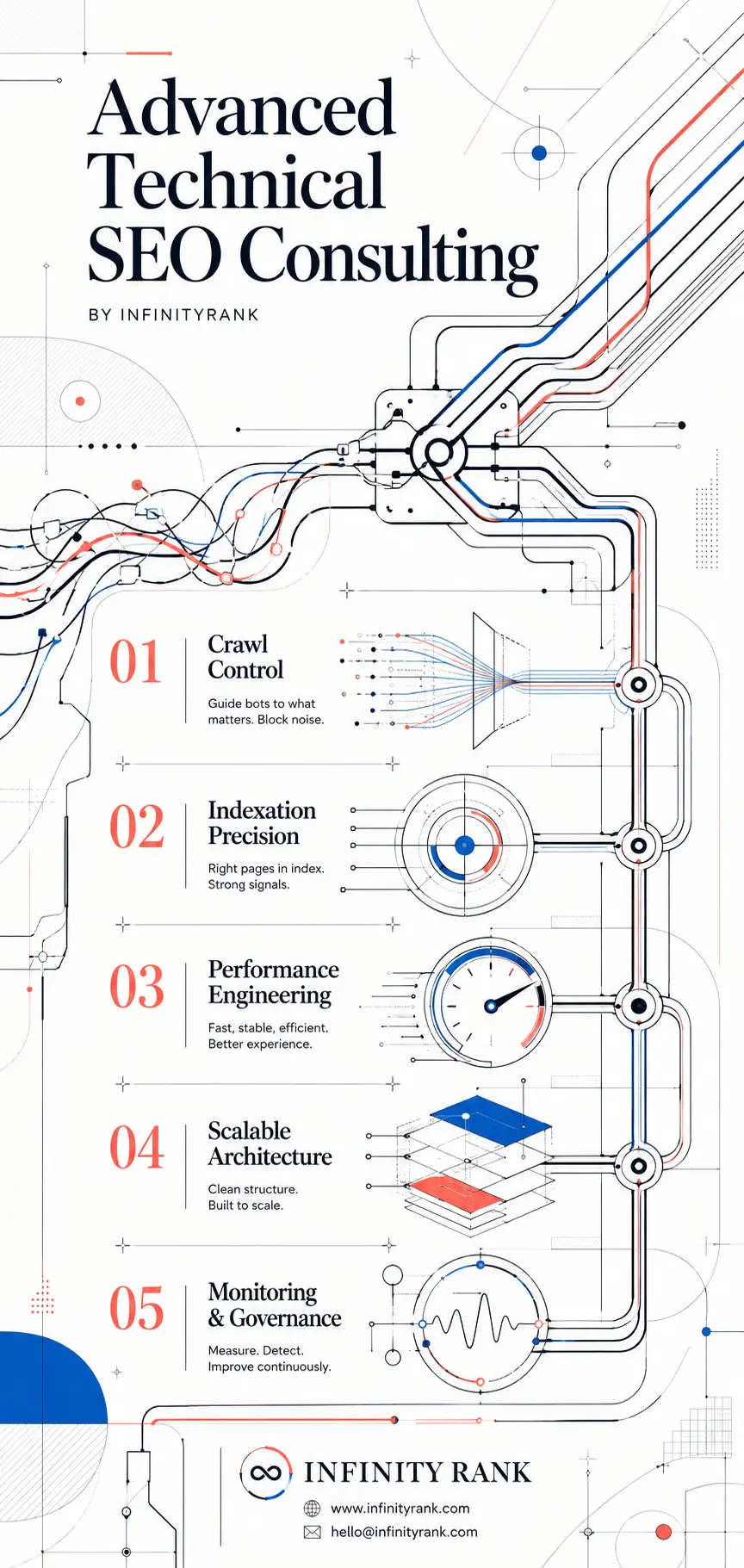
Delivering exceptional user experience through performance engineering creates the speed, stability, and responsiveness that search algorithms reward. As your web platform expands, maintaining a clean, scalable architecture alongside proactive technical monitoring and governance allows you to detect crawling bottlenecks and code issues before they hurt performance. Use these five core pillars as your operational checklist to keep your platform technically sound, resilient, and built for sustained growth.
Our 8-Step Advanced Technical SEO Framework
1. Define Business Goals and Technical Constraints
Technical SEO should start with business priorities.
Before changing XML sitemaps, JavaScript, canonicals, or crawl rules, we establish:
- Which sections generate revenue, leads, subscriptions, or other meaningful outcomes
- Which page types matter most for organic acquisition
- Which technical problems currently limit those pages
- Which KPIs will show whether changes worked
- Which CMS, framework, infrastructure, and deployment constraints matter
- Which teams own implementation
This prevents teams from spending weeks fixing technically valid issues with little business impact.
Typical output: concise technical brief defining goals, affected templates, success measures, dependencies, and implementation constraints.
2. Control Crawling and Indexation
Large or poorly governed websites can generate far more URLs than search engines need.
Common causes include:
- Filter combinations
- Sort parameters
- Internal-search pages
- Duplicate categories
- Session or tracking parameters
- Pagination mistakes
- Legacy URLs
- Printer or alternate versions
- Staging URLs
- Multiple paths to equivalent content
We review how URLs are discovered, crawled, canonicalized, indexed, and linked.
Typical work includes:
- Normalizing URL formats
- Resolving duplicate URL paths
- Reviewing canonical implementation
- Removing canonical conflicts
- Auditing indexability directives
- Cleaning XML sitemaps
- Separating useful sitemap groups where scale warrants it
- Identifying orphan URLs
- Reviewing parameter handling
- Comparing crawlable URLs with indexable URLs
- Checking server responses
- Reviewing Googlebot activity through logs when necessary
Important distinction: robots.txt controls crawling, not reliable de-indexing. Google states that blocked URLs can still appear in search results if discovered elsewhere. Pages that must not appear in Google generally need an appropriate noindex directive while remaining crawlable long enough for Google to process it.
Example robots.txt rule:
User-agent: *
Disallow: /search?
Disallow: /filter/
Disallow: /*?sort=
Do not copy rules like these blindly. Whether parameter URLs should be blocked, canonicalized, left crawlable, or handled another way depends on how site creates and uses them.
3. Diagnose Core Web Vitals With Field Data
Performance work should focus on real user experience, not isolated Lighthouse screenshots.
Current Core Web Vitals are:
- Largest Contentful Paint (LCP): loading performance
- Interaction to Next Paint (INP): responsiveness
- Cumulative Layout Shift (CLS): visual stability
Google’s current “good” thresholds are:
- LCP: 2.5 seconds or less
- INP: under 200 milliseconds
- CLS: under 0.1
Assessment uses 75th-percentile field data. Passing Core Web Vitals can support better page experience, but perfect scores do not guarantee high rankings.
Depending on stack, fixes can include:
- Reducing JavaScript long tasks
- Deferring non-critical scripts
- Code-splitting by route
- Removing unnecessary third-party scripts
- Improving server response
- Optimizing critical rendering path
- Preloading or prioritizing critical assets
- Serving correctly sized AVIF or WebP images
- Setting image dimensions
- Improving font delivery
- Reducing layout shifts
- Improving CDN caching
- Reducing unnecessary hydration
- Breaking expensive interaction handlers into smaller tasks
Goal is not chasing score of 100.
Goal is finding performance bottlenecks affecting real users and fixing them without breaking functionality.
4. Use Structured Data Where It Is Eligible and Useful
Structured data can help Google understand entities and page content and can make eligible pages available for supported search appearances.
It does not guarantee rich results.
Google also does not support every Schema.org type as search feature. Markup should match visible page content and Google’s eligibility requirements.
Common examples include:
Company and content sites
- Organization
- BreadcrumbList
- Article where applicable
- Product
- Offer
- AggregateRating where valid and eligible
- BreadcrumbList
- Relevant LocalBusiness subtype
- Business details supported by applicable structured-data requirements
Do not add schema because plugin offers it.
Add markup when it accurately describes page content and supports valid use case.
FAQ content can still be useful for users, but ordinary commercial sites should not expect FAQ rich results. Google restricted regular FAQ rich-result visibility mainly to well-known authoritative government and health websites. Google also removed HowTo rich results from Search.
Example Organization markup:
<script type="application/ld+json">
{
  "@context": "https://schema.org",
  "@type": "Organization",
  "name": "Your Brand",
  "url": "https://www.example.com",
  "logo": "https://www.example.com/logo.png",
  "sameAs": [
    "https://www.linkedin.com/company/yourbrand"
  ]
}
</script>
Validate structured data before deployment and monitor it after template changes.
5. Build Architecture That Makes Important Pages Easy to Find
Site architecture controls how users and crawlers move through site.
Important commercial pages should be discoverable through crawlable internal links from relevant categories, hubs, navigation, or contextual content.
Google uses links both to discover pages and understand relationships between them.
We review:
- Orphan pages
- Excessively deep URLs
- Category and subcategory relationships
- Breadcrumbs
- Pagination
- Hub-and-spoke structures
- Anchor text
- Internal-link distribution
- Repeated template links
- Contextual links
- Broken internal links
- Links pointing to redirects
- Links pointing to non-canonical URLs
Avoid treating “three clicks from homepage” as fixed SEO rule.
Better standard: important pages should be easy to reach through logical, crawlable paths without unnecessary depth.
For example:
Home
└── Service Category
├── Service A
├── Service B
└── Service C
Or:
Home
└── Product Category
└── Subcategory
└── Product
Architecture should reflect search demand, business value, and user navigation.
6. Audit JavaScript Rendering, Not Only Page Source
JavaScript-heavy sites require another layer of technical SEO analysis.
Google processes JavaScript pages through crawling, rendering, and indexing. A page can work perfectly in browser while still creating search problems if critical content or links depend on rendering behavior Google cannot process as expected.
Advanced JavaScript SEO review can include:
- Comparing raw HTML with rendered HTML
- Checking whether primary content appears after rendering
- Verifying titles and meta descriptions
- Checking canonical tags after rendering
- Checking robots directives
- Testing crawlable internal links
- Identifying client-side routing problems
- Reviewing lazy-loaded content
- Detecting hydration failures
- Checking blocked scripts and resources
- Reviewing structured data after rendering
- Comparing user and Googlebot output where needed
- Inspecting rendered pages through Google Search Console URL Inspection
Important navigation should use crawlable links.
For example:
<a href=”/technical-seo/”>Technical SEO</a>
Do not assume clickable JavaScript elements provide equivalent crawl behavior.
Where architecture permits, server-side rendering, static rendering, or other robust rendering patterns can reduce dependence on client-side execution for critical SEO content.
7. Handle International and Multilingual SEO Without Mixed Signals
International sites can create duplicates, wrong-country rankings, and indexing conflicts when language and canonical signals disagree.
Google recommends separate URLs for different language versions and supports hreflang for identifying localized alternatives.
We check:
- Language and regional URL structure
- Self-referencing canonicals
- Reciprocal hreflang annotations
- Missing hreflang references
- Incorrect language or country codes
x-defaultimplementation where appropriate- Canonical and hreflang conflicts
- Redirects based on IP or browser language
- Cross-language internal linking
- International XML sitemap implementation
Example cluster:
<link rel=”alternate” hreflang=”en-us” href=”https://example.com/us/page/” />
<link rel=”alternate” hreflang=”en-gb” href=”https://example.com/uk/page/” />
<link rel=”alternate” hreflang=”fr-fr” href=”https://example.com/fr/page/” />
<link rel=”alternate” hreflang=”x-default” href=”https://example.com/page/” />
Each localized page should send consistent signals about what it represents.
8. Protect Organic Performance During Migrations
Redesigns, domain moves, CMS migrations, and URL restructuring introduce search risk.
Technical SEO should be involved before launch, not after traffic drops.
Before launch
We check:
- Current indexed URL inventory
- High-value landing pages
- Existing backlinks where data is available
- URL mapping
- Metadata parity
- Content parity
- Canonical tags
- robots directives
- Structured data
- internal links
- XML sitemaps
- hreflang
- staging crawl results
- server responses
- analytics and Search Console setup
For changed URLs, map important legacy URLs to closest relevant new destination and use direct permanent server-side redirects such as 301 or 308 where appropriate.
Google recommends permanent server-side redirects for permanent URL changes.
Avoid:
- Redirect chains
- Redirect loops
- Redirecting unrelated URLs to homepage
- Leaving valuable legacy pages as 404s without reason
- Launching with staging noindex
- Blocking important assets
- Changing URLs, content, architecture, and platform without testing interactions
After launch
Monitor:
- 404 errors
- 5xx errors
- redirect behavior
- indexation changes
- canonical changes
- sitemap processing
- Crawl Stats
- Core Web Vitals
- ranking changes
- organic landing-page traffic
- high-value legacy URLs
Some volatility can occur after substantial site moves. Goal is minimizing avoidable loss and identifying problems quickly.
Server Log Analysis for Large or Complex Sites
Crawling tools show what site makes available.
Server logs show what bots requested.
That difference matters on large, frequently updated, or technically complex sites.
Log analysis can help identify:
- Googlebot request volume by directory
- URLs receiving disproportionate crawl activity
- Important sections receiving little crawl activity
- Requests to legacy URLs
- Requests hitting redirects or errors
- Parameter URLs consuming requests
- Crawl behavior after releases
- Server availability problems
- Status-code distribution
For troubleshooting crawl failures, Google recommends using Search Console Crawl Stats and server-side evidence to investigate availability and crawler behavior.
Small sites rarely need exhaustive log analysis.
Large sites can gain much more from it.
Advanced Indexation Diagnosis
“Page is not indexed” is symptom, not diagnosis.
Different causes need different fixes.
We investigate patterns such as:
- Crawled – currently not indexed
- Discovered – currently not indexed
- Duplicate without user-selected canonical
- Google chose different canonical
- Soft 404
- Blocked by robots.txt
- Excluded by noindex
- Redirected URLs
- Orphan pages
- Duplicate category paths
- Incorrect canonical clusters
- Sitemap URLs Google ignores
Then compare:
- Crawlability
- Rendered content
- canonical signals
- sitemap membership
- internal links
- content quality
- status codes
- duplicate relationships
- server behavior
Mass-submitting URLs for indexing rarely fixes underlying technical problem.
Google also notes that requesting repeated recrawls does not make same URL get crawled faster.
Technical Security and Availability Checks
Technical SEO also depends on site being reliably accessible.
Review can include:
- HTTPS implementation
- HTTP-to-HTTPS redirects
- certificate problems
- mixed-content issues
- DNS failures
- recurring 5xx responses
- CDN or firewall blocks
- staging environments exposed to search
- hacked or spam-generated URLs
- accidental authentication barriers
If Googlebot cannot reliably access site, other SEO work becomes secondary.
What Proper Technical SEO Audit Should Deliver
Useful audit should not stop at list of errors.
1. Discovery and Measurement Setup
Review:
- Google Search Console
- Analytics
- CMS
- crawling environment
- platform architecture
- server logs where relevant
- current business KPIs
2. Full Technical Crawl
Review:
- status codes
- redirects
- canonicals
- robots directives
- XML sitemaps
- pagination
- parameters
- duplication
- internal links
- indexability
3. Rendering Review
Review:
- rendered HTML
- JavaScript dependencies
- navigation
- metadata
- content loading
- structured data
- rendering failures
4. Performance Review
Review:
- field Core Web Vitals
- render path
- JavaScript execution
- asset weight
- images
- caching
- third-party scripts
- server response
5. Architecture Review
Review:
- crawl depth
- page relationships
- orphan URLs
- category structure
- breadcrumbs
- contextual internal linking
6. Structured-Data Review
Check:
- markup accuracy
- Google eligibility
- template implementation
- validation errors
- conflicts between visible content and markup
7. International Review
Where relevant:
- hreflang
- canonicals
- regional URLs
- redirects
- localization structure
8. Prioritized Development Roadmap
Every recommendation should include:
- Problem
- Affected URLs or templates
- Business impact
- Recommended fix
- Priority
- Owner
- Acceptance criteria
- Validation method
This turns SEO recommendations into work developers can ship.
How We Prioritize Technical SEO Fixes
Not every technical problem deserves same priority.
We evaluate recommendations using factors such as:
Impact
How much organic visibility, crawling, indexation, user experience, or revenue could issue affect?
Confidence
How strong is evidence that proposed fix addresses actual problem?
Effort
How much development, design, infrastructure, or QA work is required?
Typical order:
High-Impact, Lower-Effort Fixes
Examples:
- Accidental noindex
- Important pages blocked from crawling
- Broken canonical implementation
- Sitemap errors
- Broken internal links to key pages
- Incorrect redirects
High-Impact Engineering Work
Examples:
- JavaScript rendering failures
- Large-scale canonical conflicts
- Faceted-navigation problems
- Severe INP or LCP problems
- Architecture changes
- Migration remediation
Long-Term Governance
Examples:
- Parameter rules
- automated SEO tests
- template safeguards
- staging controls
- monitoring
- release QA
Technical SEO should reduce future errors, not only repair current ones.
Developer-Ready Technical SEO Recommendations
Weak recommendation:
Improve page speed.
Useful recommendation:
Product pages load third-party review widget during initial rendering. Script creates long main-thread tasks during interaction window. Defer widget initialization until after primary content becomes interactive, then verify INP using field data after deployment.
Good technical SEO gives engineering team:
- affected template
- expected behavior
- current behavior
- implementation direction
- edge cases
- acceptance criteria
- validation method
Examples:
Images
- Use responsive srcset
- Set width and height
- Avoid lazy-loading likely LCP image
- Compress and serve suitable modern formats
JavaScript
- Split large bundles
- Delay non-critical third parties
- Reduce long tasks
- Preserve critical content in rendered HTML
Caching
- Set appropriate cache policy
- Use CDN where appropriate
- Define invalidation behavior
SEO controls
- Manage canonicals centrally
- Manage robots directives centrally
- Prevent uncontrolled template overrides
Sitemaps
- Include canonical indexable URLs
- Update when eligible URLs change
- Split large inventories where useful for monitoring
Technical SEO Monitoring and Governance
Technical SEO can regress after any deployment.
Monitoring can catch problems before they spread across thousands of URLs.
Useful checks include:
- robots.txt changes
- accidental noindex
- canonical changes
- sitemap freshness
- 404 and 5xx spikes
- redirect chains
- Core Web Vitals changes
- structured-data errors
- hreflang failures
- indexed-page changes
- crawl changes
- template-level metadata failures
For larger sites, SEO rules should live as close to platform and deployment process as possible.
Manual cleanup after every release does not scale.
How to Evaluate Technical SEO Consultant
Ask questions that expose diagnostic depth.
How would you investigate crawl problems on large site?
Strong answer should go beyond running crawler.
Expect discussion of:
- Search Console
- sitemap segmentation
- canonicalization
- internal links
- parameter URLs
- server logs
- status codes
- crawl patterns
How would you diagnose poor INP?
Look for:
- field data
- long-task analysis
- interaction profiling
- JavaScript execution
- third-party scripts
- code splitting
“Minify JavaScript” alone is not enough.
How do you audit JavaScript SEO?
Expect:
- raw vs rendered HTML comparison
- rendered metadata
- crawlable links
- lazy-loaded content
- canonical and robots checks
- URL Inspection
- rendering failures
How do you handle structured data?
Look for:
- template-level implementation
- validation
- content parity
- Google eligibility
- monitoring after deployment
How do you handle migrations?
Look for:
- URL inventory
- redirect mapping
- staging crawl
- parity checks
- analytics validation
- post-launch monitoring
- rollback planning
Why Technical SEO Needs Ongoing Governance
One audit can fix existing problems.
It cannot prevent developers, plugins, CMS updates, migrations, or new product features from creating new ones.
Long-term technical SEO works best when controls become part of site itself:
- automated testing
- framework-level canonical rules
- protected robots directives
- staging safeguards
- release checks
- monitoring
- clear ownership
Goal: make correct technical behavior default.
Need Advanced Technical SEO Consulting?
Technical problems should not sit in audit spreadsheet for six months.
Infinity Rank can audit your site, identify issues affecting crawling, rendering, indexation, performance, and architecture, then turn findings into prioritized recommendations your development team can act on.
Need help diagnosing difficult technical SEO issue or planning major site change?
Book a technical SEO consultation with Infinity Rank.
Frequently Asked Questions
What is advanced technical SEO consulting?
Advanced technical SEO consulting focuses on complex problems affecting how search engines crawl, render, index, and understand websites. Work can include JavaScript SEO, canonicalization, Core Web Vitals, architecture, large-scale indexation, migrations, server logs, structured data, and international SEO.
What does technical SEO consultant do?
Technical SEO consultant diagnoses search-related site problems, determines business impact, defines fixes, works with developers where needed, and verifies implementation after changes go live.
Do small websites need server log analysis?
Usually not. Crawls, Search Console, and direct testing often provide enough information for smaller sites.
Logs become more useful on large, frequently updated, or complex websites where crawler behavior itself needs investigation.
Can technical SEO fix pages that are not indexed?
Sometimes.
First step is finding reason pages are not indexed. Causes can include crawling restrictions, noindex, canonical conflicts, duplication, rendering issues, weak internal discovery, server problems, or other factors.
No single “indexing fix” works for every case.
Do Core Web Vitals directly guarantee higher rankings?
No.
Google uses Core Web Vitals as part of page-experience signals, but passing them does not guarantee top rankings. They should be improved because they affect user experience and can contribute to stronger overall search performance.
Should every website use FAQ schema?
No.
FAQ sections can still help users, but Google no longer regularly shows FAQ rich results for ordinary commercial websites. Structured data should be selected based on page content and current Google eligibility.
Do you implement technical SEO fixes or only provide recommendations?
Scope can include diagnosis, developer-ready recommendations, implementation guidance, QA, and post-deployment validation. Exact implementation responsibility depends on site, platform, access, and development setup.
Can technical SEO consulting help with website migration?
Yes. Technical SEO can reduce avoidable migration risk through URL mapping, redirect planning, staging audits, canonical checks, internal-link updates, sitemap changes, analytics validation, launch QA, and post-launch monitoring.
Can you audit JavaScript websites?
Yes. JavaScript SEO analysis can include rendered content, links, metadata, canonicals, robots directives, lazy loading, routing, structured data, hydration behavior, and other factors affecting how search engines process pages.
How often should technical SEO be reviewed?
Depends on site.
Small stable websites may need periodic reviews. Large eCommerce, SaaS, publishing, marketplace, or frequently deployed websites benefit more from ongoing monitoring and release-level checks.
Sources
Technical recommendations in this guide follow current documentation from Google Search Central covering crawling and indexing, robots.txt, noindex, canonicalization, JavaScript SEO, Core Web Vitals, structured data, international SEO, redirects, and site migrations.