Toxic backlinks are links from spammy, manipulative, hacked, irrelevant, or low-quality websites that may create SEO risk for your site.
But here is the part most SEO guides get wrong: you should not rush to disavow every backlink that looks ugly.
Google’s disavow tool is an advanced feature. Google states that most sites do not need to use it, and using it incorrectly can harm search performance. The tool is mainly for cases where you have a large number of spammy, artificial, or low-quality links that have caused — or are likely to cause — a manual action.
That means disavowing toxic backlinks is not routine cleanup. It is damage control.
Used correctly, a disavow file can help separate your site from manipulative link patterns. Used carelessly, it can remove useful link signals and weaken rankings.
This guide explains when to disavow backlinks, when to leave them alone, how to audit risky links, and how to create a valid Google disavow file.
What Does It Mean to Disavow Backlinks?
Disavowing backlinks means asking Google to ignore selected backlinks when evaluating your website.
You are not deleting the links from the internet. The links still exist. They may still appear in Google Search Console’s Links report. You are simply telling Google that you do not want specific URLs or domains counted as part of your backlink profile.
The disavow tool is useful only in limited cases.
You should consider it when:
- Your site has received a manual action for unnatural links.
- You or a previous SEO provider built paid, automated, or manipulative links.
- You have a large pattern of spammy links that looks artificial.
- You cannot get harmful links removed manually.
- You are cleaning up after an aggressive link-building campaign.
- You are recovering from a link-based penalty or serious link spam issue.
You should not use it just because an SEO tool labels a link as “toxic.”
Third-party backlink tools are useful for discovery, but their toxicity scores are not Google’s judgment. A low-authority domain, foreign-language site, or odd-looking URL is not automatically harmful.
Before You Disavow: Check Whether You Actually Need To
Start with this question:
Is there real evidence that these backlinks are harming your site or creating manual action risk?
If the answer is no, do not disavow yet.
Check Google Search Console first. Go to:
Google Search Console → Security & Manual Actions → Manual Actions
If there is a manual action for unnatural links, you have a clear reason to investigate and clean up your backlink profile.
If there is no manual action, be more careful. Google says it can usually assess which links to trust without extra guidance from site owners.
That does not mean bad links never matter. It means most random spam links do not need your attention.
The disavow tool is most relevant when there is a pattern of manipulative links, not a few weird scraper links.
What Makes a Backlink Toxic?
A backlink may be risky when it appears to be part of an artificial attempt to manipulate search rankings.
Common examples include:
- Paid links that pass ranking signals.
- Private blog network links.
- Sitewide footer or sidebar links with exact-match anchor text.
- Links from hacked websites.
- Auto-generated spam pages.
- Irrelevant directory links created at scale.
- Comment spam links.
- Forum profile spam.
- Links from thin, duplicated, or machine-generated websites.
- Large volumes of exact-match anchor text from unrelated domains.
- Links from link farms or obvious guest post networks.
The pattern matters more than one isolated link.
One spammy backlink probably will not destroy your rankings. Hundreds or thousands of manipulative links with commercial anchor text are a different problem.
Links You Usually Should Not Disavow
Do not disavow links just because they look imperfect.
You usually should not disavow:
- Random scraper links.
- Nofollow links.
- Low-DR or low-DA links that are relevant.
- Legitimate foreign-language links.
- Normal directory citations.
- Old editorial mentions from small websites.
- Links from real blogs with low traffic.
- Links from social profiles.
- Links from syndicated content that are not manipulative.
A weak link is not always a toxic link.
Disavowing too aggressively can remove backlinks that still help your site. That is why manual review matters.
The Strategic Framework for Toxic Link Removal
Messing with your backlink profile is like doing surgery on your own website—if you don’t know exactly where to cut, you might do more harm than good. A lot of people panic when they see a “toxic” score in a third-party tool and start disavowing everything in sight, but that’s a dangerous game that can tank your rankings overnight.
You need a calm, methodical approach to separate genuine threats from harmless noise. This roadmap walks you through the five critical steps to cleaning up your link profile safely, ensuring you only remove what’s actually holding you back.
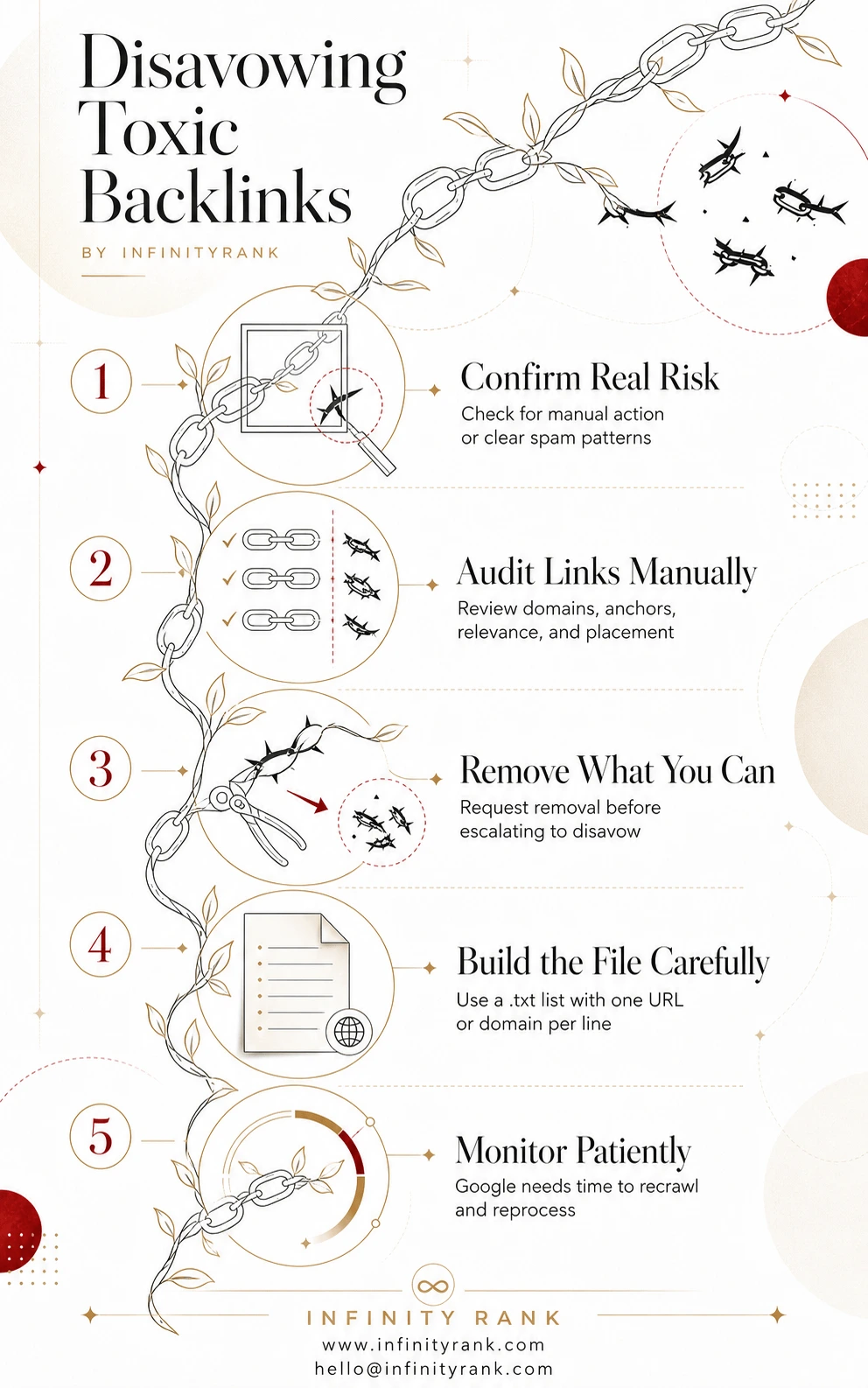
Cleaning up a link profile isn’t about hitting a “reset” button; it’s about making sure Google sees your site for the high-quality resource it actually is. By following these five pillars, you avoid the common trap of over-disavowing and keep your site’s authority intact.
Once you’ve analyzed the disavowing-toxic-backlinks-infographic, you’ll have the confidence to move forward without the fear of a manual penalty. Let’s get into the deep-dive audit to see which links really need to go.
Step 1: Export Your Backlink Data
Start by collecting backlink data from multiple sources.
Use:
- Google Search Console Links report.
- Ahrefs.
- Semrush.
- Majestic.
- Moz.
- Any previous link-building records.
- Old agency reports, if available.
Google Search Console should be your baseline because it shows links Google has discovered for your property. Third-party tools can help you find more patterns, but they should not be the only source.
Export referring domains and backlink URLs into a spreadsheet.
Add columns for:
- Linking URL.
- Linking domain.
- Target page.
- Anchor text.
- Link type.
- Relevance.
- Risk level.
- Action.
- Notes.
Keep this organized. A messy backlink audit leads to bad disavow decisions.
Step 2: Review Links Manually
Do not blindly upload a tool-generated toxic backlink export.
That is one of the fastest ways to damage your own SEO.
Review suspicious links manually. Open samples from each linking domain and look for real signs of manipulation.
Ask:
- Is this website real?
- Does it have original content?
- Is the linking page relevant?
- Is the link editorial or obviously placed for SEO?
- Is the anchor text natural?
- Does the domain link out to hundreds of unrelated commercial sites?
- Is the page hacked, auto-generated, or spammed?
- Was this link likely built by you, your agency, or a link vendor?
- Does the same anchor text appear across many unrelated domains?
Mark links as:
- Keep.
- Investigate.
- Remove request.
- Disavow URL.
- Disavow domain.
Use domain-level disavow only when the whole domain is clearly spammy or manipulative.
Use URL-level disavow when the domain is generally legitimate but one specific page is a problem.
Step 3: Try to Remove Bad Links First
Google recommends removing as many spammy or low-quality links as possible before using the disavow tool.
This is especially important if you are dealing with a manual action.
Contact site owners where possible. Ask for the link to be removed or changed to nofollow/sponsored when appropriate.
Document your efforts.
Track:
- Contacted domains.
- Contact email or form URL.
- Date contacted.
- Response.
- Link removed or not removed.
- Notes.
You do not need to waste weeks chasing obvious spam domains with no contact information. But for paid links, guest post networks, directories, and known placements, removal attempts are worth documenting.
If the link cannot be removed, add it to your disavow list.
Step 4: Create Your Disavow File
Your disavow file must follow Google’s required format.
Google’s rules are specific:
- The file must be a
.txtfile. - It must be encoded in UTF-8 or 7-bit ASCII.
- Add one URL or domain per line.
- Use domain: to disavow an entire domain or subdomain.
- Do not try to disavow an entire subfolder.
- Maximum URL length is 2,048 characters.
- Maximum file size is 100,000 lines and 2MB.
- Comments can be added with
#. - Any line beginning with
#is ignored by Google.
Example:
# Disavow file created after backlink audit
# Manual review completed: 2026-05-03
# Spammy paid link pages
https://spam-example.com/buy-cheap-links.html
https://badsite.example/fake-seo-post.html
# Entire spam domains
domain:shadyseoexample.com
domain:lowqualitylinknetwork.example
Be careful with domain-level entries.
This line:
domain:example.com
asks Google to ignore links from the entire domain.
Do not use that unless the full domain is clearly harmful.
Step 5: Upload the File in Google’s Disavow Tool
To upload the file:
- Open Google’s disavow links tool.
- Select the correct Search Console property.
- Upload your .txt file.
- Fix any errors Google reports.
- Confirm the upload.
Important: the disavow tool does not support Domain properties. Google says the tool applies to URL-prefix properties, not Domain properties.
Also, uploading a new disavow file replaces the existing file for that property. It does not merge with the old one. If you already have a disavow file, download it first, review it, and add your new entries to the existing list before uploading.
Do not upload your full backlink export.
Only upload the URLs or domains you actually want Google to ignore.
Step 6: Wait for Google to Reprocess the Links
Disavow changes are not instant.
Google says it can take a few weeks to incorporate the list because Google needs to recrawl and reprocess the affected pages.
Do not expect rankings to jump the next day.
After uploading the file, monitor:
- Manual action status.
- Organic traffic.
- Rankings for affected pages.
- Search Console impressions and clicks.
- Indexed pages.
- New suspicious backlink patterns.
If you had a manual action, submit a reconsideration request after you have cleaned up the links, attempted removals, and uploaded the disavow file.
Your reconsideration request should be specific. Explain what happened, what you removed, what you disavowed, and what you changed to prevent the issue from happening again.
Common Disavow Mistakes
1. Disavowing Links Based Only on Tool Scores
SEO tools can flag suspicious links, but they are not perfect.
Use them to prioritize review, not to make the final decision.
2. Disavowing Every Low-Authority Link
Low authority does not equal toxic.
Small sites, niche blogs, local directories, and independent publishers can still provide legitimate links.
3. Using Domain-Level Disavow Too Aggressively
A domain-level disavow is powerful. It can wipe out every link from that domain.
Use it only when the entire domain is clearly spammy.
4. Uploading a New File Without the Old Entries
Google replaces the old disavow file when you upload a new one.
If you forget to include previous entries, you may accidentally remove old disavow instructions.
5. Expecting Instant Recovery
Disavow is not a magic ranking button.
If rankings dropped because of weak content, technical SEO issues, algorithm updates, or lost high-quality links, a disavow file will not fix the real problem.
6. Disavowing Normal Spam Noise
Every established site attracts junk links.
Random scraper links, image hotlink pages, and low-quality auto-generated pages are usually not worth disavowing unless they form a serious pattern.
Should You Disavow Negative SEO Links?
Negative SEO is when someone tries to harm your site by pointing spammy links at it.
It can happen, but most spam links are ignored or discounted by modern search engines.
Do not panic over a sudden batch of strange backlinks.
Investigate first.
You should consider disavowing negative SEO links only if:
- The volume is unusually high.
- The links use aggressive commercial anchor text.
- The links point heavily to money pages.
- The links come from obvious spam networks.
- You see manual action risk.
- Your site has a history of link manipulation.
- The pattern looks coordinated, not random.
If the links are just scraper noise, leave them alone.
Does Bing Still Have a Disavow Tool?
No. Bing removed its disavow links feature and related API in October 2023. Bing said its systems can now identify and discount unnatural links without requiring webmasters to submit disavow files.
If you are optimizing for Bing, focus on avoiding link schemes, paid link manipulation, and spammy link-building practices.
Do not tell readers to submit a Bing disavow file. That advice is outdated.
How Often Should You Audit Backlinks?
Most websites do not need constant backlink cleanup.
A practical schedule:
- Small local websites: every 6–12 months.
- Growing content sites: every quarter.
- Ecommerce or affiliate sites: every quarter.
- Sites with previous manual actions: monthly until stable.
- Sites running active link-building campaigns: monthly.
- Sites in spam-heavy niches: monthly or quarterly.
You should also run a backlink audit after:
- A manual action.
- A major ranking drop.
- Buying or acquiring a domain.
- Hiring a link-building agency.
- Ending a bad SEO contract.
- Noticing suspicious anchor text spikes.
- Receiving a sudden flood of spam links.
Backlink audits are prevention. Disavow files are intervention.
Do not confuse the two.
Final Checklist Before Uploading a Disavow File
Before you upload, confirm:
- You checked Google Search Console for manual actions.
- You reviewed links manually.
- You did not rely only on toxicity scores.
- You tried to remove links where realistic.
- You separated URL-level and domain-level entries.
- You removed safe links from the file.
- Your file is
.txt. - Your file uses UTF-8 or 7-bit ASCII.
- Your file is under 2MB and 100,000 lines.
- Each URL or domain is on its own line.
- Domain entries use
domain:example.com. - You downloaded and preserved any existing disavow file.
- You selected the correct Search Console property.
- You understand the upload replaces the old file.
- You are not expecting instant ranking recovery.
If you cannot confidently check those boxes, do not upload yet.
Final Thoughts
Disavowing toxic backlinks can protect your site when there is a real link spam problem. But it is not a routine SEO chore, and it should not be treated like one.
The safest approach is simple:
Audit first.
Verify manually.
Remove what you can.
Disavow only what is clearly risky.
Monitor results patiently.
A good disavow file is precise. A bad one is dangerous.
If you are unsure whether a backlink is harmful, do not guess. Review the domain, check the pattern, and look for evidence of manipulation. The goal is not to delete every ugly backlink from your profile. The goal is to separate your site from links that create genuine risk.
FAQs About Disavowing Toxic Backlinks
What are toxic backlinks?
Toxic backlinks are links from spammy, manipulative, hacked, irrelevant, or low-quality websites that may create SEO risk. They are usually harmful when they appear in large, artificial patterns or violate search engine spam policies.
Should I disavow every bad-looking backlink?
No. Many bad-looking backlinks are harmless spam noise. Disavow only when there is a serious pattern of spammy, artificial, or low-quality links that has caused or could likely cause a manual action.
Can disavowing backlinks hurt SEO?
Yes. If you disavow legitimate backlinks, you may remove useful link signals. That can hurt rankings instead of helping them.
How long does Google take to process a disavow file?
Google says it can take a few weeks because it needs to recrawl and reprocess the affected pages.
Can I remove a disavow file later?
Yes. You can cancel disavowals in Google’s disavow tool. But reversal also takes time because Google has to reprocess the affected links.
Should I use URL-level or domain-level disavow?
Use URL-level disavow when only a specific page is harmful. Use domain-level disavow when the entire domain is clearly spammy or manipulative.
Does Bing have a disavow tool?
No. Bing removed its disavow links feature and related API in October 2023.
Do nofollow links need to be disavowed?
Usually, no. Nofollow links generally do not need disavowing unless they are part of a larger manual action cleanup or manipulative pattern.
Should I hire an SEO professional for disavow work?
If your site has a manual action, a history of paid links, or a large backlink profile, yes. Disavow work is easy to do badly and difficult to reverse quickly.