If you use links that open in a new tab, you’ve probably seen this code before:
<a href="https://example.com" target="_blank" rel="noopener noreferrer">
  Visit Example
</a>
Most site owners ignore the rel="noopener noreferrer" part because it looks like minor technical clutter. It is not. It controls how the browser handles the relationship between your page and the page you link to.
The short version: noopener is mainly for security. noreferrer is mainly for privacy. Neither one is the same as nofollow, sponsored, or ugc.
That distinction matters because bad advice about these attributes is everywhere. Some guides say you always need both. Some say noreferrer does not protect against tabnabbing. Some say these attributes are SEO signals. Those claims are either outdated or wrong.
Let’s clean it up.
What Is rel="noopener noreferrer"?
The rel attribute tells browsers, search engines, or other systems what relationship exists between the current page and the linked page.
In this case, there are two values:
rel="noopener noreferrer"They do different things.
| Attribute | Main Purpose | What It Does | Best Use Case |
|---|---|---|---|
noopener | Security | Prevents the new page from accessing the original page through window.opener | External links that open in a new tab |
noreferrer | Privacy | Prevents referrer information from being sent to the linked page and also behaves like noopener | Links where you do not want the destination site to see where the visitor came from |
MDN states that noopener prevents the opened page from getting access back to the original page through window.opener. MDN also notes that modern browsers implicitly apply noopener behavior when target="_blank" is used, but adding it explicitly is still clear, safe markup.
The important correction: noreferrer does not only protect privacy. It also implies noopener behavior. Both MDN and the HTML Standard say this..
Rel Links: Security, Privacy, and SEO Realities
Adding target="_blank" to your links is a great way to keep users on your site, but without the right attributes, you’re quietly opening the door to security flaws and tracking vulnerabilities. While many developers clump these tags together, they serve completely distinct roles in protecting your platform and managing data flow.
This visual guide to link attributes strips away the confusion by breaking down exactly how security, privacy, and crawl signals work under the hood.
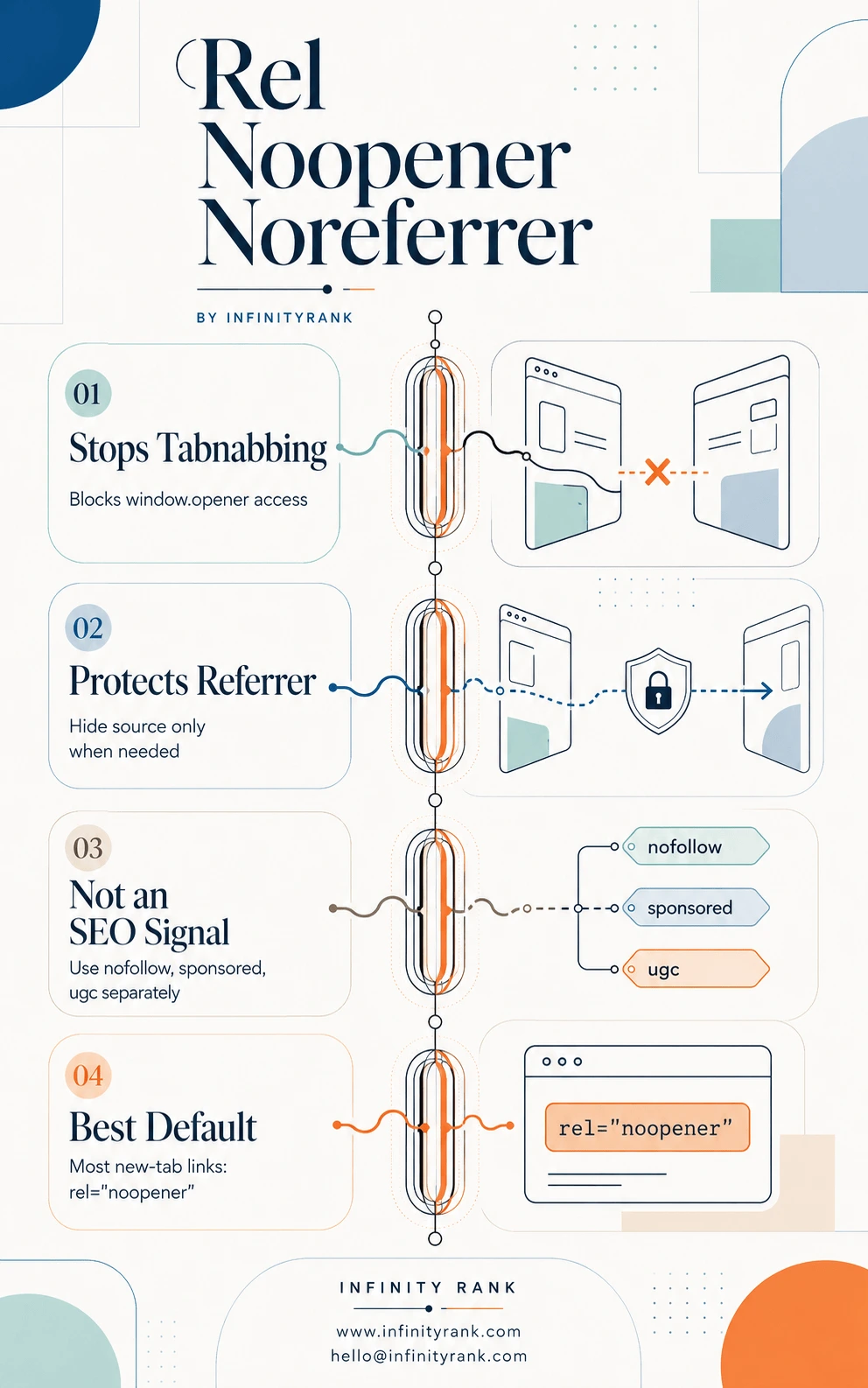
Securing your outbound links doesn’t have to complicate your crawl budget or ranking signals. By making rel="noopener" your default baseline and layer tags correctly, you keep your site secure and your analytics data clean. Use the rel-noopener-noreferrer-infographic as a quick checklist for your next technical template audit.
Why This Matters
The main issue comes from links that open in a new tab:
<a href="https://example.com" target="_blank" rel="noopener noreferrer">
  Visit Example
</a>
Historically, a page opened with target="_blank" could access the original tab through JavaScript using window.opener. A malicious page could use that connection to redirect the original tab to a phishing page.
That attack is called reverse tabnabbing.
Example:
- A visitor clicks an external link on your site.
- The external page opens in a new tab.
- That external page uses JavaScript to change the original tab.
- The visitor returns to what looks like your site, but it is now a fake login or payment page.
rel="noopener" blocks that opener connection.
Modern browsers have reduced this risk by applying noopener behavior automatically to many target="_blank" links. But explicit rel="noopener" is still worth using because it makes the intent obvious, helps with audits, and protects against older or unusual browser behavior.
noopener vs noreferrer: The Difference
Do not treat these as interchangeable.
rel="noopener"
Use this when you want security protection without hiding referral data.
Example:
<a href="https://example.com" target="_blank" rel="noreferrer">
  Visit Example
</a>
This is usually the best option for external links that open in a new tab.
It prevents the new page from controlling the original tab, but it does not intentionally hide the referring page from the destination site.
rel="noreferrer"
Use this when you want to hide referral information from the destination site.
Example:
<a href="https://example.com" target="_blank" rel="noreferrer">
  Visit Example
</a>
This tells the browser not to send the Referer header. It also behaves as if noopener were present.
That means this:
<a href="https://example.com" target="_blank" rel="noreferrer">
  Visit Example
</a>
is effectively similar to this for security purposes:
<a href="https://example.com" target="_blank" rel="noopener noreferrer">
  Visit Example
</a>
Use noreferrer only when you actually want to suppress referral data.
Should You Use noopener, noreferrer, or Both?
Use this decision table.
| Situation | Recommended Markup | Reason |
|---|---|---|
| External link opens in new tab | rel="noopener" | Security protection without hiding referral data |
| External link opens in new tab and you want privacy | rel="noopener noreferrer" or rel="noreferrer" | Hides referrer and blocks opener access |
| Affiliate or partner link | Usually avoid noreferrer | Partners may need referral data for attribution |
| Paid/sponsored link | Use rel="sponsored"; add noopener if opening in new tab | sponsored is the SEO disclosure; noopener is browser security |
| User-generated link | Use rel="ugc"; add noopener if opening in new tab | ugc tells Google the link came from users |
| Untrusted link | Use rel="nofollow noopener" if opening in new tab | nofollow is the SEO hint; noopener is security |
| Internal link in same tab | No noopener needed | No new browsing context is created |
| Internal link opening in new tab | rel="noopener" is fine | Usually unnecessary, but harmless |
Do not use noreferrer by default on every link. It can hide referral data from other sites, partners, tools, and analytics platforms that depend on referrer information.
Does rel="noopener noreferrer" Affect SEO?
noopener and noreferrer are not link equity directives.
They do not work like:
rel="nofollow"
rel="sponsored"
rel="ugc"
Google’s outbound link guidance focuses on sponsored, ugc, and nofollow for qualifying link relationships. Paid links should use sponsored; user-generated links should use ugc; untrusted or non-endorsed links can use nofollow.
So, for SEO:
| Attribute | SEO Signal? | Purpose |
|---|---|---|
noopener | No direct SEO signal | Browser security |
noreferrer | No direct ranking signal | Referrer privacy |
nofollow | Yes, link qualification hint | Tells Google not to associate your site with the linked page in the usual way |
sponsored | Yes, link qualification hint | Marks ads, sponsorships, affiliate links, or paid placements |
ugc | Yes, link qualification hint | Marks user-generated links |
If you are linking to a normal editorial source, you do not need nofollow, sponsored, or ugc.
If the link opens in a new tab, use noopener.
If the link is paid, sponsored, affiliate, or user-generated, use the proper Google-recognized attribute and add noopener when needed.
Example for a sponsored link opening in a new tab:
<a href="https://example.com" target="_blank" rel="sponsored noopener">
  Sponsored Partner
</a>
Example for a user-generated link opening in a new tab:
<a href="https://example.com" target="_blank" rel="ugc noopener">
  Community Link
</a>
Does noreferrer Break Analytics?
It depends whose analytics you mean.
If you add noreferrer, the destination site usually will not receive your page URL as the referrer. That means your site may not appear as a referral source in the destination site’s analytics.
Your own analytics tracking on your own website should still work normally because the visitor is already on your site before clicking the link.
Where noreferrer can cause problems:
- Affiliate tracking that relies on referrer data
- Partner reporting
- Referral traffic visibility for the destination site
- Cross-domain attribution setups
- Campaigns where the receiving site expects to see your URL
So do not use noreferrer casually. Use it when privacy matters more than referrer visibility.
What About referrerpolicy?
If your goal is referrer control, referrerpolicy may be a better option than noreferrer.
Example:
<a href="https://example.com"
   target="_blank"
   rel="noopener"
   referrerpolicy="strict-origin-when-cross-origin">
  Visit Example
</a>
noreferrer is blunt. It suppresses referrer information.
referrerpolicy gives you more control. You can decide whether to send the full URL, only the origin, or no referrer depending on the situation.
For many sites, the better default is:
target="_blank" rel="noopener"Then use noreferrer or referrerpolicy only when there is a specific privacy reason.
How to Add rel="noopener noreferrer" Correctly
The basic version:
<a href="https://example.com" target="_blank" rel="noreferrer">
  Visit Example
</a>
Use this for most external links that open in a new tab.
Use this when you want to hide referrer information:
<a href="https://example.com" target="_blank" rel="noopener noreferrer">
  Visit Example
</a>
Use this for paid links:
<a href="https://example.com" target="_blank" rel="sponsored noopener">
  Sponsored Link
</a>
Use this for user-generated links:
<a href="https://example.com" target="_blank" rel="sponsored noopener">
  Sponsored Link
</a>
Use this for untrusted links:
<a href="https://example.com" target="_blank" rel="nofollow noopener">
  Untrusted Source
</a>
Multiple rel values can be used together. Keep them space-separated.
Common Mistakes to Avoid
Mistake 1: Thinking noopener and nofollow Do the Same Thing
They do not.
noopener is for browser security.nofollow is for search engine link qualification.
Use the right attribute for the right job.
Bad:
<a href="https://example.com" target="_blank" rel="nofollow">
  Visit Example
</a>
Better, if the link opens in a new tab and is untrusted:
<a href="https://example.com" target="_blank" rel="noopener noreferrer">
  Visit Example
</a>
Mistake 2: Using noreferrer When You Only Need noopener
This is the most common overcorrection.
If you only want tabnabbing protection, use:
rel="noopener"Do not add noreferrer unless you intentionally want to hide referrer data.
Mistake 3: Saying noreferrer Does Not Protect Security
Wrong.
noreferrer also behaves like noopener. The HTML Standard explicitly says noreferrer has the same effect as noopener, and MDN says it behaves as if noopener were also specified.
Mistake 4: Adding These Attributes to Every Link
You do not need noopener on normal same-tab links.
This link does not need it:
<a href="/about/">About Us</a>There is no new tab, so there is no opener issue.
Mistake 5: Ignoring CMS Output
WordPress, page builders, SEO plugins, and JavaScript frameworks may add or modify link attributes automatically.
Do not assume your links are correct. Inspect the rendered HTML.
Check:
- External links opening in new tabs
- Affiliate links
- Sponsored placements
- Author bio links
- Guest post links
- User-generated links
- Navigation links
- CTA buttons
- Footer links
Recommended Default
For most websites, the safest default is:
<a href="https://example.com" target="_blank" rel="noopener">
  Visit Example
</a>
Use noreferrer only when you want to suppress referrer information:
<a href="https://example.com" target="_blank" rel="noopener noreferrer">
  Visit Example
</a>
Use SEO-specific values when the link relationship requires them:
rel="sponsored noopener"
rel="ugc noopener"
rel="nofollow noopener"
That is the clean rule.
Security attributes handle browser behavior.
SEO attributes qualify the link for search engines.
Privacy attributes control referrer data.
Do not mix them up.
FAQ
Do I need both noopener and noreferrer?
No. noopener is enough for tabnabbing protection. Add noreferrer only when you also want to hide referrer information from the destination site. noreferrer also implies noopener, but using both can make the intent explicit.
Is rel="noopener noreferrer" good for SEO?
It is not an SEO ranking tactic. noopener and noreferrer do not work like nofollow, sponsored, or ugc. They are mainly for security and privacy. For SEO link qualification, use Google-recognized values such as sponsored, ugc, and nofollow when appropriate.
Should I use noreferrer on affiliate links?
Usually, no. Many affiliate and partner systems need attribution data. Use the affiliate platform’s required tracking setup and mark paid links properly with rel="sponsored" when needed.
Should I use noopener on internal links?
Not usually. Internal links should normally open in the same tab. If an internal link opens in a new tab, noopener is harmless, but it is usually not necessary.
Do modern browsers still need noopener?
Modern browsers generally apply noopener behavior automatically for target="_blank", but explicit rel="noopener" is still good practice because it makes your intent clear and helps with audits, compatibility checks, and code reviews.
Is rel="noopener noreferrer" the same as nofollow?
No. noopener and noreferrer control browser behavior and referrer privacy. nofollow is a search engine hint about link endorsement.
Final Takeaway
Use rel="noopener" for external links that open in a new tab.
Use rel="noreferrer" only when you want to hide referral data.
Use nofollow, sponsored, or ugc when you need to qualify the link for Google.
The best default for most external links that open in a new tab is:
target="_blank" rel="noopener"That protects users without unnecessarily blocking referral information.