Losing backlinks is normal. Pages get deleted, sites redesign their content, URLs change, redirects break, and editors remove links during updates.
But ignoring lost backlinks is a mistake.
Link reclamation is one of the fastest ways to recover SEO value your site has already earned. You are not starting from zero. You are finding links that used to point to your website, figuring out why they disappeared, and fixing the issue when the link is still worth saving.
This guide explains what link reclamation is, how it differs from unlinked brand mention outreach, which lost links deserve your time, and how to recover them without wasting effort on low-value opportunities.
Link Reclamation: Easiest Rankings Saved?
Losing hard-earned backlinks to broken pages, structural site updates, or accidental editor removals is a silent authority leak that tanks rankings without warning. Chasing new placements is expensive, yet many brands ignore the massive ranking power trapped right inside their existing, broken URLs.
Fixing these internal issues and deploying targeted outreach allows you to effortlessly restore lost equity at a fraction of the cost. This link reclamation framework breaks down four quick steps to track down, fix, and secure your dropped link assets safely.
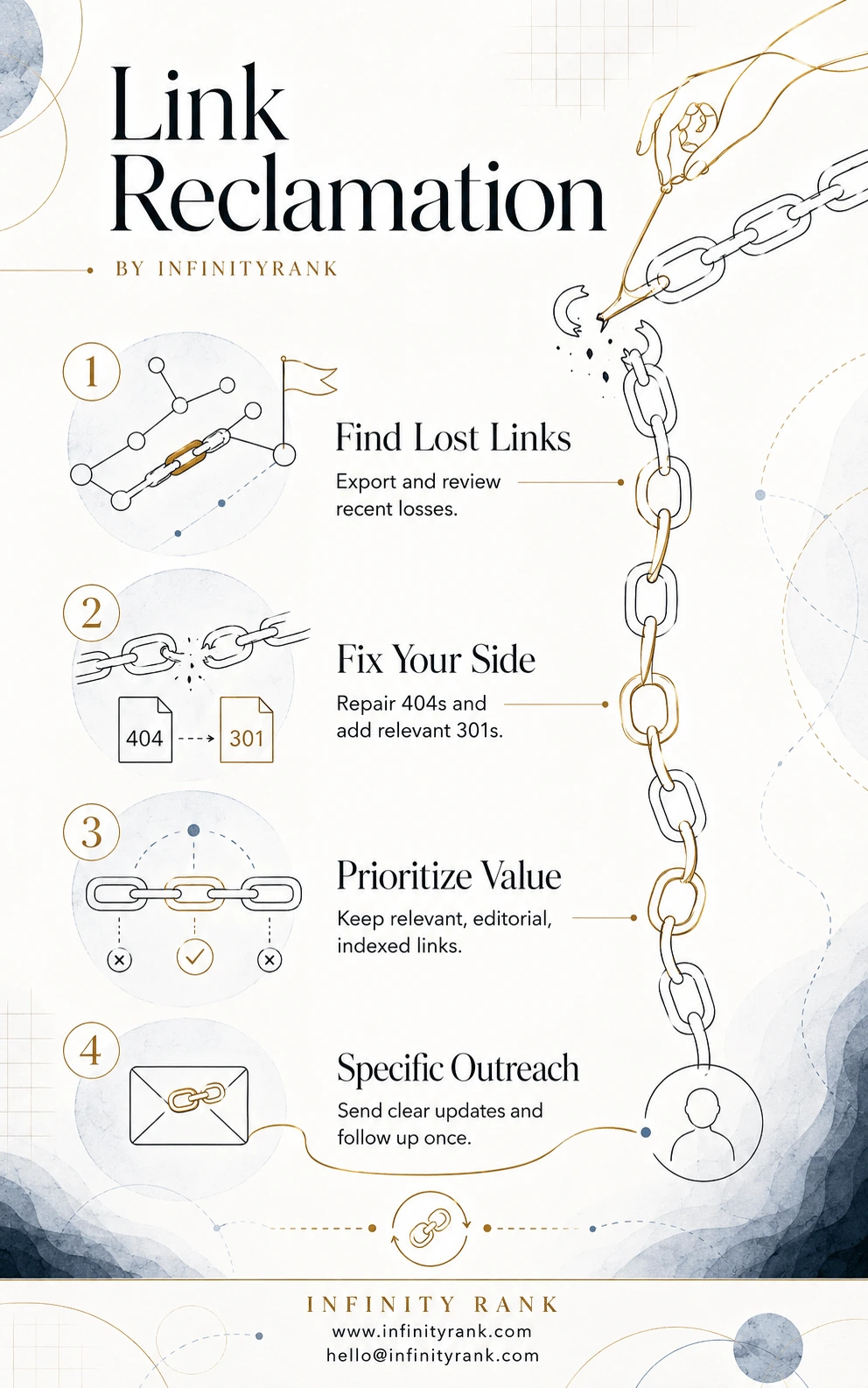
Plugging your authority leaks is the fastest way to stabilize volatile organic traffic without launching expensive new campaigns from scratch. By fixing your internal technical setup and keeping a clean line of communication with referring editors, you keep your backlink profile resilient. Use the link-reclamation-infographic to audit your recent losses and reclaim the ranking signals your brand already earned.
What Is Link Reclamation?
Link reclamation is the process of finding, reviewing, and recovering backlinks that previously pointed to your website but no longer do.
A lost backlink may disappear because:
- The linking page was updated.
- Your linked page was deleted or moved.
- A redirect was added incorrectly.
- The linking website removed the link.
- The linking page now returns a 404.
- A CMS, plugin, or formatting change broke the hyperlink.
- The content was consolidated, rewritten, or republished.
The goal is simple: recover links that still have SEO, referral, or relationship value.
This is not the same as chasing brand-new links. With link reclamation, the relationship or citation already existed. You are trying to restore value that was already earned.
Link Reclamation vs. Unlinked Brand Mentions
Many SEO guides mix these two together. That creates confusion.
They are related, but they are not the same.
| Type | What It Means | Example | Main Action |
| Link reclamation | A backlink existed before but disappeared | A blog used to link to your guide, but the link was removed after an update | Ask for the link to be restored or fix the broken URL |
| Broken backlink recovery | A referring page still links to you, but the target URL is broken | A site links to an old URL that now returns 404 | Add a redirect or ask them to update the link |
| Unlinked brand mention outreach | Your brand is mentioned but was never linked | A publication mentions “Infinity Rank” without a hyperlink | Ask them to add a relevant link |
Unlinked mentions can be part of a broader backlink recovery workflow, but they are not technically “lost links.” Treat them as a separate opportunity.
Why Link Reclamation Matters
Google uses many ranking systems and signals, so backlinks are not the only factor. But links still matter because Google’s systems include link analysis and PageRank as part of how it understands pages and relationships across the web.
Lost backlinks can hurt in three ways:
- You may lose link equity from relevant referring pages.
- You may lose referral traffic from pages that used to send visitors.
- You may lose trust signals from authoritative sites in your niche.
Link decay is also common. Ahrefs found that 66.5% of links pointing to more than 2 million sampled websites had rotted since January 2013.
That does not mean every lost link is worth saving. It means every serious SEO campaign needs a process for checking, prioritizing, and recovering the links that matter.
Common Reasons Backlinks Disappear
Before you send outreach, diagnose the problem. A bad diagnosis leads to bad outreach.
1. Your Target Page Was Deleted
If another website links to a page on your site that now returns a 404, the link still exists, but the value is leaking.
Fix it by redirecting the old URL to the closest relevant live page. Do not redirect everything to the homepage. That is lazy and usually irrelevant.
Use Google Search Console’s Page Indexing report to check URLs Google knows about and see indexing issues such as not found pages.
2. Your URL Changed Without a Proper Redirect
This happens after migrations, content pruning, CMS changes, and slug updates.
Example:
Old URL: /old-link-building-guide/
New URL: /link-building-guide/
If the old URL was linked externally and no redirect exists, you are losing value.
Fix it with a 301 redirect to the most relevant replacement page.
3. The Linking Page Was Updated
Editors often remove old references when updating content. Sometimes the removal is intentional. Sometimes it is accidental.
Check whether your content is still relevant to the new version of the page. If it is, outreach is worth trying.
4. The Linking Page Was Deleted
If the entire referring page is gone, you usually cannot reclaim that exact link.
You have two options:
- Find another relevant page on the same website and pitch your resource.
- Move on.
Do not waste time chasing pages that no longer exist unless the domain is extremely valuable and you have a strong replacement angle.
5. The Link Was Replaced by a Competitor
This is common in list posts, resource pages, statistics posts, and “best tools” articles.
Do not beg for the link back. Compare your resource against the competitor’s. If yours is stronger, explain why it is still useful for readers.
6. The Link Was Changed to Nofollow, Sponsored, or UGC
This is not always worth fighting. Some websites update outbound link policies across the entire domain.
Track the change, but only reach out if the link was changed by mistake or if the page owner has a clear editorial reason to restore it.
7. A Technical Error Broke the Link
CMS migrations, plugins, page builders, and formatting changes can break links. These are often easy wins because you are helping the site owner fix a problem.
How to Find Lost Backlinks
You need backlink data. Use one or more of these tools:
- Ahrefs
- Semrush
- Moz
- Majestic
- Google Search Console
- Screaming Frog
- Brand monitoring tools such as Mention or Google Alerts
Ahrefs is often the fastest option because Site Explorer includes backlink reports, filters, link types, Domain Rating, URL Rating, referring domains, and related backlink data.
Basic Ahrefs Workflow
- Open Site Explorer.
- Enter your domain.
- Go to the Backlinks report.
- Filter for lost backlinks.
- Export the results.
- Remove obvious junk.
- Prioritize links from relevant, authoritative, indexed pages.
- Diagnose why each link was lost.
- Fix internal issues first.
- Send outreach only where outreach is needed.
Do not blindly email every domain in the export. That is how you waste time and damage your brand.
Which Lost Links Are Worth Reclaiming?
Not every lost backlink deserves effort.
Use this checklist before outreach.
| Factor | What to Check | Priority |
| Relevance | Is the linking page topically related to your site? | High |
| Authority | Is the referring domain trustworthy? | High |
| Traffic | Does the linking page get organic traffic? | High |
| Link placement | Was the link in the main content, author bio, footer, or sidebar? | High |
| Anchor text | Was the anchor natural and relevant? | Medium |
| Link type | Was it followed, nofollow, sponsored, or UGC? | Medium |
| Indexability | Is the referring page indexed and crawlable? | High |
| Spam risk | Is the domain part of a link farm, scraper site, or low-quality directory? | Critical |
| Recovery difficulty | Can you fix it internally, or do you need outreach? | Medium |
Prioritize links that are relevant, editorial, indexed, and connected to pages that still matter for your business.
Ignore spammy directories, scraped pages, irrelevant foreign-language sites, hacked pages, and low-quality auto-generated content.
Link Reclamation Workflow
Use this workflow to keep the process clean.
| Lost Link Issue | How to Verify | Best Fix | Outreach Needed? | Priority |
| Your page returns 404 | Check the target URL manually and in Search Console | Add a 301 redirect to the closest relevant page | No, unless the referring page should update the link | High |
| Your page redirected to an irrelevant URL | Check redirect chain | Update the redirect target | Sometimes | High |
| Linking page removed your link | Compare current page with old version if available | Ask for restoration if your resource still fits | Yes | Medium/High |
| Linking page deleted | Check whether the URL is dead | Find another relevant page on the same domain | Sometimes | Low/Medium |
| Link changed to nofollow | Inspect the link attribute | Only contact if likely accidental | Sometimes | Low/Medium |
| Brand mention has no link | Search brand mentions | Ask for a relevant hyperlink | Yes | Medium |
| Competitor replaced your link | Review the updated page | Pitch your resource only if clearly better | Yes | Medium/High |
| CMS formatting broke link | Inspect page HTML | Ask them to fix the broken link | Yes | High |
Step 1: Export Lost Backlinks
Start with your backlink tool of choice and export lost backlinks from the last 30, 60, or 90 days.
For larger sites, also run quarterly and yearly checks. Some valuable links disappear slowly, especially after site redesigns or content refreshes.
Your export should include:
- Referring domain
- Referring URL
- Lost backlink date
- Target URL
- Anchor text
- Link type
- Domain authority or DR
- Page traffic estimate
- HTTP status
- First seen date
- Last seen date
Step 2: Clean the Data
Raw backlink exports are messy.
Remove:
- Spam domains
- Scraper sites
- Auto-generated pages
- Irrelevant directories
- Forum profile links
- Pages blocked by robots.txt
- Pages that are not indexed
- Links from hacked or suspicious sites
- Duplicate links from the same template
Keep:
- Editorial links
- Relevant resource pages
- Industry blogs
- News mentions
- Partner pages
- Local citations
- High-quality list posts
- Pages that send referral traffic
The goal is not to recover the most links. The goal is to recover the links that can actually help.
Step 3: Fix Internal Problems First
Before contacting anyone, fix what you control.
Check whether your lost links point to:
- Deleted pages
- Moved URLs
- Redirect chains
- Redirect loops
- Soft 404s
- Canonicalized pages
- Noindexed pages
- Pages blocked by robots.txt
- HTTP pages instead of HTTPS pages
If the issue is on your side, outreach is unnecessary until the technical problem is fixed.
For example, if 20 referring domains link to an old URL that now returns 404, add a relevant 301 redirect first. That may recover value without a single email.
Step 4: Prioritize Outreach
Once internal fixes are done, sort the remaining opportunities by value.
Use this simple priority system:
| Priority | Criteria | Action |
| High | Relevant domain, editorial link, followed link, indexed page, strong traffic or authority | Contact first |
| Medium | Relevant but lower authority, nofollow link, weak traffic, or uncertain value | Contact after high-priority links |
| Low | Low relevance, weak page, little authority, questionable placement | Skip or batch later |
| Ignore | Spam, scraper, irrelevant, hacked, paid-link footprint | Do not contact |
This prevents the common mistake of spending hours trying to recover links that were never useful.
Step 5: Send Specific Outreach
Bad outreach says:
“Hi, please link to us.”
Good outreach says:
“Your article currently links to an outdated URL. The correct replacement is here.”
Be precise. Editors are more likely to fix a clear issue than respond to a vague request.
Template 1: Broken Backlink
Subject: Broken link on your article
Hi [Name],
I noticed a broken link in your article on [topic]:
[Referring page URL]
The link currently points to this old URL:
[Broken URL]
The correct replacement is:
[New URL]
It should be a better fit for readers because it covers [brief reason].
Thanks,
[Your Name]
Template 2: Removed Link
Subject: Quick note about your [topic] article
Hi [Name],
I saw that your article on [topic] was recently updated:
[Referring page URL]
It previously referenced our guide on [resource topic]. If you are still including resources on [specific subtopic], this updated version may still be useful:
[Your URL]
No pressure either way. I just wanted to flag it in case it helps your readers.
Best,
[Your Name]
Template 3: Unlinked Brand Mention
Subject: Quick update to your mention of [Brand]
Hi [Name],
Thanks for mentioning [Brand] in your article:
[Page URL]
Would you consider linking the mention to our relevant page here?
[URL]
It gives readers more context on [specific topic].
Thanks,
[Your Name]
Template 4: Competitor Replaced Your Link
Subject: Resource suggestion for your [topic] page
Hi [Name],
I noticed your article on [topic] now links to [competitor/resource].
That resource is useful. I also wanted to share our updated guide because it includes [specific unique value: newer data, examples, templates, screenshots, etc.]:
[Your URL]
If you are updating that section again, it may be worth considering as an additional reference.
Best,
[Your Name]
Step 6: Track Every Opportunity
Do not manage link reclamation from memory. Use a spreadsheet or CRM.
Track these fields:
- Referring domain
- Referring URL
- Target URL
- Anchor text
- Link status
- Loss reason
- Priority
- Contact name
- Contact email
- Outreach date
- Follow-up date
- Response
- Final status
- Link recovered?
- Notes
Status labels should be simple:
- Not reviewed
- Technical fix needed
- Ready for outreach
- Contacted
- Followed up
- Recovered
- Rejected
- No response
- Not worth reclaiming
Step 7: Follow Up Once
One follow-up is enough.
Send it 5–7 business days after the first email.
Do not send five reminders. You are not closing a sales deal. You are asking someone to update their website.
Follow-Up Template
Subject: Re: Broken link on your article
Hi [Name],
Just following up on this.
The broken link is still live here:
[Referring page URL]
Correct replacement:
[Your URL]
Hope this helps keep the page updated.
Thanks,
[Your Name]
How Often Should You Run Link Reclamation?
For most websites, monthly is enough.
Use this schedule:
| Website Type | Recommended Frequency |
| Small business site | Monthly |
| Local business site | Monthly |
| SaaS site | Monthly or biweekly |
| Ecommerce site | Biweekly |
| Large publisher | Weekly |
| Enterprise site | Weekly or automated alerts |
High-growth websites should check more often because they publish, redirect, and update URLs more frequently.
Link Reclamation Mistakes to Avoid
Trying to Recover Every Link
This is the biggest mistake.
Some links deserve to be lost. Do not chase spam, irrelevant links, or dead pages with no value.
Redirecting Everything to the Homepage
Homepage redirects are usually lazy and irrelevant.
Redirect old URLs to the closest matching live page. If no relevant replacement exists, consider rebuilding the old page or letting it 404.
Sending Generic Outreach
Editors ignore vague requests. Always mention the page, the broken or missing link, and the correct replacement.
Ignoring Redirect Chains
A redirect chain can dilute crawl efficiency and create poor user experience. Keep redirects clean and direct.
Confusing Mentions With Lost Links
An unlinked mention is an opportunity. A lost link is a recovery target. Track them separately.
Forgetting to Monitor After Recovery
A recovered link can disappear again. Keep monitoring your best referring domains.
Link Reclamation for Local Businesses
Local businesses can benefit from link reclamation too.
Common local opportunities include:
- Local news mentions
- Chamber of commerce pages
- Sponsor pages
- Event pages
- Local directories
- Partner pages
- Community organization pages
- Vendor pages
Local citations often mention a business name, address, or phone number without linking to the website. Those are good unlinked mention opportunities.
For local SEO, prioritize links from geographically relevant websites over random high-authority domains with no local connection.
Link Reclamation for SaaS and B2B Companies
SaaS and B2B sites often lose links during:
- Product rebrands
- Feature page changes
- Blog pruning
- Help center migrations
- Case study updates
- Integration page changes
- Pricing page redesigns
These sites should track lost backlinks after every major content, product, or URL migration.
If your company removes an old feature page, check whether that URL has backlinks before deleting it. If it does, redirect it to the most relevant replacement.
Link Reclamation Checklist
Use this before starting outreach:
- Export lost backlinks.
- Remove spam and irrelevant links.
- Check whether the target URL is broken.
- Fix redirects and 404s first.
- Confirm the referring page is live.
- Confirm the referring page is indexed.
- Check whether the link was removed, changed, or redirected.
- Prioritize high-value opportunities.
- Find the correct contact.
- Send specific outreach.
- Follow up once.
- Track recovered links.
- Recheck monthly.
Final Thoughts
Link reclamation is not a replacement for link building. It is maintenance.
You still need new, relevant backlinks. But you also need to protect the links you already earned.
Start with your highest-value lost backlinks. Fix technical issues first. Then send targeted outreach only where the link is relevant, recoverable, and worth the effort.
Done properly, link reclamation helps recover link equity, protect referral traffic, and keep your backlink profile cleaner over time.
FAQs
What is link reclamation?
Link reclamation is the process of finding and recovering backlinks that previously pointed to your website but no longer do. It usually involves fixing broken URLs, correcting redirects, or asking site owners to restore removed links.
Is link reclamation the same as unlinked brand mention outreach?
No. Link reclamation deals with links that existed before and were lost. Unlinked brand mention outreach deals with brand mentions that never had a link in the first place.
Are all lost backlinks worth reclaiming?
No. Recover links from relevant, trustworthy, indexed pages. Ignore spammy, irrelevant, or low-quality links.
How often should I check for lost backlinks?
Most websites should check monthly. Large websites, ecommerce stores, SaaS companies, and publishers should check weekly or biweekly.
What tools can I use for link reclamation?
You can use Ahrefs, Semrush, Moz, Majestic, Google Search Console, Screaming Frog, and brand monitoring tools. Ahrefs is especially useful for lost backlink reports and backlink filtering.
What if the linking page was deleted?
If the referring page is gone, you usually cannot recover that exact link. Look for another relevant page on the same domain or move on.
Should I reclaim nofollow links?
Sometimes. A nofollow link can still send referral traffic and brand visibility. But do not prioritize it over a relevant followed editorial link.
Can link reclamation improve rankings?
It can help, especially when you recover relevant, authoritative links to important pages. But rankings depend on many signals, so recovery is not guaranteed.