A sitewide backlink sounds powerful at first.
You get one link from a website, but that link appears across hundreds or thousands of pages — usually in the footer, sidebar, header, template, widget, or navigation area.
That can look like a huge backlink win.
It usually is not.
Sitewide backlinks are not automatically bad. Many are normal. Footer credits, brand links, legal links, partner links, and navigation links exist across the web for legitimate reasons. The problem starts when a sitewide backlink is used to manipulate rankings, especially with exact-match anchor text, paid placement, irrelevant domains, or hidden template links.
Google’s spam policies define link spam as links created mainly to manipulate search rankings, and Google specifically lists paid links, keyword-rich widget links, and widely distributed footer or template links as examples when they are used improperly.
So the question is not, “Are sitewide backlinks good or bad?”
The better question is: Why does the link exist, where is it placed, what anchor text does it use, and is it properly qualified?
What Are Sitewide Backlinks?
A sitewide backlink is an external link that appears across most or all pages of a website.
Unlike a single editorial backlink inside a blog post, a sitewide backlink repeats automatically because it is placed inside a global website element.
Common sitewide backlink placements include:
- Footer credits
- Sidebar blogrolls
- Header navigation links
- Partner or sponsor sections
- Website design credits
- Theme or plugin attribution links
- Widgets, badges, and embedded tools
- Cross-links between sister brands or owned websites
Example:
If a website has 5,000 indexed pages and your link appears in the footer template, backlink tools may report thousands of links from that one domain.
That does not mean you received 5,000 separate editorial endorsements.
It means one domain is linking to you repeatedly through its template.
That distinction matters.
Why Sitewide Backlinks Became Popular
Sitewide backlinks became popular because they were easy to scale.
In the early days of SEO, SEOs bought footer links, traded blogroll links, and embedded keyword-rich links inside themes, plugins, badges, and widgets. One placement could create thousands of backlinks.
For a while, that tactic worked.
A web design agency could place “best web design company” in the footer of every client site. A WordPress theme creator could distribute a template with a keyword-rich backlink built in. A sponsor could buy a footer link across an entire website.
The appeal was obvious: one agreement, thousands of links.
The problem is also obvious: that is not the same as earning editorial trust.
Modern link evaluation is stricter. A repeated template link is easy to detect. A natural brand credit is one thing. A keyword-stuffed footer link across thousands of pages is another.
Sitewide Links: Power or Penalty?
Deploying links across every page of a website,like global footers or sidebars is highly misunderstood. Done carelessly with commercial, exact-match anchors, it triggers immediate spam filters and manual actions. However, when executed transparently with natural, branded anchors on highly relevant platforms, these links establish massive digital prominence.
This sitewide backlink blueprint covers four critical pillars to separate safe, high-value signals from severe algorithmic risks.
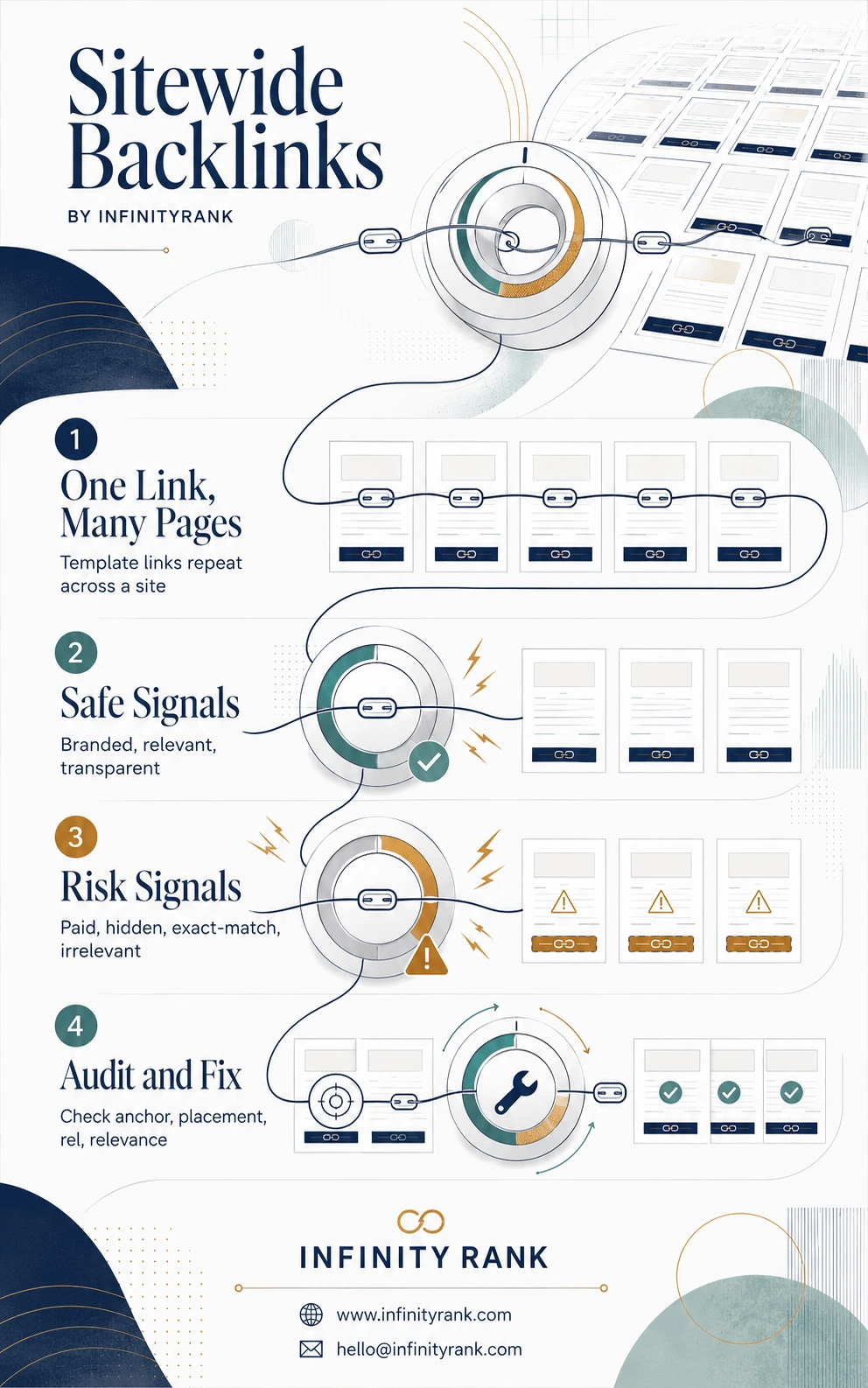
Managing global template links requires a strict balance between passing authority and maintaining a natural profile. By enforcing editorial relevance, using brand-first anchors, and auditing link attributes, you capture widespread exposure without endangering your rankings. Use the sitewide-backlinks-infographic as your tactical quality filter to review and secure your multi-page placements safely.
How Google Treats Sitewide Backlinks Today
Google does not treat every sitewide backlink the same way.
A natural branded footer credit is usually low risk. A paid, keyword-rich, followed footer link on an irrelevant site is high risk.
Google evaluates link patterns based on intent, placement, anchor text, relevance, and whether the link is qualified correctly.
Here are the main factors that matter.
1. Link Intent
The first question is simple: does the link help users, or does it exist mainly to influence rankings?
A link to a parent company, partner brand, website designer, software provider, or legal resource can be legitimate.
A link placed only to push PageRank is risky.
Google’s spam policy covers links created mainly to manipulate search rankings. That includes buying or selling links for ranking purposes, excessive exchanges, automated link creation, and widely distributed footer or template links.
2. Anchor Text
Anchor text is one of the clearest risk signals.
Safer anchors:
- Brand name
- Naked URL
- Product name
- Company name
- Neutral text such as “Visit website”
Risky anchors:
- “best SEO agency”
- “cheap link building services”
- “buy backlinks”
- “casino bonus”
- “payday loan company”
- Any exact-match commercial keyword repeated across hundreds of pages
A few branded sitewide links are normal. Thousands of exact-match money anchors are not.
3. Relevance
Relevance matters.
A SaaS company linking to its parent company makes sense. A design agency linked from client footers makes sense. A nonprofit linking to a sponsor can make sense.
A food blog linking sitewide to a crypto exchange, casino site, or payday loan brand does not look natural.
The weaker the topical relationship, the higher the risk.
4. Link Placement
Sitewide links usually appear in boilerplate areas: footers, sidebars, templates, widgets, and navigation menus.
That does not automatically make them harmful. But it does reduce their editorial value.
A contextual backlink inside a relevant article usually carries stronger trust than a repeated footer link.
That is why sitewide links should not be the foundation of your link-building strategy.
5. Link Qualification
If the sitewide link is paid, sponsored, advertorial, or part of a commercial arrangement, it should be qualified.
Google recommends using rel="sponsored" for advertisements or paid placements. rel="nofollow" is also acceptable for links where you do not want Google to associate your site with the destination.
For paid links, Google says qualifying links with rel="nofollow" or rel="sponsored" keeps them from violating its spam policies.
When Sitewide Backlinks Can Help
Sitewide backlinks can be fine when they are natural, transparent, and useful to users.
1. Branded Footer Credits
Example:
“Website designed by InfinityRank”
This is normal when a client agrees to credit the agency. The safest version uses branded anchor text, not a keyword like “best SEO agency.”
Better:
“Website by InfinityRank”
Risky:
“Best SEO link building agency”
2. Parent Company or Sister Brand Links
A company with multiple brands may link between them in the footer or navigation.
Example:
A SaaS company links to its parent company, support portal, or related product.
That is usually reasonable if the relationship is real and clear.
3. Sponsor or Partner Links
A sponsor may appear across a nonprofit, event, or community website.
That can be legitimate, but if money, sponsorship, or benefits are involved, the link should usually use rel="sponsored".
4. Software, Widget, or Badge Attribution
Some tools and badges include attribution links.
This is where risk increases fast.
A branded attribution link may be acceptable. A forced, keyword-rich, followed link embedded in distributed widgets is risky because Google lists keyword-rich, hidden, or low-quality widget links as link spam examples.
When Sitewide Backlinks Can Hurt SEO
Sitewide backlinks become risky when they look manipulative.
1. Exact-Match Commercial Anchors
If one domain sends 3,000 links with the same anchor text — for example, “best link building services” — that pattern is hard to defend.
It looks engineered.
Use branded or neutral anchor text instead.
2. Paid Links Without rel="sponsored" or nofollow
A paid sitewide footer link that passes ranking credit is a problem.
Google’s guidance is clear: paid links should be qualified. Use rel="sponsored" for paid placements. nofollow is still acceptable, but sponsored is more specific.
3. Irrelevant Domains
A backlink from an unrelated site is not always spam. But a sitewide backlink from an unrelated site is more suspicious because of scale.
One odd link may be ignored. Thousands of repeated irrelevant links can create a bad pattern.
4. Distributed Template Links
Theme, plugin, template, and widget links can become risky when they are widely distributed and keyword-rich.
Google specifically lists widely distributed footer or template links as examples of link spam when used to manipulate rankings.
5. Hidden or Low-Quality Links
Hidden links, tiny links, low-contrast links, or links buried in code are not clever. They are spam signals.
Do not use them.
Sitewide Backlink Risk Table
| Sitewide Link Type | Risk Level | Recommended Action |
| Branded footer credit | Low | Use branded anchor text |
| Parent company link | Low | Keep it clear and relevant |
| Internal navigation link | Low | No issue if it helps users |
| Sponsor footer link | Medium to High | Use rel=”sponsored” |
| Paid sidebar link | High | Use rel=”sponsored” or remove |
| Widget or badge attribution | Medium to High | Use branded anchor or nofollow |
| Keyword-rich template link | High | Remove or change to branded/qualified |
| Irrelevant sitewide link | High | Remove, nofollow, or disavow only if necessary |
| Hidden footer link | Critical | Remove immediately |
How to Audit Sitewide Backlinks
Do not judge sitewide backlinks by link count alone.
A backlink tool may show thousands of links from one domain. That does not automatically mean danger. You need to inspect the pattern.
Use this process.
1. Check Referring Domains With Abnormally High Link Counts
Open your backlink tool and sort by number of backlinks per referring domain.
Look for cases where one domain links hundreds or thousands of times.
Tools you can use:
- Google Search Console
- Ahrefs
- Semrush
- Majestic
- Moz
- Screaming Frog for site-level checks
Do not rely on the number alone. Use it as a flag for manual review.
2. Inspect the Link Placement
Open several linking pages from the same domain.
Check where the link appears:
- Footer
- Sidebar
- Header
- Widget
- Badge
- Blogroll
- Author box
- Navigation
- Hidden template area
If the link appears in the same location on every page, it is sitewide.
3. Review Anchor Text
Check whether the anchor is branded, neutral, or keyword-rich.
Good:
- InfinityRank
- infinityrank.com
- Visit InfinityRank
- Website by InfinityRank
Bad:
- best backlinks
- cheap backlinks
- link building agency
- buy authority links
If the anchor is commercial and repeated across many pages, fix it.
4. Check Topical Relevance
Ask one question:
Would this link make sense to a real visitor?
If the answer is no, the link is probably not worth keeping as a followed sitewide backlink.
5. Identify Whether Money or Benefits Were Involved
If the link exists because of payment, sponsorship, free products, services, or a contract, qualify it.
Use:
<a href="https://example.com" rel="sponsored">Brand Name</a>
Or, when sponsorship does not apply but you still do not want ranking association:
<a href="https://example.com" rel="nofollow">Brand Name</a>
6. Look for Link Profile Imbalance
If most of your backlinks come from a small number of sitewide domains, your link profile is weak.
A strong backlink profile should include a mix of:
- Editorial links
- Digital PR links
- Relevant guest contributions
- Niche mentions
- Resource page links
- Brand citations
- Natural partner links
- Contextual links from relevant pages
Sitewide links should be incidental, not the main strategy.
How to Handle Sitewide Backlinks Safely
Use this decision framework.
Keep the Link If:
- It is branded.
- It is relevant.
- It helps users.
- It is transparent.
- It comes from a real business relationship.
- It is not using exact-match commercial anchor text.
- It is not part of a paid link scheme.
Change the Link If:
- The anchor text is too aggressive.
- The link is paid but not qualified.
- The link appears in a widget, badge, or template.
- The placement looks unnatural.
- The linking site is relevant, but the link implementation is risky.
Best fixes:
- Change exact-match anchors to branded anchors.
- Add
rel="sponsored"for paid placements. - Add
rel="nofollow"when you do not want ranking association. - Move the link to a single relevant page instead of every page.
- Use one partner page instead of a sitewide footer.
Remove the Link If:
- It is hidden.
- It is irrelevant.
- It is paid and cannot be qualified.
- It uses spammy anchors.
- It appears across a low-quality domain network.
- It was built only to manipulate rankings.
Disavow Only When Necessary
Do not rush to disavow every suspicious sitewide backlink.
Google says the Disavow Tool is an advanced feature and should be used with caution because incorrect use can harm search performance. Google also says most sites do not need it, and recommends disavowing only when there are considerable spammy, artificial, or low-quality links and they caused, or are likely to cause, a manual action.
Use this order:
- Try to remove the link.
- Ask the site owner to change the anchor or add the right
relattribute. - Document outreach attempts.
- Disavow only if the backlink pattern is serious and removal is not possible.
Sitewide Backlinks vs. Editorial Backlinks
Sitewide backlinks and editorial backlinks are not equal.
| Factor | Sitewide Backlink | Editorial Backlink |
| Placement | Footer, sidebar, template, widget | Body content |
| Repetition | Often repeated across many pages | Usually appears once |
| Context | Often limited | Stronger topical context |
| Risk | Higher if paid, irrelevant, or keyword-rich | Lower if naturally earned |
| SEO value | Usually limited | Usually stronger |
| Best use | Attribution, navigation, partnerships | Authority, relevance, rankings |
A sitewide backlink can support brand visibility. But for SEO value, contextual editorial links are usually stronger.
Best Practices for Sitewide Backlinks
Follow these rules.
Use Branded Anchors
Do not use commercial money anchors in sitewide placements.
Use your brand name, company name, or naked URL.
Keep Sitewide Links Relevant
Do not chase sitewide links from random websites.
A relevant single-page editorial link is usually better than a sitewide link from an unrelated domain.
Qualify Paid Links
If money, sponsorship, or compensation is involved, use rel="sponsored".
Do not try to pass ranking credit through paid sitewide links.
Avoid Forced Widget Links
Do not require third-party websites to include followed keyword-rich links as part of using your widget, plugin, badge, or template.
Give site owners a choice. Use branded anchors. Consider nofollow.
Monitor Link Spikes
A sudden jump in backlinks from one domain usually means a template or sitewide placement was added.
Investigate before assuming it is good.
Do Not Build Your Strategy Around Sitewide Links
Sitewide links are not a substitute for real authority building.
Use digital PR, original data, guest contributions, resource links, expert quotes, and contextual placements.
Final Thoughts
Sitewide backlinks are not automatically harmful.
They become a problem when they are paid, irrelevant, hidden, over-optimized, or built mainly to manipulate rankings.
The safest sitewide backlinks are branded, relevant, transparent, and useful to visitors. The riskiest ones are exact-match commercial anchors repeated across thousands of pages.
If you already have sitewide backlinks, audit them before removing anything. Check the anchor text, placement, relevance, relationship, and rel attributes. Fix what can be fixed. Remove what is clearly manipulative. Use the Disavow Tool only when the risk is serious and removal is not possible.
Need a backlink risk audit? InfinityRank can review your referring domains, anchor text, sitewide links, and link placement risks before they turn into a bigger SEO problem.
FAQs
Are sitewide backlinks bad for SEO?
No. Sitewide backlinks are not automatically bad. They are risky when they are paid, irrelevant, hidden, keyword-rich, or created mainly to manipulate rankings.
Do sitewide backlinks still count?
They may be discovered and reported by backlink tools, but repeated links from one domain should not be treated as thousands of separate editorial endorsements. Focus on referring domain quality, relevance, anchor text, and placement.
Can sitewide backlinks improve rankings?
Sometimes, but they are rarely the best link-building tactic. A relevant editorial backlink inside useful content is usually stronger than a repeated footer or sidebar link.
What anchor text should I use for sitewide backlinks?
Use branded or neutral anchors. Avoid exact-match commercial keywords.
Should paid sitewide backlinks use rel="sponsored"?
Yes. Google recommends rel="sponsored" for advertisements and paid placements. nofollow is also acceptable, but sponsored is more specific.
How do I remove bad sitewide backlinks?
Ask the site owner to remove the link, change the anchor text, or add the correct rel attribute. Use Google’s Disavow Tool only when there are considerable spammy links and a manual action exists or is likely.
Are internal sitewide links different?
Yes. Internal sitewide links, such as navigation menus, footer links, category links, and legal pages, are normal. The main risk discussed here is external sitewide backlinks pointing between different websites.