Hidden backlinks are links placed on a webpage in a way that users cannot easily see, but search engines may still detect. They are usually added to manipulate rankings, inflate authority, or pass link equity without giving visitors a clear, visible link.
That is the problem.
Google does not judge links only by whether they exist. It also looks at how they are placed, whether they help users, and whether they appear manipulative. A hidden backlink can look like an attempt to deceive search engines, especially when it is buried in CSS, injected into a hacked site, hidden in a template, or placed where normal visitors would never notice it.
Not every hidden link is spam. Some hidden links are legitimate for accessibility, navigation, or interactive design. But hidden backlinks used for SEO manipulation are risky and should be removed.
This guide explains what hidden backlinks are, why they matter, how to find them, and what to do if they appear on your site or in your backlink profile.
What Are Hidden Backlinks?
A hidden backlink is a hyperlink that points from one site to another but is not clearly visible to users.
Common examples include:
- Links styled with
display:none - Links hidden with
visibility:hidden - Links made invisible using
opacity:0 - Links placed off-screen with CSS positioning
- Links using font sizes too small to see
- White text links on a white background
- Links injected into templates, footers, widgets, or plugins
- Links added through hacked files or compromised CMS access
- Links generated with JavaScript in ways users do not notice
The intent matters. A hidden skip link for accessibility is not the same as a hidden footer link stuffed into a WordPress theme to manipulate rankings.
The first helps users. The second is spam.
Hidden Backlinks: Identifying Invisible Risks
Sometimes the biggest threats to your website are the ones you can’t even see. Hidden backlinks operate beneath the surface, invisible to your average visitor but fully visible and often problematic to search engine crawlers. Whether they’ve appeared through a compromised plugin or a shady theme, these “ghost” links can quietly drain your authority and trigger ranking issues without you ever realizing they’re there.
This strategic roadmap for hidden backlinks walks you through the lifecycle of these invisible connections, from identifying the source to cleaning up the damage.
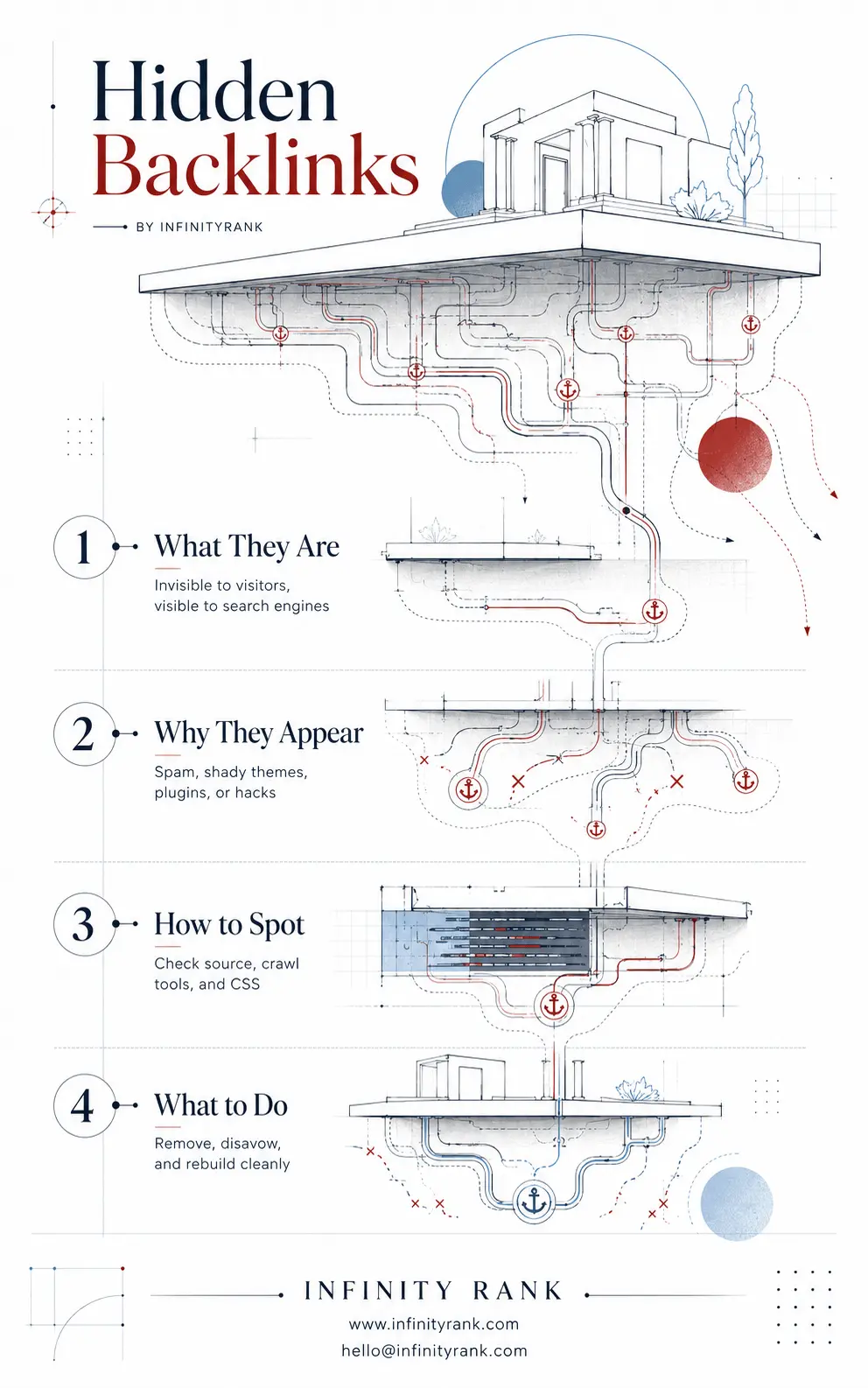
Maintaining a clean backlink profile is about more than just earning new links; it’s about guarding against the ones that shouldn’t be there in the first place. By staying proactive and auditing the “invisible” parts of your site, you ensure your authority remains untainted.
Use the steps outlined in this framework to keep your digital foundation secure and your rankings steady. Now, let’s dig into the specific tools you need to shine a light on what’s happening in your site’s source code.
Why Do People Use Hidden Backlinks?
Hidden backlinks are usually used for one of three reasons.
First, some site owners use them to pass link equity without making the link obvious. They want the SEO benefit without displaying a real editorial link to visitors.
Second, low-quality SEO sellers use hidden backlinks as part of link schemes. They place links across hacked sites, abandoned pages, free themes, widgets, or private networks.
Third, attackers inject hidden links into compromised websites. This is common in hacked WordPress sites, outdated plugins, nulled themes, and poorly secured hosting accounts.
In all cases, the result is the same: a link exists for search engines, not users.
That is exactly why hidden backlinks are dangerous.
Are Hidden Backlinks Against Google’s Rules?
Hidden backlinks can violate Google’s spam policies when they are used to manipulate search rankings.
Google’s position is simple: content and links should not be hidden from users for the purpose of deceiving search engines. Hidden text and hidden links are specifically treated as spam when the goal is ranking manipulation rather than user benefit.
The old phrase “Webmaster Guidelines” is outdated. The current framework is Google Search spam policies.
That distinction matters because SEO advice should use the current terminology. If a hidden backlink exists only to influence rankings and users cannot reasonably see or use it, assume it is risky.
Why Hidden Backlinks Can Hurt SEO
Hidden backlinks can damage SEO in several ways.
They Can Trigger Manual Actions
If Google reviews a site and finds manipulative hidden links, the site may receive a manual action. That can reduce visibility or remove affected pages from search results until the issue is fixed and reconsideration is requested.
Use the term “manual action,” not “manual penalty.” That is Google’s actual Search Console terminology.
They Can Reduce Trust
Even without a manual action, hidden backlinks can make a site look untrustworthy. Google’s ranking systems are built to identify spam patterns. A site filled with hidden links, hacked outbound links, or manipulative link placements is not sending positive quality signals.
They Can Waste Crawl and Indexing Signals
Hidden injected links can create messy internal and external linking patterns. If your site is compromised, search engines may crawl links that should not exist, associate your domain with spammy destinations, or discover hacked pages you never meant to publish.
They Can Harm Users
A hidden backlink problem is often a security problem. If attackers injected links into your site, they may have also added redirects, malware, cloaked pages, or unauthorized admin users.
Do not treat hidden backlinks as only an SEO issue. Treat them as a site integrity issue.
Hidden Backlinks vs. Legitimate Hidden Links
Not every hidden link is bad. Some hidden links are normal and useful.
Legitimate examples include:
- Skip navigation links for screen-reader and keyboard users
- Links inside menus that open after user interaction
- Accordion or tabbed content that becomes visible when clicked
- Mobile navigation links hidden on desktop layouts
- Accessibility text meant for assistive technologies
The difference is purpose.
A legitimate hidden link supports usability, accessibility, or responsive design. A spammy hidden backlink exists mainly to manipulate rankings.
Use this test: would the link still make sense if Google did not exist?
If the answer is no, the link is probably risky.
How to Find Hidden Backlinks on Your Own Site
If you suspect hidden backlinks are on your site, check both the visible page and the code behind it.
1. View the Page Source
Open the page source and search for:
<a href=- Suspicious domains
- Casino, pharma, adult, crypto, loan, or gambling keywords
- Foreign-language anchor text that does not belong on your site
Source code checks are basic, but they catch obvious injected links.
2. Inspect the Rendered DOM
Some hidden backlinks do not appear clearly in raw source because they are inserted by JavaScript. Use your browser’s inspection tools to view the rendered DOM.
Look for links that exist in the HTML but are not visible on the page.
3. Crawl the Site
Use a crawler such as Screaming Frog, Sitebulb, or Lumar to extract outbound links across the site.
Filter for:
- External links
- Followed links
- Links in footers, sidebars, widgets, and templates
- Links with suspicious anchor text
- Links pointing to unrelated domains
- Links appearing sitewide
A sitewide hidden outbound link is a serious red flag.
4. Search CSS for Hiding Patterns
Check theme, plugin, and custom CSS files for rules such as:
display: none;
visibility: hidden;
opacity: 0;
font-size: 0;
position: absolute;
left: -9999px;
text-indent: -9999px;
These rules are not always bad. They are often used for legitimate design and accessibility. But when they hide outbound commercial links, that is a problem.
5. Check WordPress Themes and Plugins
If your site uses WordPress, inspect:
- Theme footer files
- Header files
- Widget areas
- Custom HTML blocks
- Plugin settings
- Recently installed plugins
- Nulled or pirated themes
functions.php- Database content
Hidden backlinks are often injected into themes, especially footers.
6. Review Recently Modified Files
Look for files changed around the time rankings dropped, malware warnings appeared, or suspicious links were first detected.
Check:
- Theme files
- Plugin files
- Upload directories
.htaccesswp-config.php- Unknown PHP files
- Server logs
Unexpected file changes are often a sign of compromise.
7. Use Google Search Console
Google Search Console can help you check:
- Manual actions
- Security issues
- External links
- Indexed pages
- Crawl activity
Do not rely on the deprecated link: Google search operator. It is not a reliable backlink discovery method and should not be part of a modern SEO audit.
How to Find Hidden Backlinks Pointing to Your Site
Hidden backlinks can also point to your domain from other websites. These may come from hacked sites, link networks, spam pages, or negative SEO attempts.
To review them:
- Export backlink data from Google Search Console.
- Compare it with data from tools such as Ahrefs, Semrush, Majestic, or Moz.
- Look for unnatural patterns.
- Check suspicious pages manually.
- Confirm whether the link is actually visible to users.
- Prioritize links from hacked, irrelevant, or obviously spammed pages.
Do not panic over every bad backlink. Most sites attract some spam links over time. A few junk links are normal.
The concern is a large pattern of manipulative, artificial, or harmful links that could affect trust or trigger manual review.
What to Do If You Find Hidden Backlinks on Your Site
If hidden backlinks are on your own site, remove them immediately.
Start with the exact source of the link. Do not only delete the visible output. Find how it got there.
Step 1: Remove the Link
Delete the hidden backlink from the page, template, widget, plugin, database entry, or injected file.
Step 2: Fix the Cause
If the link came from a hacked file, compromised plugin, or unauthorized user, removal alone is not enough.
You need to:
- Update CMS core files
- Update plugins and themes
- Remove unused plugins
- Delete unknown admin users
- Rotate passwords
- Check server access
- Review file permissions
- Scan for malware
- Restore clean files from backup when needed
Step 3: Crawl Again
After cleanup, crawl the site again to confirm the hidden links are gone.
Do not assume the problem is fixed because one page looks clean.
Step 4: Check Search Console
Review Manual Actions and Security Issues in Google Search Console.
If there is a manual action, fix the issue thoroughly before submitting a reconsideration request. Document what you removed, how you fixed the cause, and what safeguards you added.
Should You Disavow Hidden Backlinks?
Use the disavow tool carefully.
Disavow is not a general cleanup button. Google warns that it is an advanced feature and should be used only in specific cases.
You should usually consider disavow only when:
- You have a large number of spammy, artificial, or low-quality links
- The links are likely to cause a manual action
- You already have a manual action for unnatural links
- You cannot get the links removed
- The pattern is clearly manipulative
Before disavowing, try to remove links where practical. Keep records of outreach and cleanup attempts.
For most sites, random spam links do not need disavow. Google is good at ignoring many low-quality links. But if your backlink profile has a serious artificial-link problem, disavow may be appropriate.
How to Prevent Hidden Backlinks
Prevention is easier than cleanup.
Use these controls:
- Keep your CMS, themes, and plugins updated
- Avoid nulled themes and pirated plugins
- Limit admin access
- Use strong passwords and two-factor authentication
- Monitor outbound links regularly
- Crawl your site monthly
- Review Search Console alerts
- Back up your site
- Use malware scanning
- Audit new plugins before installing them
- Review agency or freelancer work before publishing
If you outsource SEO, demand transparency. Any backlink you pay for should be visible, relevant, and defensible.
A hidden backlink is not a strategy. It is a liability.
FAQ About Hidden Backlinks
Are hidden backlinks always bad?
No. Hidden links used for accessibility, navigation, or responsive design can be legitimate. Hidden backlinks used to manipulate rankings are the problem.
Can hidden backlinks improve rankings?
They may appear to help in the short term, especially if they pass link equity before detection. But they are not a safe or sustainable SEO tactic. The risk is greater than the reward.
Can competitors hurt me with hidden backlinks?
Spam links can point to any site. Google often ignores obvious junk links, but large-scale artificial link patterns should be reviewed. If the links are severe and clearly manipulative, document them and consider disavow only if Google’s criteria are met.
How do I know if my site has hidden backlinks?
Crawl your site, inspect rendered HTML, check source code, review outbound links, scan theme and plugin files, and monitor Search Console. Hidden backlinks often appear in footers, templates, widgets, or compromised files.
Should I remove all hidden links?
No. Do not remove legitimate accessibility or navigation links just because they are visually hidden. Remove hidden links that are irrelevant, deceptive, injected, paid, or created mainly for SEO manipulation.
Final Takeaway
Hidden backlinks are risky when they are used to manipulate search engines instead of helping users.
If they are on your site, remove them and fix the source of the problem. If they point to your site, review the pattern before taking action. Do not rush into disavow unless the link problem is serious and meets Google’s guidance.
Good backlinks are visible, relevant, editorial, and useful.
Hidden backlinks fail that test.