Linking to other websites can feel counterintuitive. Many site owners worry that external links will send readers away, leak authority, or help competitors.
That fear is outdated.
Used properly, outbound links make your content more useful, better supported, and easier to trust. They help readers verify your claims, explore deeper resources, and understand where your information comes from. Google also states that links help it understand page relevance and discover pages to crawl, and that external links can help establish trust when they cite useful sources.
That does not mean every outbound link gives you a ranking boost. It does mean smart linking is part of strong editorial SEO.
Below are the real benefits of linking to other sources in blog posts, plus the rules for doing it without creating SEO problems.
What Are Outbound Links?
Outbound links, also called external links, are links from your website to another website.
Example:
If you write a blog post about SEO and link to Google Search Central, Moz, Ahrefs, Semrush, a government report, a study, or an industry publication, that is an outbound link.
Outbound links are different from internal links.
Internal links point to another page on your own site. External links point to another domain.
Both matter. Internal links help users and search engines move through your website. External links help support claims, add context, and point readers to sources that strengthen your content.
Do Outbound Links Help SEO?
Yes, but not in the lazy way many people explain it.
Outbound links are not magic ranking buttons. Adding five links to authority sites will not automatically push your page to page one.
The real SEO value comes from usefulness, context, and trust. Google’s link best practices say anchor text should be descriptive, concise, and relevant because it helps both users and Google understand the linked page. Google also says linking to other sites is not something to fear when the links make sense and provide context.
So the correct way to think about outbound links is simple:
Good external links improve content quality.
Poor external links weaken trust.
Irrelevant or manipulative links create risk.
External Linking: The Strategic Value of Outbound Citations
Many creators hoard their link equity out of fear that pointing users elsewhere will dilute their own site authority or drive traffic away. In reality, isolation kills rankings; search engines evaluate your content based on how well it connects to the broader web ecosystem. Proactively referencing trusted platforms demonstrates deep research and signals that your content belongs among top-tier resources.
This outbound linking breakdown explores why referencing external sources actually protects and elevates your search visibility.
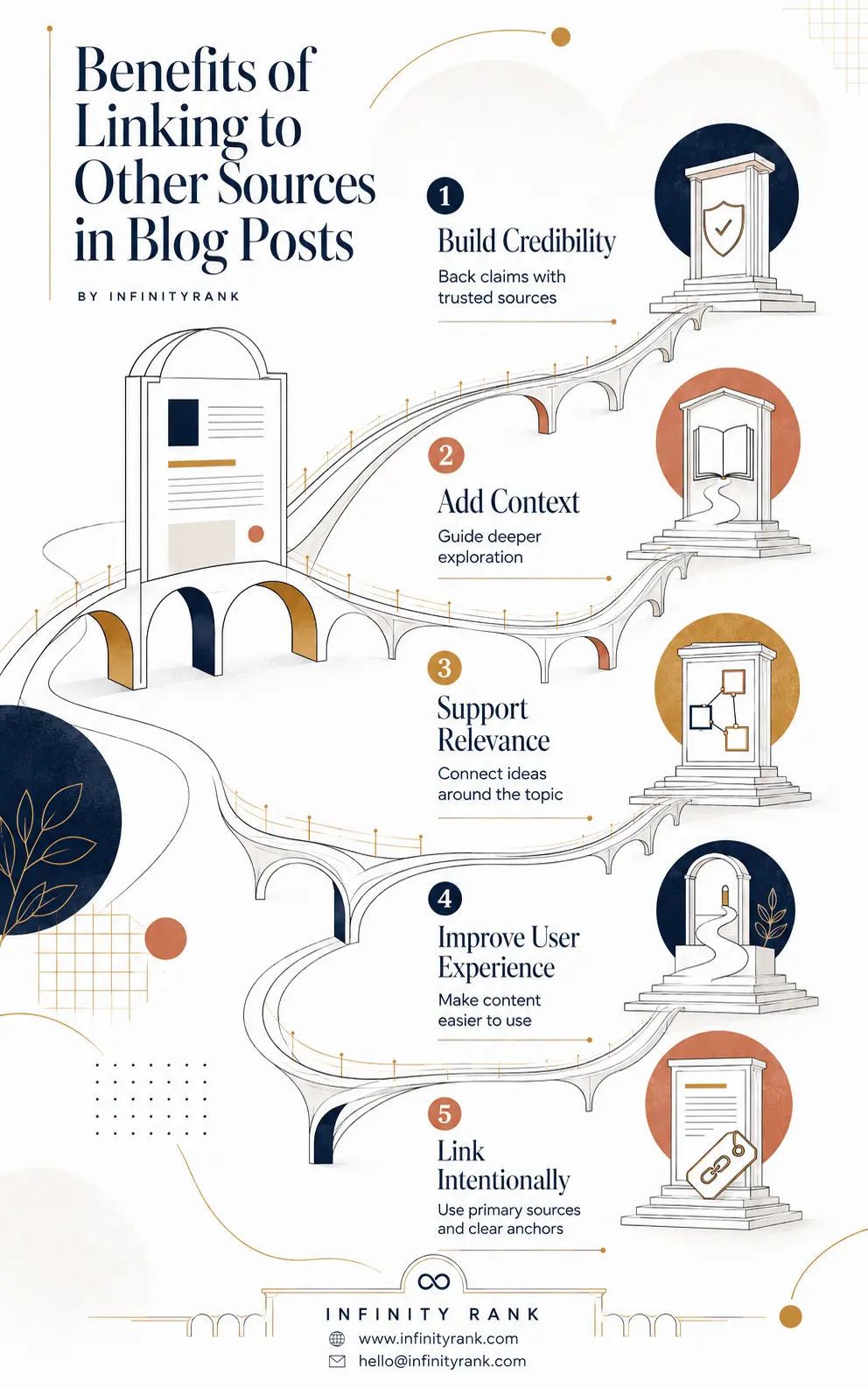
Citing external sources isn’t about sending traffic away—it’s about grounding your content in verified facts and creating a better resource for your readers. By aligning your content with primary data and trusted entities, you build an authority profile that search engines confidently reward. Use the benefits-of-linking-to-other-sources-in-blog-posts-infographic as a quality checklist for your next content review.
1. Outbound Links Build Credibility
Readers trust content more when they can verify it.
If you make a claim about SEO, marketing, finance, health, law, or technology, unsupported statements are weak. Linking to credible sources shows that your article is not just opinion.
Good sources include:
- Official documentation
- Government websites
- Research papers
- Industry studies
- Reputable publications
- Original data sources
- Expert reports
Bad sources include:
- Thin affiliate pages
- Unverified blogs
- AI-generated content farms
- Outdated statistics pages
- Spammy websites
- Irrelevant commercial pages
Credibility is not created by linking to famous websites. It is created by linking to the right source for the claim.
For example, if you explain Google link attributes, link to Google’s own documentation. If you cite a statistic, link to the original report instead of a blog post that copied it.
2. External Links Give Readers More Context
A blog post should not try to explain everything from scratch.
Good external links let you keep your article focused while still giving readers access to deeper background information.
Example:
If you write about keyword research, you do not need to explain every detail of Google Keyword Planner. You can briefly explain the point, then link to the official resource or a dedicated guide.
That improves the user experience because readers can choose how deep they want to go.
This matters because people do not read blog posts in isolation. They compare sources, verify claims, open supporting material, and judge whether your advice is worth trusting.
A page with useful outbound links feels researched. A page with no sources often feels thin.
3. Linking Out Supports Topical Relevance
Search engines use links to understand relationships between pages and topics. Google states that links help determine page relevance and help Google discover new pages.
That does not mean you should stuff a page with links. It means relevant links can reinforce the topic you are covering.
For example, an article about outbound links should naturally reference:
- Google’s link best practices
- Google’s outbound link qualification rules
- Anchor text guidance
- Link spam policies
- Editorial sourcing standards
Those sources help frame the topic accurately.
The key word is relevant.
A link to a high-authority site is useless if the page has nothing to do with your article. Relevance beats domain authority.
4. External Links Improve User Experience
Readers do not want dead-end content.
If your article mentions a tool, study, regulation, report, or technical concept, link to it. Do not force readers to search for it themselves.
Good outbound links help readers:
- Verify your claims
- Find original data
- Learn a concept in more detail
- Compare opinions
- Check official documentation
- Understand technical terms
This makes your article more useful.
Bad linking does the opposite. Random links, vague anchors like “click here,” and links to irrelevant pages interrupt the reading experience.
Your goal is not to add links for SEO decoration. Your goal is to make the article easier to use.
5. Outbound Links Strengthen E-E-A-T Signals
E-E-A-T stands for experience, expertise, authoritativeness, and trustworthiness.
Outbound links do not automatically prove E-E-A-T. But they can support it.
A well-sourced article shows that the author has done the research. It also helps readers separate evidence from opinion.
This is especially important for YMYL topics: health, finance, law, safety, and other areas where bad advice can harm people.
For those topics, vague statements are not enough. You need strong sourcing from primary or highly authoritative sources.
Even for SEO content, citations matter. If you tell people what Google recommends, link to Google. If you mention a ranking study, link to the actual study. If you discuss paid links, link to Google’s policy.
6. Linking to Others Can Support Relationship Building
External links can also help with digital PR and outreach.
When you reference a company, expert, tool, or study, that link can become a reason to start a conversation.
Do not expect automatic backlinks in return. That is unrealistic. Most sites will not notice every mention.
But useful citations can support outreach like:
“Hi, we referenced your study in our guide on outbound links because it helped explain X.”
That is more natural than cold-pitching someone for a backlink with no prior connection.
Outbound linking is not a guaranteed link-building tactic. It is a relationship-building touchpoint.
7. External Links Help You Avoid Unsupported Claims
The internet is full of recycled SEO advice.
A lot of it is vague, outdated, or wrong.
Linking to sources forces better editorial discipline. Before publishing a claim, you have to ask:
- Where did this come from?
- Is the source original?
- Is the source current?
- Is the source trustworthy?
- Does the source actually support the claim?
This prevents lazy writing.
For example, do not write, “Google rewards websites that link to authority sources,” unless you can prove it. A better version is:
“Relevant outbound links can improve content quality by helping readers verify claims and access supporting context.”
That is accurate, safer, and more useful.
Best Practices for Linking to Other Sources
External links only help when they are intentional. Follow these rules.
Link to Primary Sources First
Primary sources are usually best.
Examples:
- Google documentation for Google-related SEO claims
- Government pages for legal or regulatory claims
- Original research reports for statistics
- Tool documentation for software instructions
- Brand documentation for product-specific claims
Secondary sources are fine when they add analysis, but do not cite them as if they are the original source.
Use Descriptive Anchor Text
Anchor text should tell the reader what they will get after clicking.
Bad anchor text:
- Click here
- Read more
- This article
- Website
- Source
Better anchor text:
- Google’s link best practices
- official outbound link qualification rules
- research on consumer search behavior
- guide to natural link building tips
Google recommends descriptive, concise, relevant anchor text and warns against generic or keyword-stuffed anchors.
Do Not Overload the Page With Links
There is no perfect number of external links per blog post. Google says there is no magical ideal number of links on a page. If it feels excessive, it probably is.
Use as many links as needed to support the content.
A short opinion post may need two or three sources. A technical SEO guide may need ten or more.
The standard is usefulness, not a fixed count.
Open External Links Carefully
Many websites open external links in a new tab. That is a user experience choice, not a ranking factor.
If you use target="_blank", add rel="noopener noreferrer" for security and privacy hygiene.
Check External Links Regularly
External links decay over time.
Pages move. Reports get deleted. URLs redirect. Sources become outdated.
Review outbound links during content refreshes. Replace broken or outdated links with better current sources.
When to Use Nofollow, Sponsored, and UGC
Not every external link should be treated the same.
Google gives specific rel attributes to explain your relationship with outbound links. For normal editorial links that you trust and want Google to crawl without qualification, no special rel attribute is needed. For paid, user-generated, or untrusted links, use the correct attribute.
| Link Type | Attribute | Use It When |
| Normal editorial link | No special attribute required | You are linking naturally to a trusted, relevant source |
| Sponsored link | rel="sponsored" | The link is paid, sponsored, advertorial, affiliate, or part of compensation |
| User-generated link | rel="ugc" | The link appears in comments, forums, or user-submitted content |
| Untrusted link | rel="nofollow" | You do not want Google to associate your site with the linked page |
| Mixed case | rel="sponsored nofollow" or rel="ugc nofollow" | The link fits more than one category |
Paid links are where many sites create risk. Google’s spam policies define link spam as links created primarily to manipulate rankings, including buying or selling links that pass ranking credit.
So if money, products, discounts, services, or other compensation influenced the link, qualify it.
Common Outbound Linking Mistakes
Linking to Weak Sources
Do not link to a random blog just because it ranks well.
Check whether the page is original, accurate, current, and trustworthy.
Using Generic Anchor Text
“Click here” tells the reader nothing.
Use anchor text that describes the destination.
Linking Only to Homepages
Deep links are usually better.
If you cite a specific claim, link to the exact page that supports it, not the homepage.
Linking to Competitors Without Purpose
It is not automatically bad to link to competitors. But do not do it lazily.
Only link to a competitor if their page genuinely helps the reader or supports a point better than other available sources.
Using Nofollow on Every External Link
Blanket nofollow is not a good default.
Use normal editorial links for trusted sources. Use nofollow, sponsored, or ugc when the situation calls for it.
Ignoring Broken Links
Broken outbound links damage user experience and make old content look neglected.
Check them during every content update.
Outbound Linking Checklist for Blog Posts
Before publishing, ask:
- Does every factual claim have a source when needed?
- Are important statistics linked to the original source?
- Are external links relevant to the exact topic?
- Is the anchor text descriptive?
- Are paid or affiliate links marked with
rel="sponsored"? - Are user-generated links marked with
rel="ugc"? - Are untrusted links marked with
rel="nofollow"? - Do links open correctly?
- Are there any broken or redirected links?
- Are internal links included where they help the reader?
If a link does not help the reader, remove it.
Frequently Asked Questions
Do outbound links help SEO?
Outbound links can support SEO by improving trust, context, and usefulness. They are not guaranteed ranking boosts. The value comes from linking to relevant, credible sources that help readers understand or verify your content.
How many outbound links should a blog post have?
There is no fixed number. Use enough links to support your claims and help the reader. A short article may only need a few external links, while a technical guide may need many more.
Should I use nofollow for all external links?
No. Use normal editorial links for trusted, relevant sources. Use nofollow when you do not want Google to associate your site with the linked page. Use sponsored for paid or affiliate links and ugc for user-generated content.
Is linking to competitors bad?
Not automatically. If a competitor’s page genuinely helps the reader or supports a specific point, linking to it can make sense. But do not link to competitors casually when a better primary source is available.
What is the best anchor text for external links?
The best anchor text is descriptive, concise, and relevant. Avoid generic phrases like “click here” or “read more.” Use anchor text that tells readers what they will find after clicking.
Can bad outbound links hurt my website?
Bad outbound links can damage trust and user experience. Links to spammy, irrelevant, paid, or unsafe pages create risk, especially if they look manipulative or are not properly qualified with the right rel attributes.
Conclusion
Linking to other sources does not weaken your blog. Bad linking weakens your blog.
Good outbound links make your content more credible, useful, and transparent. They help readers verify your claims, give search engines clearer context, and show that your content is based on research rather than recycled opinion.
Use external links when they help the reader. Link to primary sources when possible. Use descriptive anchor text. Qualify paid, user-generated, or untrusted links properly. Review old links during content updates.
That is how outbound linking should work: not as an SEO trick, but as part of publishing better content.